


Andrew Neil
Super User
April 22, 2021
Question

CubeIDE v1.6.0: Debug 'Disconnect' doesn't work

In a Debug session, I pressed the 'Disconnect' button - and this happened:
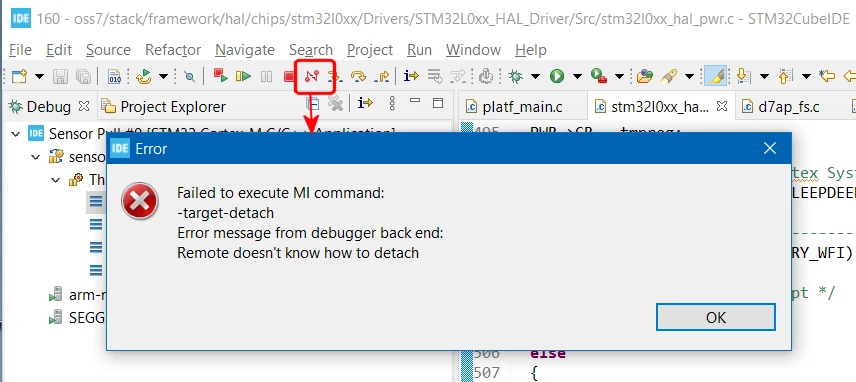
0693W00000AMDyIQAX.png 

This is on Win10-Pro, and using the ST-Link (converted to J-Link) on a B-L027Z-LRWAN1.

Is this a known deficiency, or should it work ?

What is (or should be) the difference between 'Disconnect' and 'Terminate' ?

This topic has been closed for replies.

3 replies

Markus GIRDLAND
ST Employee
April 23, 2021

Hello!

This is a known issue but it's not tracked in the known issue list in our release note since it can't be fixed from our side. It stems from J-Link not supporting this command. We will contact SEGGER to ask them to look into this and if they add support in a future version we might be able to fix it in an update.

Andrew Neil
Super User
April 23, 2021

Thanks.

Do you mean the J-Link-converted-from-ST-Link doesn't support this command?

Or j-Links in general do not support it?

It certainly is possible to disconnect from a running target using a "normal" J-Link with Segger Embedded Studio - maybe they just use a different command to achieve the same end?

A complex system that works is invariably found to have evolved from a simple system that worked.A complex system designed from scratch never works and cannot be patched up to make it work.
Markus GIRDLAND
ST Employee
May 3, 2021

We are in contact with SEGGER regarding this. The standard Eclipse button "Disconnect" sends a 'D' command to the GDB server which then need to disconnect in a proper way. They have confirmed that they don't support the 'D' packet (in either converted nor in general) so we are making a feature request to them at the moment.

I'm not sure what other command they might be using in order to get the same result. But if they have a similar functionality then perhaps we can make a special case while debugging with J-Link. I'm sure it will be brought up during our discussions if that's the case.