


AKova.2
Associate II
August 2, 2020
Question

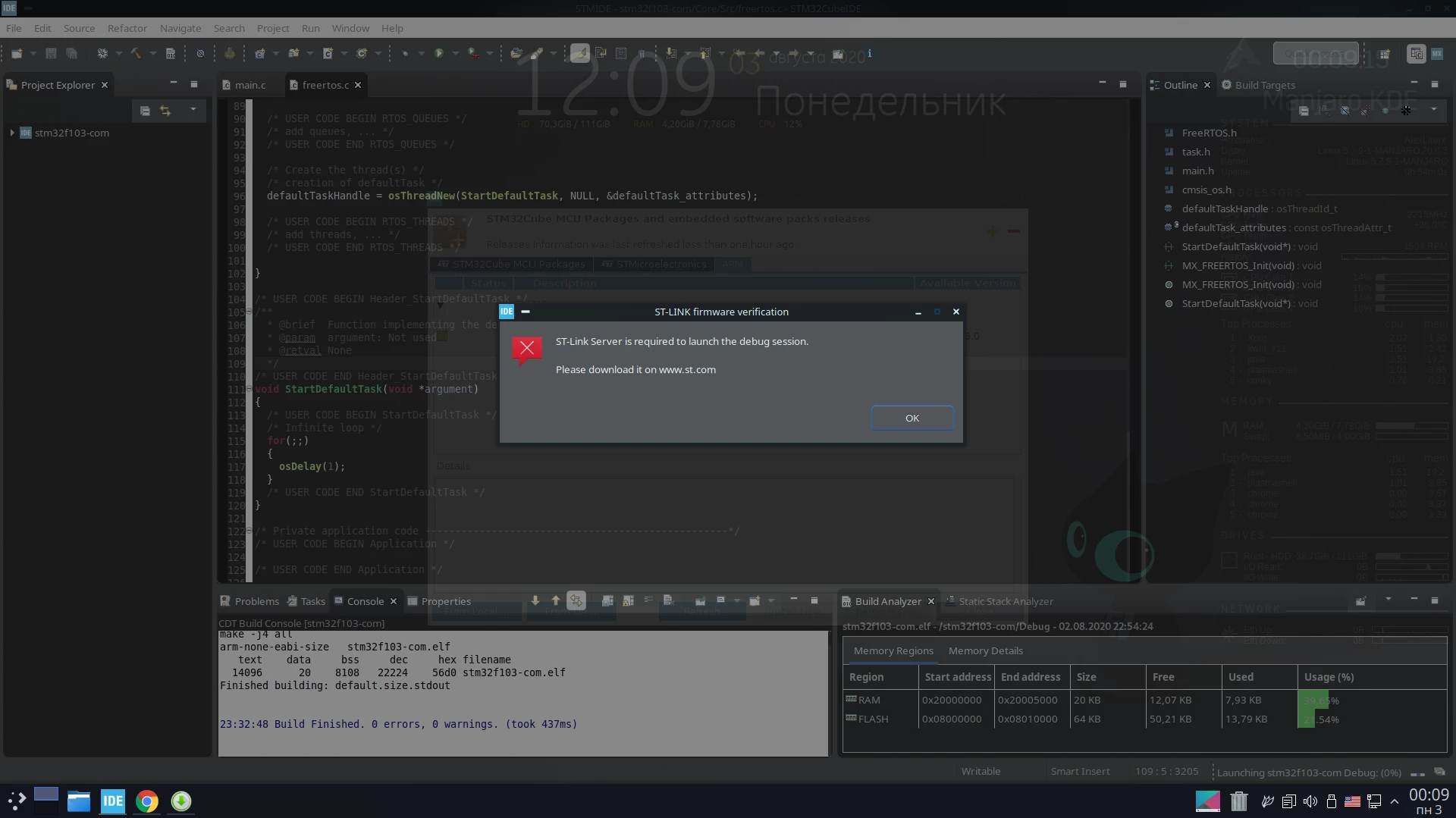
After updating CubeIDE to version 1.4.0 (Linux), the debugger does not work.
  • August 2, 2020
  • 29 replies
  • 12139 views

0693W000003BtojQAC.pngAfter updating CubeIDE to version 1.4.0 (Linux), the debugger does not work.

A window appears

 "ST-LINK firmware verification"

in which there is a message - "STLink server is required to launch the debug session".

How to fix it?

This topic has been closed for replies.

29 replies

AKova.2
AKova.2Author
Associate II
August 3, 2020

I downloaded STLINK Server, during installation I received a message that this package is already installed.

Tell me where in CubeIDE are the STLINK Server settings?

KnarfB
Super User
August 3, 2020

STM32CubeIDE 1.4.0 debugging works for me on 64-bit Ubuntu 18.04. The stlink-gdb-server comes as a STM32CubeIDE plugin. A typical debug session starts both, arm-none-eabi-gdb (which is on the path in /opt/st/stm32cubeide_1.4.0/plugins/com.st.stm32cube.ide.mcu.externaltools.gnu-tools-for-stm32.7-2018-q2-update.linux64_1.4.0.202007081208/tools/bin) and stlink-gdb-server:

$ ps aux | grep -i gdb
 
frank 28904 0.2 0.0 31968 11968 pts/3 Ss+ 08:40 0:00 arm-none-eabi-gdb --interpreter mi2 --nx -q --interpreter console -ex new-ui mi /dev/pts/2 -ex set pagination off -ex show version
 
frank 28911 0.7 0.0 34020 4944 ? Sl 08:40 0:00 /opt/st/stm32cubeide_1.4.0/plugins/com.st.stm32cube.ide.mcu.externaltools.stlink-gdb-server.linux64_1.4.0.202007081208/tools/bin/ST-LINK_gdbserver -p 61234 -l 1 -d -s -cp /opt/st/stm32cubeide_1.4.0/plugins/com.st.stm32cube.ide.mcu.externaltools.cubeprogrammer.linux64_1.4.0.202007081208/tools/bin -m 0 -k

Check if those components are installed in your system. If not, I would try reinstalling.

Here is my install log:

$ sudo '/home/frank/Downloads/st-stm32cubeide_1.4.0_7511_20200720_0928_amd64.deb_bundle.sh' 
Creating directory st-stm32cubeide_1.4.0_7511_20200720_0928_amd64.deb_bundle.sh.root
Verifying archive integrity... All good.
Uncompressing STM32CubeIDE installer 100% 
STMicroelectronics Software License Agreement
...
License accepted.
(Reading database ... 440631 files and directories currently installed.)
Preparing to unpack st-stlink-server-1.3.0-4-linux-amd64.deb ...
stlink-server: no process found
Unpacking st-stlink-server (1.3.0-4) over (1.2.0-3) ...
Preparing to unpack st-stlink-udev-rules-1.0.2-3-linux-all.deb ...
Unpacking st-stlink-udev-rules (1.0.2-3) over (1.0.2-2) ...
Selecting previously unselected package st-stm32cubeide-1.4.0.
Preparing to unpack st-stm32cubeide_1.4.0_7511_20200720_0928_amd64.deb ...
Unpacking st-stm32cubeide-1.4.0 (1.4.0-7511-20200720-0928-1) ...
Setting up st-stlink-server (1.3.0-4) ...
Setting up st-stlink-udev-rules (1.0.2-3) ...
Setting up st-stm32cubeide-1.4.0 (1.4.0-7511-20200720-0928-1) ...
/
Processing triggers for gnome-menus (3.13.3-11ubuntu1.1) ...
Processing triggers for desktop-file-utils (0.23-1ubuntu3.18.04.2) ...
Processing triggers for mime-support (3.60ubuntu1) ...
Do you want to install Segger J-Link udev rules? [Y/n] n
STM32CubeIDE installed successfully

As a workaround you may switch to ST-Link (OpenOCD) in your Debug Configuration under Debugger.

AKova.2
AKova.2Author
Associate II
August 3, 2020

I tried to download STLINK Server from the HELP menu -> Install new software.

Here is the result.

0693W000003BuhtQAC.png

As far as I understand, these elements are present. And the file you specified in the specified path is also there.

0693W000003BulgQAC.png

I don’t understand what’s the matter ... everything worked before. Ide reinstalled, the result is the same. It works on Windows.

Maybe the paths are not spelled out somewhere?

AKova.2
AKova.2Author
Associate II
August 3, 2020

The list of installed packages contains STLINK Server.0693W000003BuxDQAS.png

0693W000003BuxNQAS.png

KnarfB
Super User
August 3, 2020

> Here is the result.

Yes those are outdated versions from last year. The error message is correct.

There should be no need to install STLINK Server separately.

I would try re-installing STM32CubeIDE from scratch.

You first delete all existing versions using

$ sudo apt remove 'st-stm32cubeide*' 'st-stlink*'

and then install the downloaded unzipped shell archive:

$ sudo ~/Downloads/st-stm32cubeide_1.4.0_7511_20200720_0928_amd64.deb_bundle.sh

hth

KnarfB

AKova.2
AKova.2Author
Associate II
August 3, 2020

I have reinstalled CubeIDE but I will try again on your advice.

I have Arch Linux (Manjaro). I installed the st-stm32cubeide_1.4.0_7511_20200720_0928_amd64.sh package downloaded from the official site.

Sorry for my English, I use a translator ... :)

gcrisa
Associate II
August 3, 2020

I had exactly the same issue updating to 1.4.0 on Windows. Already tried a clean install and an upgrade to another computer too: nothing worked. Just updated to 1.4.1 and the issue is still present...

Is there any error log we can check to know exactly what's wrong?!

AKova.2
AKova.2Author
Associate II
August 3, 2020

In Windows, this version works, updated to 1.4.1 everything works.

But as for me, the program works more stable on Linux.

gcrisa
Associate II
August 3, 2020

Actually I didn't know if it was appropriate to post my question here, as this thread explicitly targets Linux. But since the IDE core should be the same I thought at least to ask about some kind of advice on how to get details of what the issue is (eg. server not starting, or whatever). I get nothing more than the "ST-LINK firmware verification" window, all the console/log files are empty...

Dick Mincher
Associate III
August 6, 2020

Same problem for me on OSX Catalina with 1.4.0 update.

S.Ma
Principal
August 6, 2020

1.4.1 is the latest and greatest version...

Dick Mincher
Associate III
August 6, 2020

Thanks .

It doesn't show up on the update list in the IDE (yet?). I've switched to a SEGGER for now. I'll check for updates again later or manually update. Hopefully that fixes it.

S.Ma
Principal
August 6, 2020

Once you get a working version stick with it to progress on your task at hand. I was told some automotive projects refrain from upgrading once ready to start...

Plum
Associate
August 6, 2020

Same issue here on OSX, appeared after 1.4.0 update. stlink-server v1.3.0-4 (2020-01-29-14:18). Can we please have a fix for this?