


X-CUBE-SBSFU FAQ
Summary
This article is a list of frequently asked questions about X-CUBE-SBSFU (SBSFU legacy).
X-CUBE-SBSFU is a security framework that provides the following features:
- Secure bootloader module.
- Secure firmware update module.
- Secure engine module. It manages secure services.
- Key management service module (L4, WL).
The term legacy refers to the target product scope, not necessarily the maintenance status.
SBSFU intends to work on legacy STM32 products. These products include STM32L0, STM32L1, STM32L4/L4+, STM32F4, STM32F7, STM32G0, STM32G4, and STM32WB.
At the time of this article, the X-CUBE-SBSFU version used is 2.8.0.
1. Can I configure an SBSFU project with CubeMX?
In general, no. SBSFU projects are typically not configured through CubeMX-generated .ioc files.
How it is usually done:
- The bootloader hardware configuration is handled through HAL and BSP.
- Any hardware-related changes are usually made in the SBSFU/target directory.
The recommended approach:
- Develop the user application separately in CubeMX.
- Validate it independently.
- Port it into SBSFU.
Refer to application note AN5056, section 8, Adapting the user application, for application porting guidance.
2. What is the purpose of the SBSFU package?
SBSFU is a reference implementation for:
- Secure boot.
- Secure firmware update.
It is designed to:
- Cover most STM32 series.
- Remain generic enough to adapt to different products and constraints.
3. Can I use the STM32 system bootloader DFU with SBSFU?
Not in a closed device.
SBSFU already includes a dedicated application for downloading user code during the firmware update process. In the reference implementation, the download application supports UART/Ymodem[1] only.
Firmware update with SBSFU requires specific actions and dedicated files to validate the image before execution. The standard DFU mechanism does not provide the same security flow and may not support these requirements.
Once RDP level 1 is activated, the flash is locked and the device boots only from user flash.
1.Ymodem: a file transfer protocol used for transferring the image for the host PC to the device.
4. Where should I start with SBSFU?
A good starting point is:
1. Read UM2262: Getting started with the X-CUBE-SBSFU STM32Cube Expansion Package.
2. Read AN5056: How to integrate the X-CUBE-SBSFU STM32Cube Expansion Package.
3. Read the readme attached with each example.
4. Follow the STM32 MOOC: Security part 6, STM32 security ecosystem.
5. Do I need to configure option bytes manually?
This depends on the OB_DEV_MODE config option in the SBSFU/App/app_sfu.h.
- If OB_DEV_MODE is enabled, SBSFU can automatically enforce some option-byte settings during development.
- If OB_DEV_MODE is disabled, SBSFU checks the option bytes but does not necessarily repair mismatches; the user must provision them beforehand.
- In RDP level 2, option-byte changes are no longer possible.
6. How to download the firmware image in SBSFU
The X-CUBE-SBSFU package offers two methods to download the (.sfb) file:
- Via Tera Term on windows, which is the default behavior, this is available in the SBSFU getting started user manual 2262, section 8.4.2, Send firmware.
- Minicom on Linux, by enabling MINICOM_YMODEM defined SBSFU/App/app_sfu.h.
7. What to do before uploading SBSFU to the device?
Before uploading the SBSFU elf file, the device should be prepared:
- The RDP level should be at 0.
- The WRP is disabled on all flash regions (start address > end address).
- The PCROP is disabled (start address > end address).
- The FLASH SWAP_BANK should be disabled.
- The STM32 chip is fully erased.
Note:
After uploading the elf file to the device, the user needs to follow these steps:
a) Power cycle the board after programming SBSFU (unplug/plug the USB cable).
b) The SBSFU application starts and configures security mechanisms in development mode. In product mode, security mechanisms are only checked to be at the correct values.
c) Power cycle the device a second time (unplug/plug the USB cable): the SBSFU application starts with the configured securities turned on.
8. Recovering the SBSFU device
In RDP level 1, it is possible to recover the STM32 device.
In RDP level 2, recovery is not possible.
Typical steps:
- Reset the WRP section to the default START > END.
- Reset the PCROP section.
- Set RDP to level 0.
- Apply the changes.
9. How do I debug an SBSFU project?
Debugging an SBSFU project is not possible when the device is at RDP level 2 or 1.
To facilitate the debugging process, the user needs to make the STM32 device in development mode:
1. Deactivate all security protections: enable this config SECBOOT_DISABLE_SECURITY_IPS
2. Deactivate SFU_FINAL_SECURE_LOCK_ENABLE
3. Activate SFU_FWIMG_BLOCK_ON_ABNORMAL_ERRORS_MODE
4. Activate the SFU_VERBOSE_DEBUG_MODE and SFU_DEBUG_MODE.
Additionally, when debugging and some of the security features are enabled, make sure SFU_DAP_PROTECT_ENABLE is disabled; this feature disables the DAP.
If not all the security features are disabled, it is very useful to activate SECBOOT_OB_DEV_MODE. It activates the static security features (option bytes) at startup if they are not set.
9.1 What are the debug access limitations?
If the user is in development mode (security options are disabled), there are no debug limitations.
Once security option bytes are enabled, and RDP level 1 is set, the debug port access is limited. It is no longer possible to debug code and data stored in embedded flash, SRAM2, and backup registers. Flash cannot be read, erased, or programmed through the debug port. However, the debug port is still available to perform option byte configuration or RDP regression.
In RDP level 2, the debug port is closed and no longer can be opened again.
9.2 Can I still access the device via JTAG when SBSFU is enabled, and the device is set to RDP level 1 or level 2?
In RDP level 2, the device is locked so any access to the device via debug port results in a hardfault.
In RDP level 1, debug port access is still available, but the user cannot access the device flash memory.
10. How to make the device production ready
1. Deactivate SECBOOT_DISABLE_SECURITY_IPS, make sure that all security settings are activated.
2. Deactivate verbose mode: SFU_VERBOSE_DEBUG_MODE.
3. Deactivate SFU_FWIMG_BLOCK_ON_ABNORMAL_ERRORS_MODE.
4. Deactivate SECBOOT_OB_DEV_MODE.
5. Activate SFU_FINAL_SECURE_LOCK_ENABLE to configure the RDP level 2. On
STM32H7 series, the secure user memory is also configured when
SFU_FINAL_SECURE_LOCK_ENABLE is enabled.
6. Deactivate SFU_DEBUG_MODE to remove all prints of SBSFU that can be valuable information for an attacker.
RDP level 1 does not guarantee the highest level of security (no Root of Trust, the device can still be erased).
The option bytes can no longer be changed in RDP level 2.
In RDP level 2, firmware update is possible by utilizing the firmware update capability in SBSFU.
11. What is the relationship between SBSFU and SFI?
SBSFU and SFI are different concepts.
SBSFU is a secure boot secure firmware solution that ensures only authorized software is executed on a device.
SFI is a secure manufacturing solution that provides security when programming devices in a nontrusted facility owned by a Contract Manufacturer (CM).
In practice, SBSFU and SFI are complementary but not concurrent. SFI securely installs the initial firmware (including SBSFU) in an untrusted factory. Once SBSFU is installed and active, SFI is typically disabled or overwritten. To maintain security, set RDP level 1 and BOOT_LOCK, ensuring only the SBSFU boot chain executes.
12. How do I enable rollback and image verification?
To enable the rollback feature in SBSFU using the ENABLE_IMAGE_STATE_HANDLING compiler flag.
To do so, go into each project (SECoreBin, SBSFU, UserApp):
Right click, go to properties and follow the instructions as displayed in the picture below:
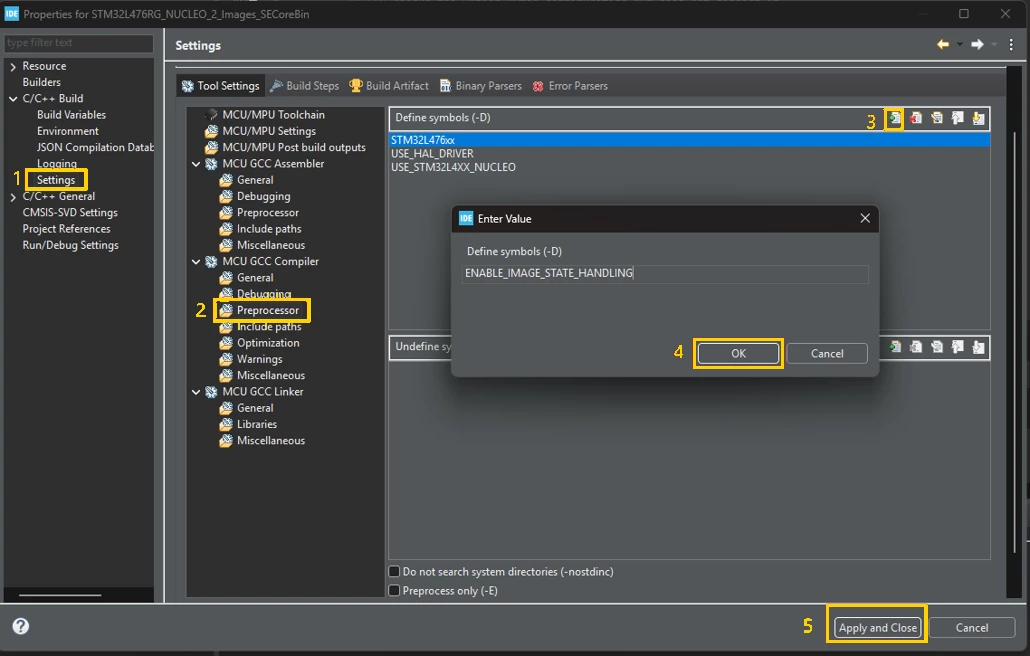
Apply and close, then rebuild all projects.
13. Can SBSFU interfere with safety mechanisms like X-CUBE-CLASSB or RAMECC?
X-CUBE-CLASSB is an STM32 software expansion package designed to support the development of functional-safety applications. It provides software self-test libraries and integration examples that help detect potential faults in the MCU and support compliance with IEC 60730-1 and IEC 60335-1 requirements up to Class B. The package reduces development effort by providing ready-to-integrate safety mechanisms and documentation for safety-related applications.
It is a software diagnostic tool that performs checks on the MCU states (CPU, memory, peripheral).
It is possible for SBSFU protections to interface with X-CUBE-CLASSB, depending on the memory and MPU configuration.
SBSFU protections can potentially cause integration conflicts with X-CUBE-CLASSB:
- MPU region conflicts.
- Memory access restrictions.
- Protected RAM or flash areas overlapping with safety checks.
What to verify:
- SBSFU MPU regions do not overlap with memory used by X-CUBE-CLASSB or RAMECC.
- Security settings do not block required runtime access.
- The startup sequence is compatible with safety initialization.
Recommended approach:
- Check memory region assignments.
- Review of MPU configuration.
- Validate the boot sequence.
- Test with a minimal setup first.
- Reintroduce protections gradually.
14. What to do without KMS (Key Management Service)?
KMS implementation is available only on STM32L4, WL projects in the X-CUBE-SBSFU package and uses firewall protection.
The user can migrate to newer solutions (Security Manager or TF-M) or develop the secure service that manages the keys. Refer to section 8 in AN5056, Adapting the user application.
15. Custom protocol for downloading the application
The SBSFU solution only supports UART/Ymodem firmware update.
However, it is modular enough to replace the function that does that with your own function. Alternatively, SBSFU supports a standalone loader. You can create your own loader with the protocol you want (USB, CAN, …).
16. How to adapt SBSFU to another platform?
SBSFU porting is highly dependent on the target STM32 device, so there is no single step-by-step procedure that applies to all platforms. However, the following approach can help identify the main areas that need to be adapted. AN5056, particularly sections 3.1 Hardware adaptation and 3.2 Memory mapping definition, provides additional details.
- Start from the closest reference project
Find the SBSFU example that is closest to your target device. For example, when porting to an STM32H733ZGTX, you can start with the STM32H750B-DK example. Build and run the reference project first to become familiar with its configuration and behavior. - Adapt the hardware
SBSFU relies on HAL APIs and device-specific hardware features, such as UART, flash memory, MPU, security mechanisms, and option bytes.
Some parts of SBSFU are generic, while others are specific to a particular STM32 family or device. AN5056, section 3.1, Hardware adaptation, provides an overview of the areas that may require modification. - Review the memory mapping
Flash and RAM sizes and layouts can differ between STM32 devices. Therefore, the SBSFU memory map must be reviewed and adapted to the target device.
AN5056, section 3.2, Memory mapping definition, describes the main areas involved. A useful approach is to first document the memory map of the reference example. This provides a baseline that makes it easier to identify which addresses and sizes need to be modified for the new target. - Configure SBSFU for your application
Keep SBSFU in development mode during the initial integration and testing phase. First, verify that SBSFU boots successfully on the target device, then port and test the user application.
Once the integration is working correctly and the hardware adaptation and memory mapping are validated, configure the SBSFU security features according to your application requirements. - Add the user application
Once SBSFU boots successfully on the target device, add the user application. Generating the application with STM32CubeMX is one of the simplest approaches.
See our related article: Porting a CubeMX Application to SBSFU. - Keep the SBSFU project in its original directory structure
Avoid moving the SBSFU project to a different directory. The project relies on relative paths, including compiler include-paths and paths used by build scripts.
Instead, create a copy of the closest reference project and keep it at the same directory level. For example:
x-cube-sbsfu-v2-8-0/
└── STM32CubeExpansion_SBSFU_V2.8.0/
└── Projects/
└── STM32H750B-DK/
└── Applications/
└── 2_Images_ExtFlash_copy/
You can then import the copied project into STM32CubeIDE and perform the required modifications on the copy.
For platform-specific issues or questions that are not covered by the documentation, refer to the ST Community security forum for additional support.