

Troubleshooting waking up from stop mode issues with LPTIM in STM32U5
- 0 replies
- 1256 views
Introduction
When working with the STM32U5 microcontroller, you may encounter issues where the low-power timer (LPTIM) fails to wake the device from stop 2 mode. This article provides insights on what might cause the issues.
1. Using LPTIM2 instance
As stated in the STM32U5 reference manual, LPTIM2 is only functional in stop 0/1 modes:
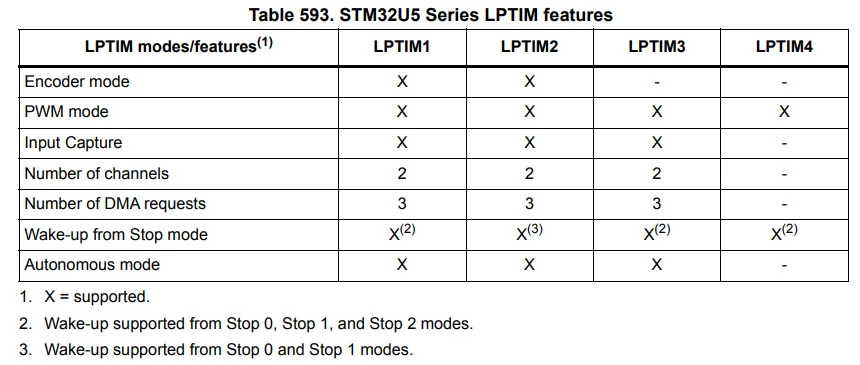 STM32U5 LPTIM features
This is because in the smart run domain (SRD), only LPTIM1,3,4 are autonomous, having their own independent clock (kernel clock) request capability. They automatically switch on when requested by a peripheral and switches off when no peripheral requests it. This autonomous feature enables these peripherals wake up the device from stop 2 mode.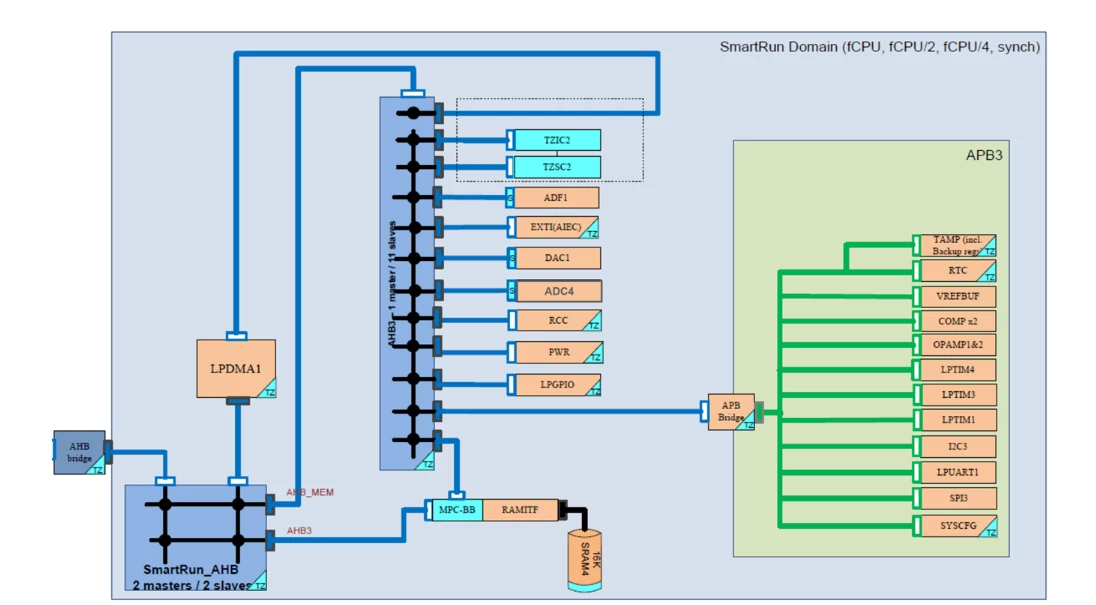 Smart run domain
2. Autonomous mode not enabled
When using LPTIM1/3/4, it’s mandatory to allow it to requests it clock and remain functional in stop 2 mode without waking up the CPU. This can be achieved using the following macro:
__HAL_RCC_LPTIM1_CLKAM_ENABLE();3. Device remains stuck in LPTIM interrupt
This is a known limitation for STM32u575xx, STM32U585xx, STM32U535xx, STM.32U545xx series.
When disabling the LPTIM, if the ENABLE bit in the LPTIM_CR register is cleared within a small time window around an LPTIM interrupt occurrence, the LPTIM interrupt signal may be affected. Specifically, the LPTIM interrupt signal used to wake up the device from stop mode may be frozen in an active state.
This prevents the device from entering low-power mode and causes the firmware to remain stuck in the LPTIM interrupt routine.
Check the STM32U575xx and STM32U585xx device errata for a workaround for this limitation.
Related links
- Reference manual 0456: STM32U5 Series Arm®-based 32-bit MCUs
- Application note 5645: STM32U5 Series power optimization using LPBAM
- ST Wiki: Getting started with LPBAM
- Errata sheet: STM32U575xx and STM32U585xx device errata