


Semer CHERNI
ST Employee
October 22, 2024

Installing the AC5 toolchain to Keil® MDK for non-AC6 STM32CubeMX compatible projects

  • October 22, 2024
  • 1 reply
  • 5066 views

Important notice for Keil® MDK Users

Default toolchain update

Keil® MDK version 5.37 and later:

  • Default toolchain: Arm Compiler 6 (AC6)
  • Deprecated toolchain: Arm Compiler 5 (AC5)

Compatibility alert

If you’re working on STM32 projects generated using STM32CubeMX, be aware that the following STM32 products may not be compatible with AC6, potentially leading to compilation errors. As in the illustrated example below, an error message could be: "Target 'x' uses ARM-Compiler 'V5.06 update 7 (build 960)' which is not available."

SemerCHERNI_0-1729527375568.png

Affected products

  • STM32Fx, STM32L(0x, 1x, 4x)
  • STM32H7(2x, 3x, 4x, 5x, Ax, Bx)
  • STM32Gx, STM32WB(1x, 3x, 5x)
  • STM32MP15x

Steps to install and use Arm Compiler 5

  1. Manual download: Download Arm Compiler 5 manually from this link.
  2. Installation guide: Follow the step-by-step instructions available in this guide to add Arm Compiler 5 to Keil® MDK 5.37 or newer.
  3. Select AC5: Once installed, you can select AC5 as the Arm Compiler in your project settings.

By following these steps, you can continue using Arm Compiler 5 and avoid potential issues with your STM32 projects.
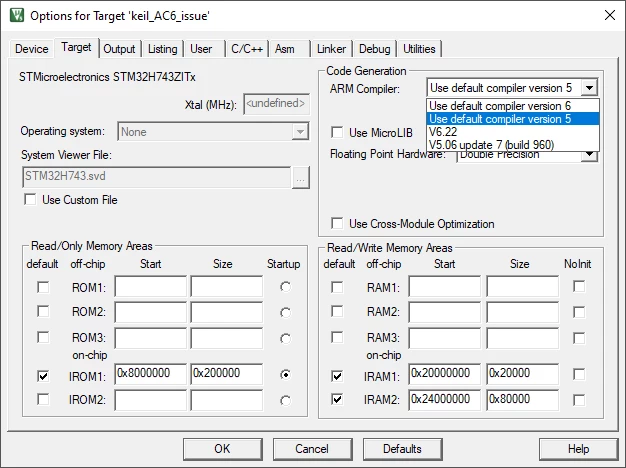
SemerCHERNI_1-1729527375571.png


1 reply

Visitor II
May 16, 2025

Hello,

unfortunately I’m running into licensing issues when trying to use Compiler 5:

*** Warning: The configured compiler version '5.06 update 7 (build 960)' does not support the selected User Based Licensing technology.

Isn’t the compiler covered by the license server?

HelmPeter99_0-1747417146452.png