


How to use STMicroelectronics classic USB device middleware with new STM32 families
Summary
This article presents a tutorial for importing and using the legacy STMicroelectronics USB middleware in the new lines of STM32 to implement a CDC class to open a virtual COM port. The STM32H5 series was selected for this tutorial, but the steps can be easily tailored to some other STM32 families, such as STM32U5.
For all the STM32 series released from 2021 onwards, the now classic, STMicroelectronics USB middleware is no longer offered as part of the STM32Cube native offer. But to maintain compatibility with legacy applications, this package is still available to be downloaded and manually included in your project via our GitHub page. You can download the package from the following links:
GitHub - STMicroelectronics - Middleware USB Device
GitHub - STMicroelectronics - Middleware USB Host
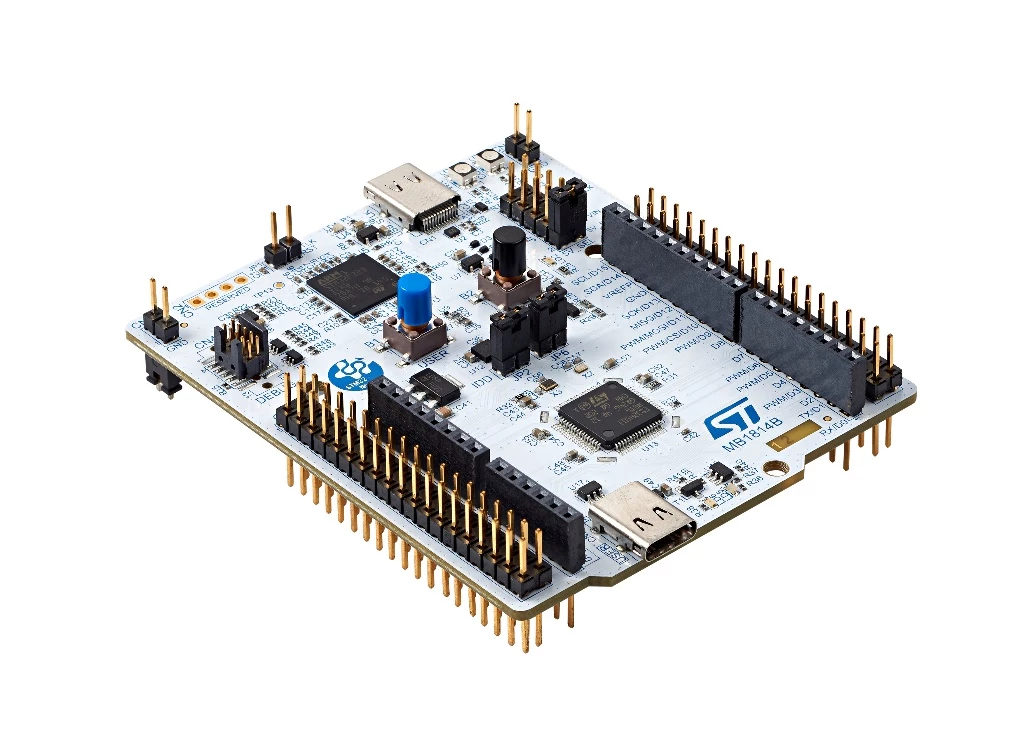
This tutorial was built using STM32CubeIDE 1.13.1, using the STM32CubeH5 HAL driver version 1.1.1 and using the NUCLEO-H503RB, which embeds an STM32H503RBT6 MCU. For further details about this board, refer to the device user manual.
For a detailed explanation regarding the classic USB library, refer to to the USB wiki and the STM32 USB training:
ST Wiki - Introduction to USB with STM32
1. Development
Start by creating a project for the STM32H503RB in the STM32CubeIDE.
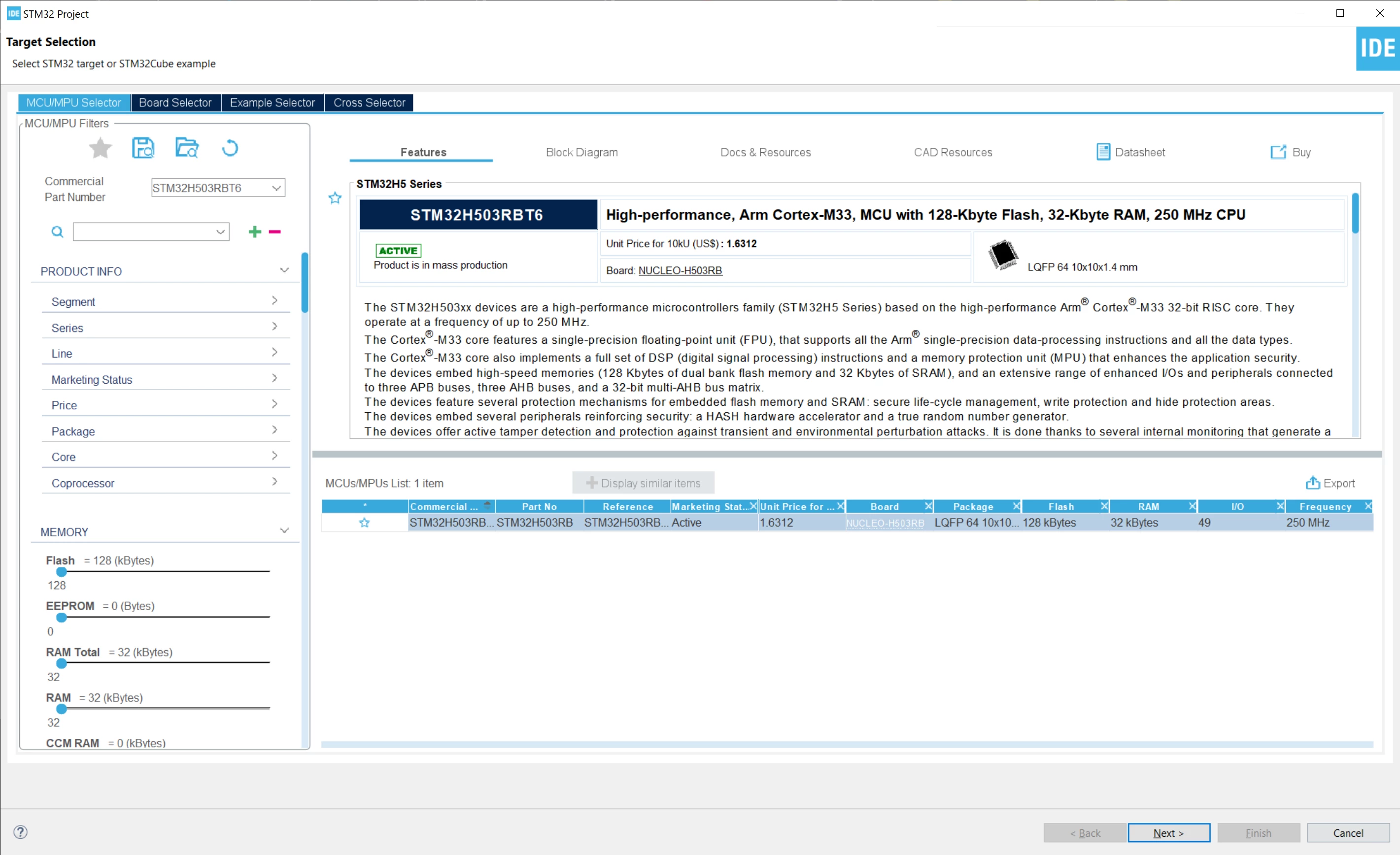
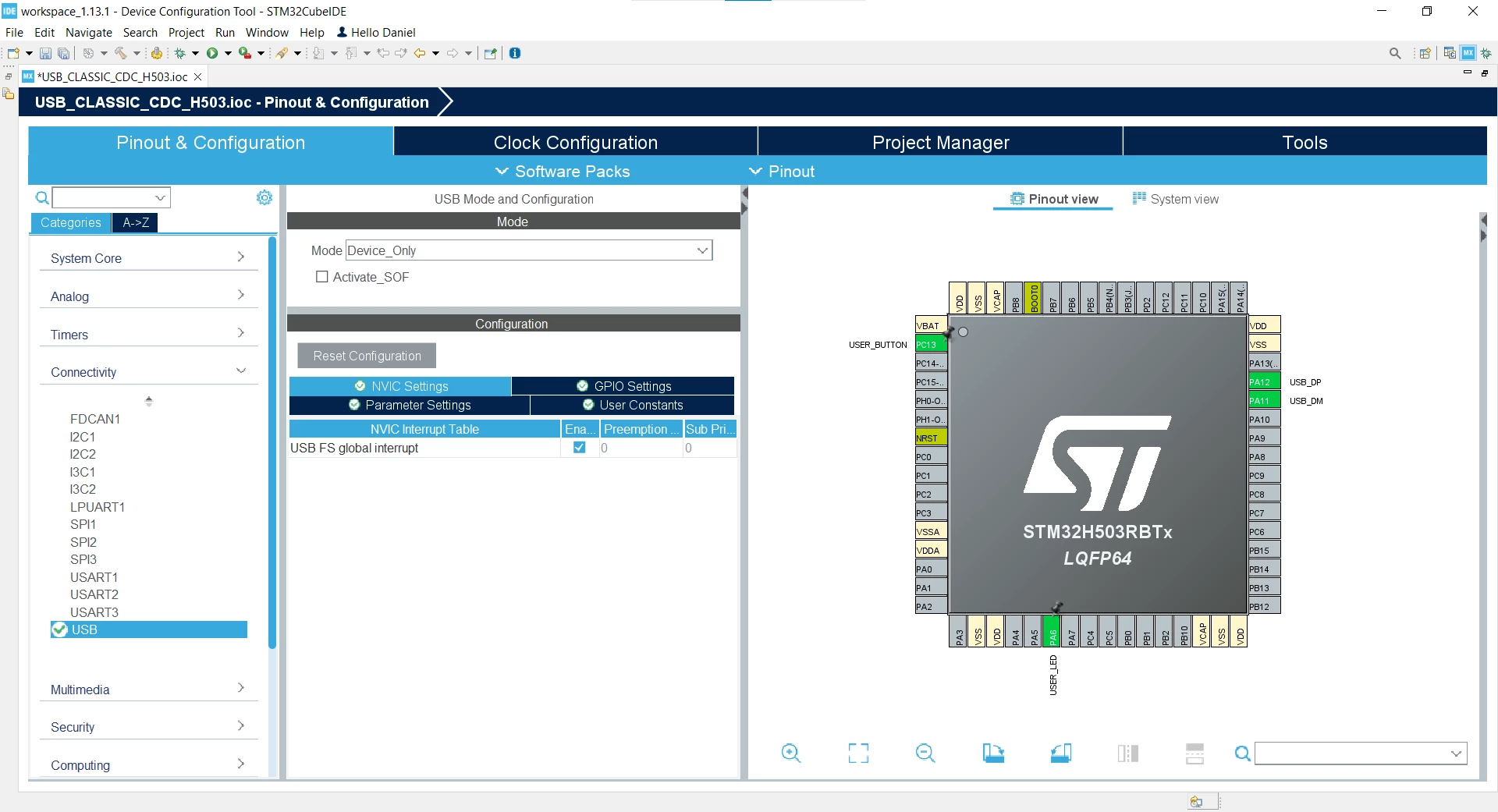
Once the project creation is done, enable the USB Peripheral in Device only mode and activate its interrupt in the NVIC Settings tab.
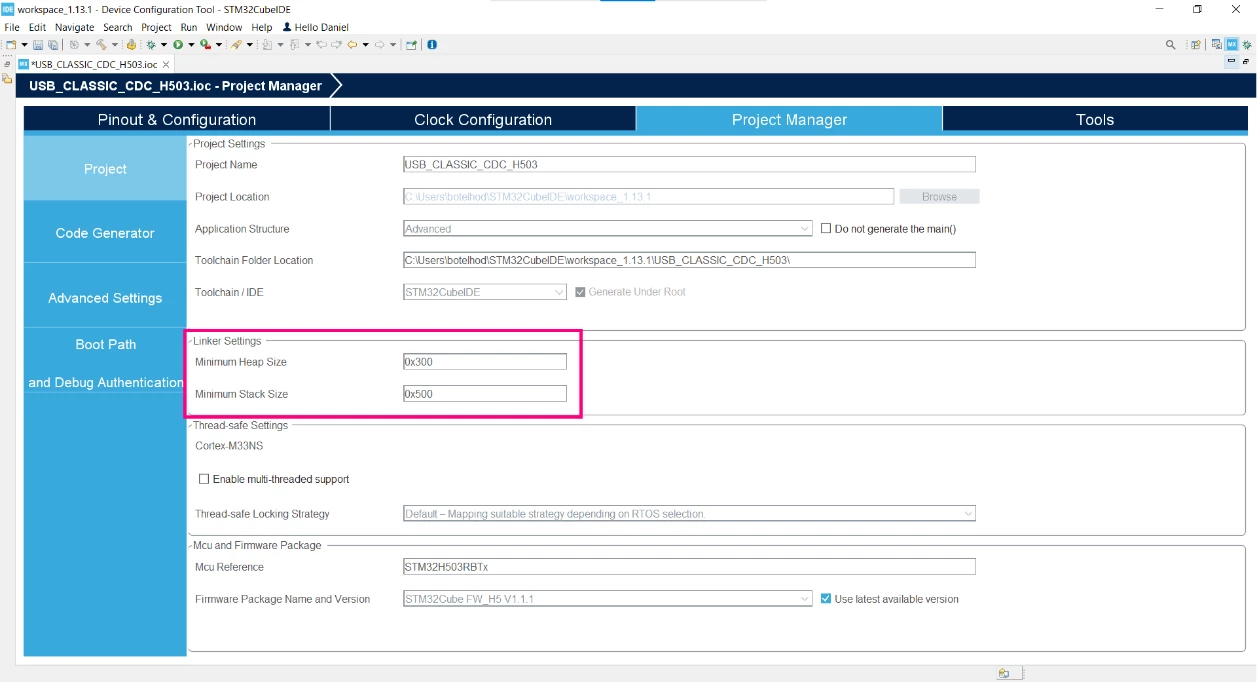
After that, increase the amount of heap and stack size of the project as indicated in the image below, this action can be done in the Project Manager tab:
After doing that, generate the code by clicking on the highlighted icon, or just pressing the alt + K shortcut.

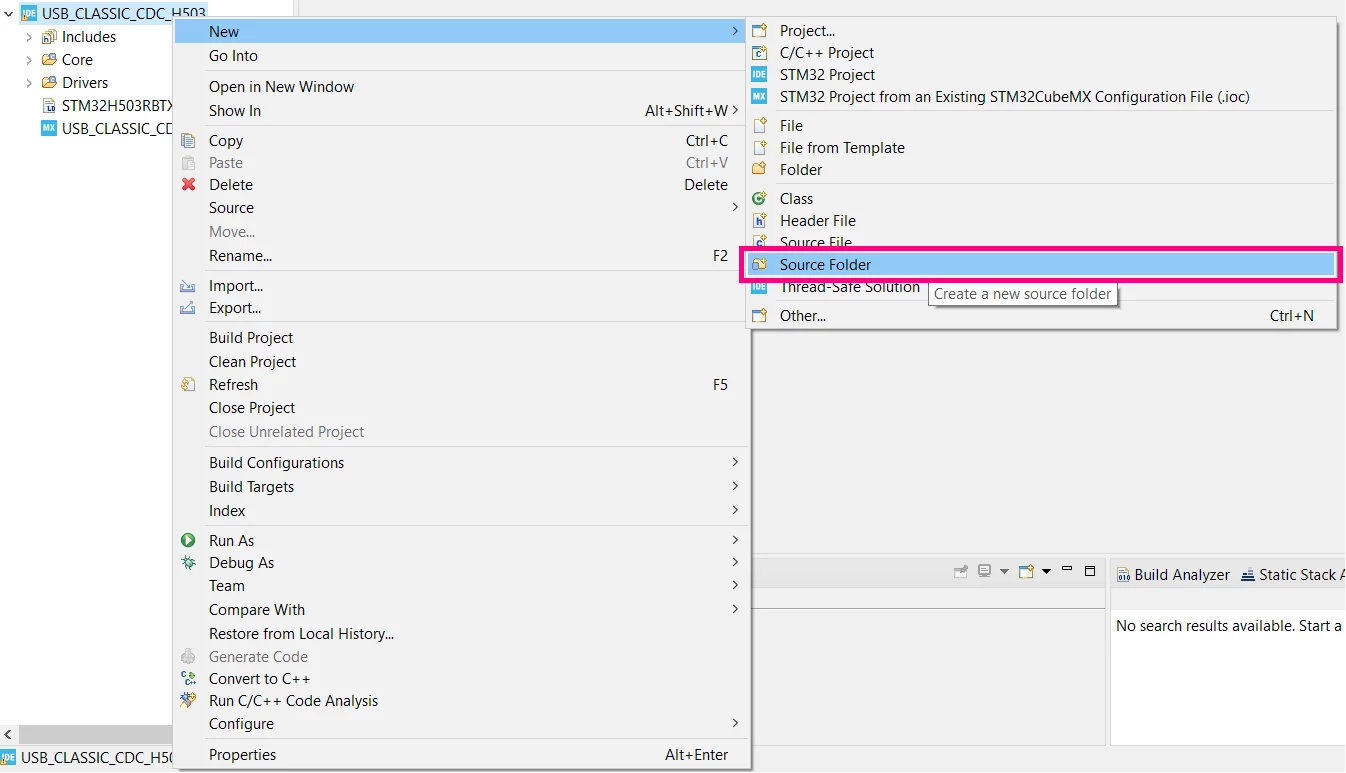
Once the code is generated, create a source folder in your project called USB.
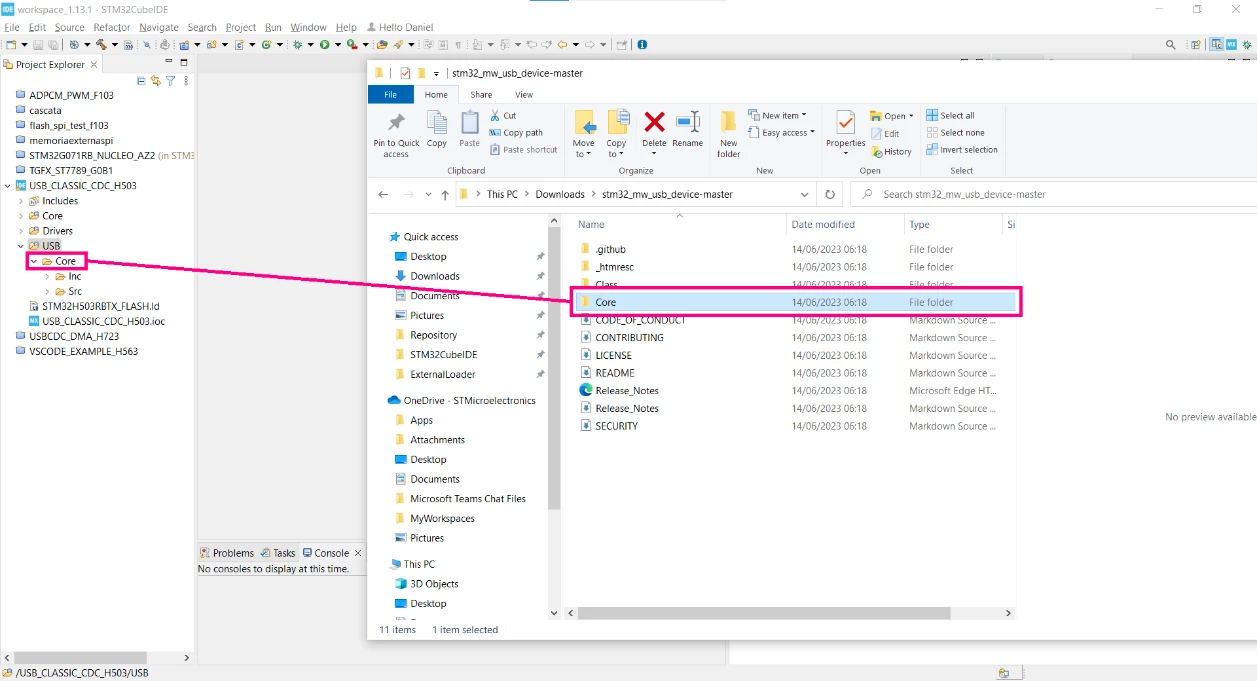
Download the USB Device package from the GitHub (the same link presented in the introduction of this article). Open the software pack folder and import the Core folder into the created ‘USB’ folder.
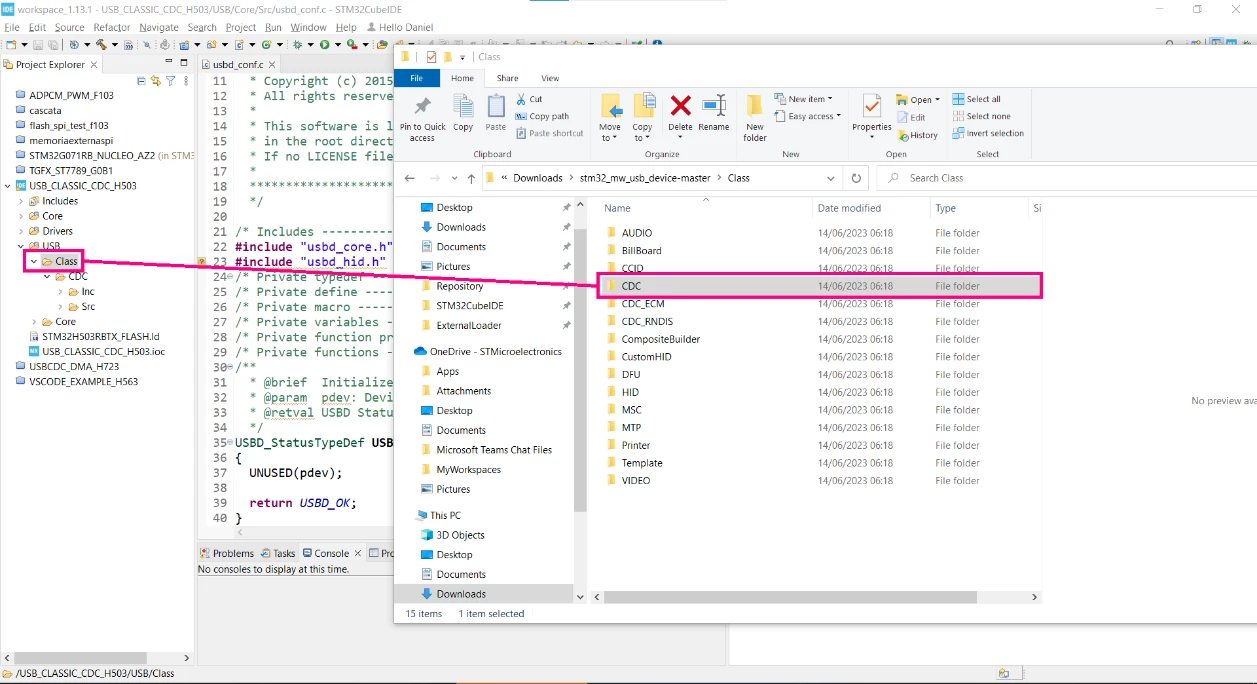
Now, create another folder called ‘Class’ and import the desired classes to your project, in this case, the CDC is the only one selected.
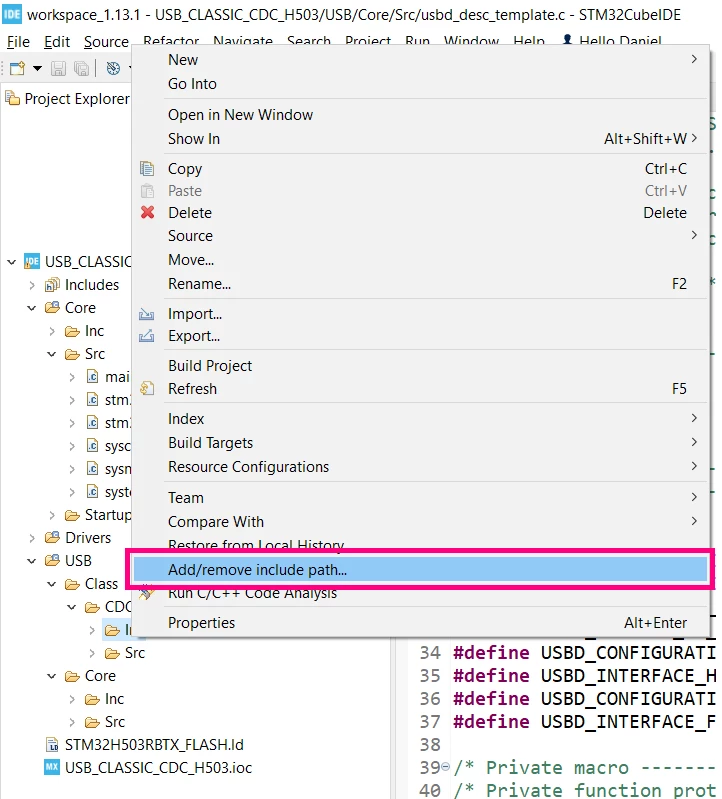
Add the path to the include reference. Right click in the ‘Inc’ folder inside the USB/Class/CDC/.. path, then select `Add/remove include path…` option, and in the pop-up menu, press OK. Perform the same steps for the USB/Core/Inc as well.
Make sure to rename the USB/Core/Inc/usbd_conf_template.h and USB/Core/Src/usbd_conf_template.c files to usbd_conf.h/.c. After doing so, open the usbd_conf.h. In this file, we need to replace the HAL driver header file name according to the MCU Family we are using. In this case, the STM32H503 is being used, so the include is as follows:
/* Includes ------------------------------------------------------------------*/
#include "stm32h5xx.h" /* replace 'stm32xxx' with your HAL driver header filename, ex: stm32f4xx.h */
#include <stdio.h>
#include <stdlib.h>
#include <string.h>
In the next step, you should change the defines according to your application. In this example, we set the defines as follows (the other defines will not be used and can be deleted):
/** @defgroup USBD_CONF_Exported_Defines
 * @{
 */
#define USBD_MAX_NUM_INTERFACES 1U
#define USBD_MAX_NUM_CONFIGURATION 1U
#define USBD_MAX_STR_DESC_SIZ 0x100U
#define USBD_SELF_POWERED 1U
#define USBD_DEBUG_LEVEL 0U
/* #define USBD_USER_REGISTER_CALLBACK 1U */
/* ECM, RNDIS, DFU Class Config */
#define USBD_SUPPORT_USER_STRING_DESC 0U
/* BillBoard Class Config */
#define USBD_CLASS_USER_STRING_DESC 0U
#define USBD_CLASS_BOS_ENABLED 0U
#define USB_BB_MAX_NUM_ALT_MODE 0x2U
/* CDC Class Config */
#define USBD_CDC_INTERVAL 2000U
After that, the usbd_conf.h file can be saved and closed. Now, open the usbd_conf.c file. In this file, we need to link the HAL PCD drivers with the middleware. First, add the used class include header files:
/* Includes ------------------------------------------------------------------*/
#include "main.h"
#include "usbd_core.h"
#include "usbd_cdc.h" /* Include class header file */
The second step is to import the PCD_HandleTypeDef to this file:
/* Private variables ---------------------------------------------------------*/
extern PCD_HandleTypeDef hpcd_USB_DRD_FS;
The next one is to create a function prototype, which will be implemented later in this file:
/* Private function prototypes -----------------------------------------------*/
static USBD_StatusTypeDef USBD_Get_USB_Status(HAL_StatusTypeDef hal_status);
Then, we need to implement the PCD Callbacks and populate as follows:
/* Private functions ---------------------------------------------------------*/
void HAL_PCD_SetupStageCallback(PCD_HandleTypeDef *hpcd)
{
 USBD_LL_SetupStage((USBD_HandleTypeDef*)hpcd->pData, (uint8_t *)hpcd->Setup);
}

void HAL_PCD_DataOutStageCallback(PCD_HandleTypeDef *hpcd, uint8_t epnum)
{
 USBD_LL_DataOutStage((USBD_HandleTypeDef*)hpcd->pData, epnum, hpcd->OUT_ep[epnum].xfer_buff);
}

void HAL_PCD_DataInStageCallback(PCD_HandleTypeDef *hpcd, uint8_t epnum)
{
 USBD_LL_DataInStage((USBD_HandleTypeDef*)hpcd->pData, epnum, hpcd->IN_ep[epnum].xfer_buff);
}

void HAL_PCD_SOFCallback(PCD_HandleTypeDef *hpcd)
{
 USBD_LL_SOF((USBD_HandleTypeDef*)hpcd->pData);
}

void HAL_PCD_ResetCallback(PCD_HandleTypeDef *hpcd)
{
 USBD_SpeedTypeDef speed = USBD_SPEED_FULL;
 if ( hpcd->Init.speed != PCD_SPEED_FULL)
 {
 Error_Handler();
 }
 /* Set Speed. */
 USBD_LL_SetSpeed((USBD_HandleTypeDef*)hpcd->pData, speed);
 /* Reset Device. */
 USBD_LL_Reset((USBD_HandleTypeDef*)hpcd->pData);
}

void HAL_PCD_ConnectCallback(PCD_HandleTypeDef *hpcd)
{
 USBD_LL_DevConnected((USBD_HandleTypeDef*)hpcd->pData);
}

void HAL_PCD_DisconnectCallback(PCD_HandleTypeDef *hpcd)
{
 USBD_LL_DevDisconnected((USBD_HandleTypeDef*)hpcd->pData);
}
Finally, implement the code to perform the driver link for the STM32H503:
USBD_StatusTypeDef USBD_LL_Init(USBD_HandleTypeDef *pdev)
{
 pdev->pData = &hpcd_USB_DRD_FS;
 HAL_PCDEx_PMAConfig((PCD_HandleTypeDef*)pdev->pData , 0x00 , PCD_SNG_BUF, 0x40);
 HAL_PCDEx_PMAConfig((PCD_HandleTypeDef*)pdev->pData , 0x80 , PCD_SNG_BUF, 0x80);
 HAL_PCDEx_PMAConfig((PCD_HandleTypeDef*)pdev->pData , CDC_IN_EP , PCD_SNG_BUF, 0xC0);
 HAL_PCDEx_PMAConfig((PCD_HandleTypeDef*)pdev->pData , CDC_OUT_EP , PCD_SNG_BUF, 0x100);
 HAL_PCDEx_PMAConfig((PCD_HandleTypeDef*)pdev->pData , CDC_CMD_EP , PCD_SNG_BUF, 0x140);
 return USBD_OK;
}

USBD_StatusTypeDef USBD_LL_DeInit(USBD_HandleTypeDef *pdev)
{
 HAL_StatusTypeDef hal_status;
 hal_status = HAL_PCD_DeInit(pdev->pData);
 return USBD_Get_USB_Status(hal_status);
}

USBD_StatusTypeDef USBD_LL_Start(USBD_HandleTypeDef *pdev)
{
 HAL_StatusTypeDef hal_status;
 hal_status = HAL_PCD_Start(pdev->pData);
 return USBD_Get_USB_Status(hal_status);
}

USBD_StatusTypeDef USBD_LL_Stop(USBD_HandleTypeDef *pdev)
{
 HAL_StatusTypeDef hal_status;
 hal_status = HAL_PCD_Stop(pdev->pData);
 return USBD_Get_USB_Status(hal_status);
}

USBD_StatusTypeDef USBD_LL_OpenEP(USBD_HandleTypeDef *pdev, uint8_t ep_addr,
 uint8_t ep_type, uint16_t ep_mps)
{
 HAL_StatusTypeDef hal_status;
 hal_status = HAL_PCD_EP_Open(pdev->pData, ep_addr, ep_mps, ep_type);
 return USBD_Get_USB_Status(hal_status);
}

USBD_StatusTypeDef USBD_LL_CloseEP(USBD_HandleTypeDef *pdev, uint8_t ep_addr)
{
 HAL_StatusTypeDef hal_status;
 hal_status = HAL_PCD_EP_Close(pdev->pData, ep_addr);
 return USBD_Get_USB_Status(hal_status);
}

USBD_StatusTypeDef USBD_LL_FlushEP(USBD_HandleTypeDef *pdev, uint8_t ep_addr)
{
 HAL_StatusTypeDef hal_status;
 hal_status = HAL_PCD_EP_Flush(pdev->pData, ep_addr);
 return USBD_Get_USB_Status(hal_status);
}

USBD_StatusTypeDef USBD_LL_StallEP(USBD_HandleTypeDef *pdev, uint8_t ep_addr)
{
 HAL_StatusTypeDef hal_status;
 hal_status = HAL_PCD_EP_SetStall(pdev->pData, ep_addr);
 return USBD_Get_USB_Status(hal_status);
}

USBD_StatusTypeDef USBD_LL_ClearStallEP(USBD_HandleTypeDef *pdev,
 uint8_t ep_addr)
{
 HAL_StatusTypeDef hal_status;
 hal_status = HAL_PCD_EP_ClrStall(pdev->pData, ep_addr);
 return USBD_Get_USB_Status(hal_status);
}

uint8_t USBD_LL_IsStallEP(USBD_HandleTypeDef *pdev, uint8_t ep_addr)
{
 PCD_HandleTypeDef *hpcd = (PCD_HandleTypeDef*) pdev->pData;
 if((ep_addr & 0x80) == 0x80)
 {
 return hpcd->IN_ep[ep_addr & 0x7F].is_stall;
 }
 else
 {
 return hpcd->OUT_ep[ep_addr & 0x7F].is_stall;
 }
}

USBD_StatusTypeDef USBD_LL_SetUSBAddress(USBD_HandleTypeDef *pdev,
 uint8_t dev_addr)
{
 HAL_StatusTypeDef hal_status;
 hal_status = HAL_PCD_SetAddress(pdev->pData, dev_addr);
 return USBD_Get_USB_Status(hal_status);
}

USBD_StatusTypeDef USBD_LL_Transmit(USBD_HandleTypeDef *pdev, uint8_t ep_addr,
 uint8_t *pbuf, uint32_t size)
{
 HAL_StatusTypeDef hal_status;
 hal_status = HAL_PCD_EP_Transmit(pdev->pData, ep_addr, pbuf, size);
 return USBD_Get_USB_Status(hal_status);
}

USBD_StatusTypeDef USBD_LL_PrepareReceive(USBD_HandleTypeDef *pdev,
 uint8_t ep_addr, uint8_t *pbuf,
 uint32_t size)
{
 HAL_StatusTypeDef hal_status;
 hal_status = HAL_PCD_EP_Receive(pdev->pData, ep_addr, pbuf, size);
 return USBD_Get_USB_Status(hal_status);
}

uint32_t USBD_LL_GetRxDataSize(USBD_HandleTypeDef *pdev, uint8_t ep_addr)
{
 return HAL_PCD_EP_GetRxCount((PCD_HandleTypeDef*) pdev->pData, ep_addr);
}

void *USBD_static_malloc(uint32_t size)
{
 UNUSED(size);
 static uint32_t mem[(sizeof(USBD_CDC_HandleTypeDef) / 4) + 1]; /* On 32-bit boundary */
 return mem;
}

void USBD_static_free(void *p)
{
 UNUSED(p);
}

void USBD_LL_Delay(uint32_t Delay)
{
 HAL_Delay(Delay);
}

USBD_StatusTypeDef USBD_Get_USB_Status(HAL_StatusTypeDef hal_status)
{
 USBD_StatusTypeDef usb_status = USBD_OK;
 switch (hal_status)
 {
 case HAL_OK :
 usb_status = USBD_OK;
 break;
 case HAL_ERROR :
 usb_status = USBD_FAIL;
 break;
 case HAL_BUSY :
 usb_status = USBD_BUSY;
 break;
 case HAL_TIMEOUT :
 usb_status = USBD_FAIL;
 break;
 default :
 usb_status = USBD_FAIL;
 break;
 }
 return usb_status;
}
Doing that, all the needed changes in the usbd_conf files are done and we can move forward to the usbd_desc files. So, rename the USB/Core/Src/usbd_desc_template.c and USB/Core/Inc/usbd_desc_template.h to usbd_desc.h/.c. Then, let us start by opening the usbd_desc.c file. Here, we need to start changing some defines for the descriptor:
/* Private define ------------------------------------------------------------*/
#define USBD_VID 0x0483
#define USBD_PID 22336 /* Replace '0xaaaa' with your device product ID */
#define USBD_LANGID_STRING 1033 /* Replace '0xbbb' with your device language ID */
#define USBD_MANUFACTURER_STRING "STMicroelectronics" /* Add your manufacturer string */
#define USBD_PRODUCT_HS_STRING "STM32 Virtual ComPort" /* Add your product High Speed string */
#define USBD_PRODUCT_FS_STRING "STM32 Virtual ComPort" /* Add your product Full Speed string */
#define USBD_CONFIGURATION_HS_STRING "CDC Config" /* Add your configuration High Speed string */
#define USBD_INTERFACE_HS_STRING "CDC Interface" /* Add your Interface High Speed string */
#define USBD_CONFIGURATION_FS_STRING "CDC Config" /* Add your configuration Full Speed string */
#define USBD_INTERFACE_FS_STRING "CDC Interface" /* Add your Interface Full Speed string */
And change the descriptor settings, so the VCOM class can work properly (the lines 12 and 13 are the only ones that change from default):
__ALIGN_BEGIN uint8_t USBD_DeviceDesc[USB_LEN_DEV_DESC] __ALIGN_END =
{
 0x12, /* bLength */
 USB_DESC_TYPE_DEVICE, /* bDescriptorType */
#if ((USBD_LPM_ENABLED == 1) || (USBD_CLASS_BOS_ENABLED == 1))
 0x01, /*bcdUSB */ /* changed to USB version 2.01
 in order to support BOS Desc */
#else
 0x00, /* bcdUSB */
#endif /* (USBD_LPM_ENABLED == 1) || (USBD_CLASS_BOS_ENABLED == 1) */
 0x02,
 0x02, /* bDeviceClass */
 0x02, /* bDeviceSubClass */
 0x00, /* bDeviceProtocol */
 USB_MAX_EP0_SIZE, /* bMaxPacketSize */
 LOBYTE(USBD_VID), /* idVendor */
 HIBYTE(USBD_VID), /* idVendor */
 LOBYTE(USBD_PID), /* idVendor */
 HIBYTE(USBD_PID), /* idVendor */
 0x00, /* bcdDevice rel. 2.00 */
 0x02,
 USBD_IDX_MFC_STR, /* Index of manufacturer string */
 USBD_IDX_PRODUCT_STR, /* Index of product string */
 USBD_IDX_SERIAL_STR, /* Index of serial number string */
 USBD_MAX_NUM_CONFIGURATION /* bNumConfigurations */
}; /* USB_DeviceDescriptor */
You can change the template resource names to the most convenient name according to your implementation. For example, changing the function:
uint8_t *USBD_Class_DeviceDescriptor(USBD_SpeedTypeDef speed, uint16_t *length);to:
uint8_t *USBD_CDC_DeviceDescriptor(USBD_SpeedTypeDef speed, uint16_t *length);Make sure to update all the references related to these resources to avoid compiling warnings and errors.
Doing that, the editions in the usbd_desc.c are done, save this file and open the usbd_desc.h. In this file, edit the USBD_DescriptorsTypeDef exporting line to reflect the variable declared in the usbd_desc.c file. Since we did not change the resources name in this file, to make it easier to be followed, the standard name is used:
/* Exported functions ------------------------------------------------------- */
extern USBD_DescriptorsTypeDef Class_Desc; /* Replace 'XXX_Desc' with your active USB device class, ex: HID_Desc */
You can save and close both usbd_desc.h/.c files and move to the next one. In the following step, we need to rename the USB/Class/CDC/Inc/usbd_cdc_if_template.h and USB/Class/CDC/Src/usbd_cdc_if_template.c to usbd_cdc_if.h/.c. In the usbd_cdc_if.h file, add the following defines:
/* Exported constants --------------------------------------------------------*/
#define APP_RX_DATA_SIZE 512
#define APP_TX_DATA_SIZE 512
Add the exported function to transmit data through the VCP:
/* Exported functions ------------------------------------------------------- */
uint8_t TEMPLATE_Transmit(uint8_t* Buf, uint16_t Len);
Now, you can save and close this file to open the usbd_cdc_if.c. In this file, declare the buffer variables:
/* Create buffer for reception and transmission */
/* It's up to user to redefine and/or remove those define */
/** Received data over USB are stored in this buffer */
uint8_t UserRxBufferFS[APP_RX_DATA_SIZE];
/** Data to send over USB CDC are stored in this buffer */
uint8_t UserTxBufferFS[APP_TX_DATA_SIZE];
extern USBD_HandleTypeDef hUsbDeviceFS;
Then populate the following functions as shown below:
static int8_t TEMPLATE_Init(void)
{
 USBD_CDC_SetTxBuffer(&hUsbDeviceFS, UserTxBufferFS, 0);
 USBD_CDC_SetRxBuffer(&hUsbDeviceFS, UserRxBufferFS);
 return (0);
}

static int8_t TEMPLATE_Receive(uint8_t *Buf, uint32_t *Len)
{
 USBD_CDC_ReceivePacket(&hUsbDeviceFS);
 return (USBD_OK);
}
Finally, you can add the transmit function as:
uint8_t TEMPLATE_Transmit(uint8_t* Buf, uint16_t Len)
{
 uint8_t result = USBD_OK;
 USBD_CDC_HandleTypeDef *hcdc = (USBD_CDC_HandleTypeDef*)hUsbDeviceFS.pClassData;
 if (hcdc->TxState != 0){
 return
 USBD_BUSY;
 }
 USBD_CDC_SetTxBuffer(&hUsbDeviceFS, Buf, Len);
 result = USBD_CDC_TransmitPacket(&hUsbDeviceFS);
 return result;
}
There are no restrictions to change the function names and remove the TEMPLATE portion of it, but this action is up to the developer. You can save and close this file, and move to the main.c file. This article uses the comment section’s as guidance for the needed code to be added.
In this file, include the following headers:
/* Private includes ----------------------------------------------------------*/
/* USER CODE BEGIN Includes */
#include "usbd_core.h"
#include "usbd_cdc_if.h"
/* USER CODE END Includes */
Then, add these variables:
/* USER CODE BEGIN PV */
USBD_HandleTypeDef hUsbDeviceFS;
extern USBD_DescriptorsTypeDef Class_Desc;
/* USER CODE END PV */
And finally, add the following code into the MX_USB_PCD_Init function (note that each code has a user code section):
/* USER CODE BEGIN USB_Init 0 */
hpcd_USB_DRD_FS.pData = &hUsbDeviceFS;
/* USER CODE END USB_Init 0 */

/* USER CODE BEGIN USB_Init 2 */
if(USBD_Init(&hUsbDeviceFS, &Class_Desc, 0) != USBD_OK)
 Error_Handler();

if (USBD_RegisterClass(&hUsbDeviceFS, &USBD_CDC) != USBD_OK)
 Error_Handler();

if(USBD_CDC_RegisterInterface(&hUsbDeviceFS, &USBD_CDC_Template_fops) != USBD_OK)
 Error_Handler();

if(USBD_Start(&hUsbDeviceFS) != USBD_OK)
 Error_Handler();
/* USER CODE END USB_Init 2 */
Now, all the needed implementations are done. The next steps are just to create an example to check the middleware functionality.
To check the functionality, add the following code into the main.c file:
/* USER CODE BEGIN 1 */
uint8_t TxMessageBuffer[] = "MY USB IS WORKING! \r\n";
/* USER CODE END 1 */

/* USER CODE BEGIN 2 */
while(hUsbDeviceFS.pClassData == NULL);
/* USER CODE END 2 */

/* Infinite loop */
/* Infinite loop */
/* USER CODE BEGIN WHILE */

while (1)
{
 TEMPLATE_Transmit(TxMessageBuffer, sizeof(TxMessageBuffer));
 HAL_Delay(500);
 /* USER CODE END WHILE */

 /* USER CODE BEGIN 3 */
}
/* USER CODE END 3 */
In the USB/Class/CDC/Src/usbd_cdc_if.c file, add the following code:
static int8_t TEMPLATE_Receive(uint8_t *Buf, uint32_t *Len)
{
 if(Buf[0] == '1')
 HAL_GPIO_WritePin(GPIOA, GPIO_PIN_5, GPIO_PIN_SET);
 else if(Buf[0] == '0')
 HAL_GPIO_WritePin(GPIOA, GPIO_PIN_5, GPIO_PIN_RESET);
 USBD_CDC_ReceivePacket(&hUsbDeviceFS);
 return (USBD_OK);
}
Congratulations on reaching here! Now, you have all the necessary settings and demo code to test the example we have presented here. Now, let us see the results!
2. Results
The implemented code shows a basic transmit and receive data through the USB Virtual COM Port. At the beginning the TxMessageBuffer is created and filled with a message to be transmitted.
/* USER CODE BEGIN 1 */
uint8_t TxMessageBuffer[] = "MY USB IS WORKING! \r\n";
/* USER CODE END 1 */
After that, we wait for the USB to be connected and set, polling the pClassData into the hUsbDeviceFS.
/* USER CODE BEGIN 2 */
while(hUsbDeviceFS.pClassData == NULL);
/* USER CODE END 2 */
Once the USB is connected and set, we start to transmit the message on every 500 ms, as the code below:
/* Infinite loop */
/* USER CODE BEGIN WHILE */
while (1)
{
 TEMPLATE_Transmit(TxMessageBuffer, sizeof(TxMessageBuffer));
 HAL_Delay(500);
/* USER CODE END WHILE */

/* USER CODE BEGIN 3 */
}
/* USER CODE END 3 */
Finally, we use the received data to control the status of the User LED available in the Nucleo board, connected to the PA5, according to its User Manual.
static int8_t TEMPLATE_Receive(uint8_t *Buf, uint32_t *Len)
{
 if(Buf[0] == '1')
 HAL_GPIO_WritePin(GPIOA, GPIO_PIN_5, GPIO_PIN_SET);
 else if(Buf[0] == '0')
 HAL_GPIO_WritePin(GPIOA, GPIO_PIN_5, GPIO_PIN_RESET);

 USBD_CDC_ReceivePacket(&hUsbDeviceFS);
 return (USBD_OK);
}
Now that you know how the demo works, let us try it. So, build (you should get zero errors and zero warnings) then click on the Debug button and wait for the debug session to be opened. Your STLINK might request to be updated. You can do so and then issue to debug again once it is completed.

Wait until the code reaches the breakpoint in the first line of the main function:
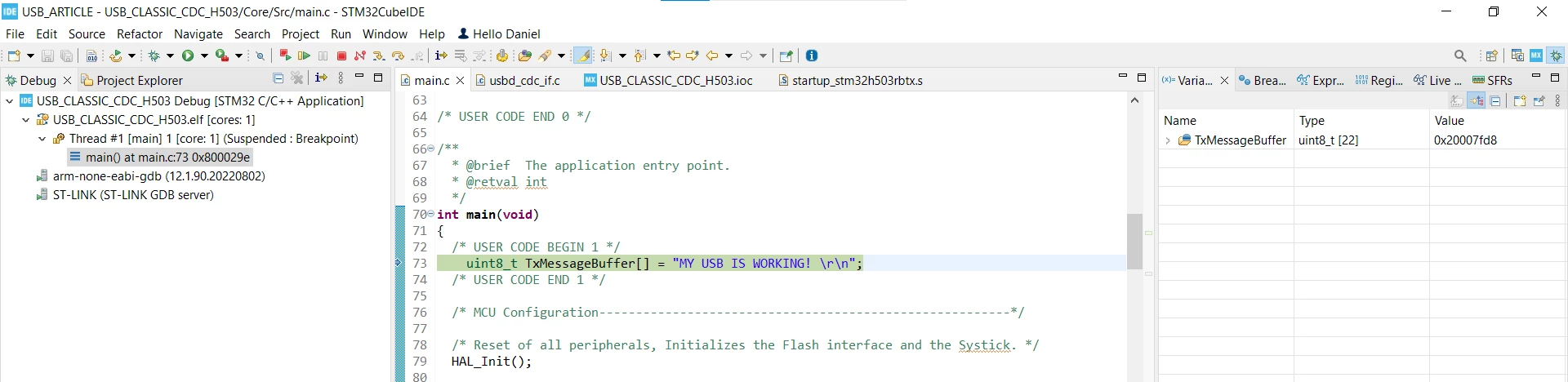
Then click on Resume, or press F8 to let the application start to run:

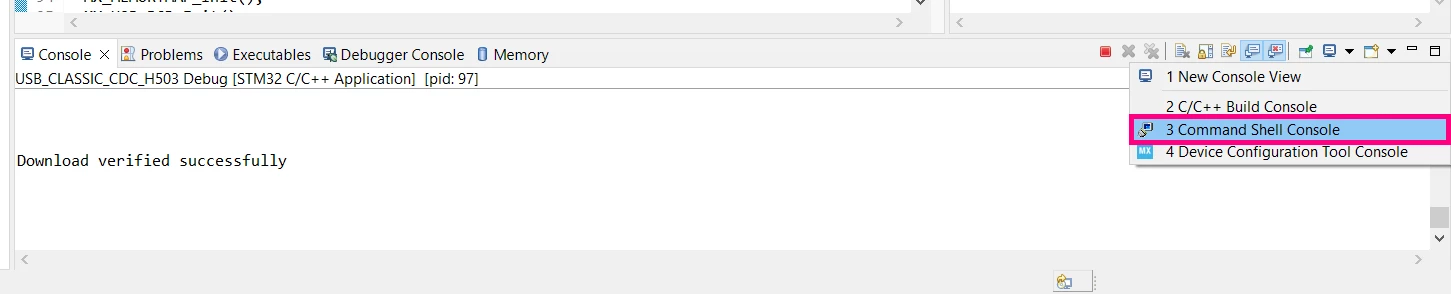
Let us open a terminal in the STM32CubeIDE to see the application running. For that, click o New Shell console:
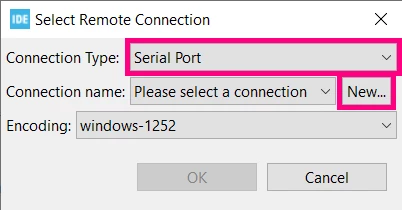
In the opened menu, select Serial Port for the Connection Type, then click on New…
In the new menu, create a connection for your board. Make sure to select the proper Serial Port, then click Finish and finally OK:
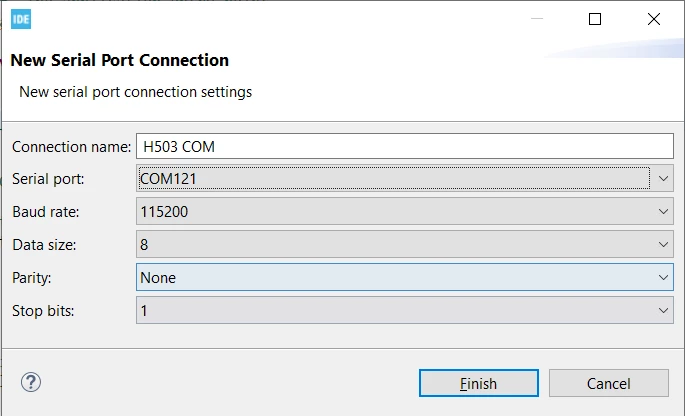
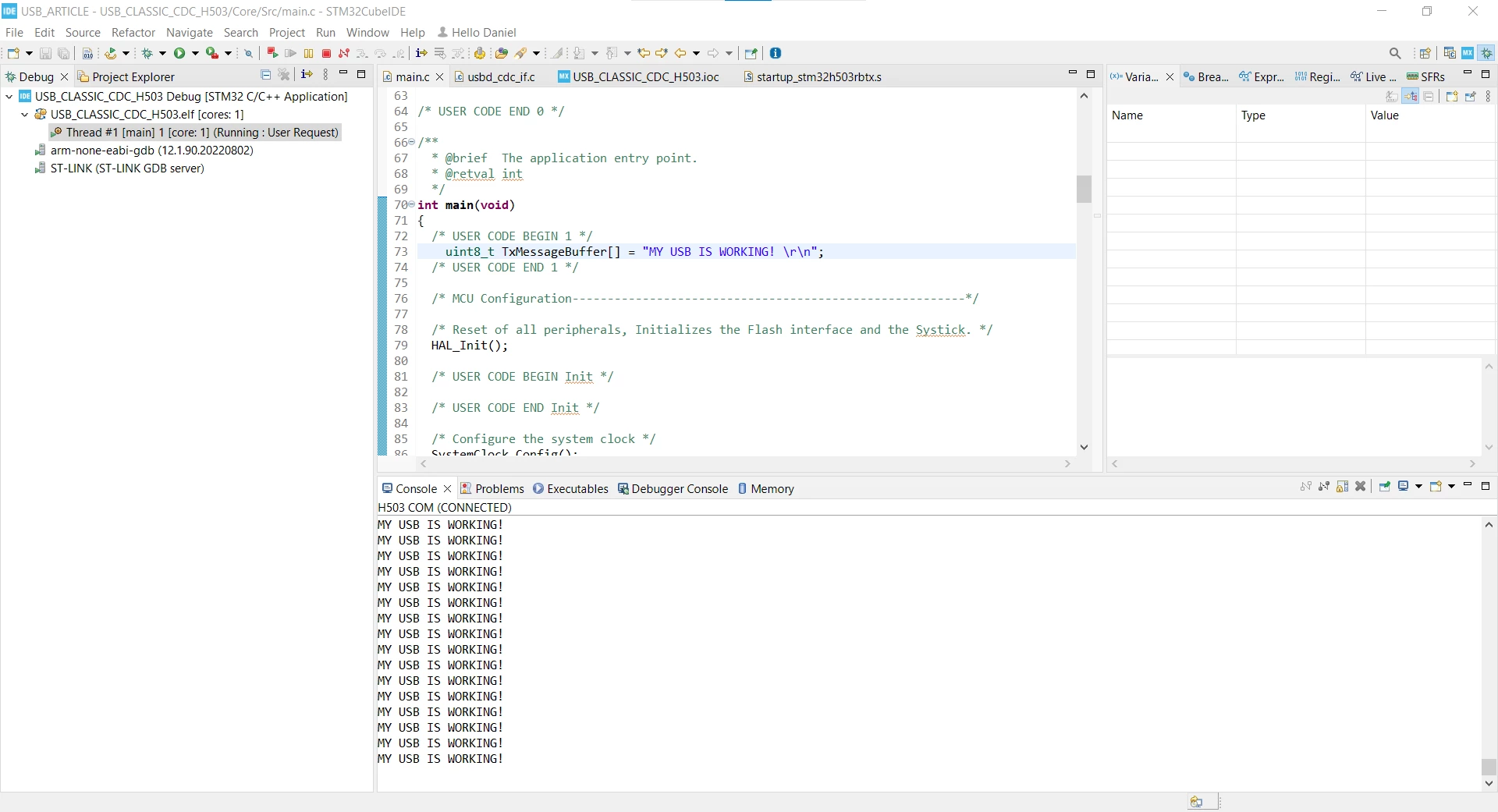
Doing that, a console with a Virtual COM Port terminal opens and we can see our application running, printing the message on every 500 ms. If you type ‘1’ the User LED should be turned ON and ‘0’ will turn it OFF.
3. Conclusion
That concludes our article. Now you have the needed information to implement the STMicroelectronics classic USB device middleware. The steps for doing that in another MCU Family or for other classes are very similar. If you face any difficulties while developing, refer to our demonstration projects available in our GitHub or contact us through the Community or by the On-line Support channel.
We hope the this article was helpful!
4. Relevant links:
Here are some relevant links that can help you in your developments using our ST peripheral:
ST Wiki - Introduction to USB with STM32
GitHub - STMicroelectronics - Middleware USB Device