


How to use STM32CubeProgrammer and the STLINK-V3SET to access the I2C bootloader on my STM32 board?
1. Introduction
Every STM32 MCU comes pre-programmed with a system memory bootloader stored in the internal boot ROM (system memory). Its main purpose is to download the application program to the internal Flash memory through one of the available serial peripherals on the target device (e.g. USART, CAN, USB DFU, I2C, and SPI). To verify which peripheral interfaces support the activation of the bootloader, the communication protocols and respective command set and sequence, please review AN2606 (STM32 Microcontroller System Memory Boot Mode).
STM32CubeProgrammer is an all-in-one software tool for programming STM32 products, compatible across multiple operating systems and available in both Graphical User Interface (GUI) and Command Line Interface (CLI) versions. It’s an easy to use and efficient application for reading, writing, and verifying device memory through both the JTAG and SWD debug interfaces and bootloader interfaces (e.g. USART, CAN, USB DFU, I2C, and SPI). It is recommended to always keep up to date with the latest version of STM32CubeProgrammer.
You can find the latest version of STM32CubeProgrammer on st.com. See the relevant documentation and links section at the end of this article for direct link to STM32CubeProgrammer’s landing page.
On the other hand, if you already have STM32CubeProgrammer installed on your system you can refer to the steps below to check your current STM32CubeProgrammer version, and if there are any updates available.
2. Step 1: Launch the STM32CubeProgrammer GUI (Graphical User Interface).
In the bottom left-hand corner of the screen, select the ‘?’ icon. Then select the ‘Software Update’ option.
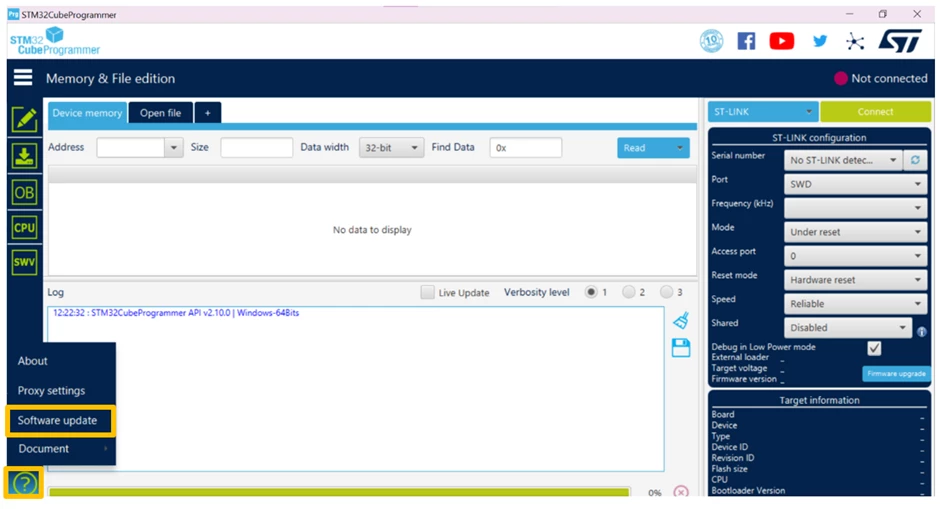
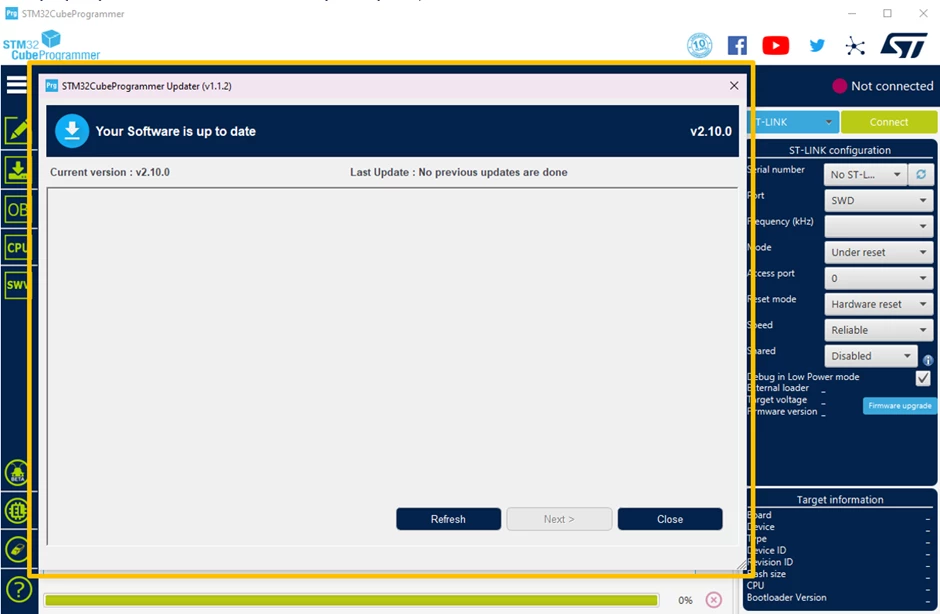
3. Step 2: A STM32CubeProgrammer updater pop-up window will appear.
Note that the contents of this window may differ, depending on the current version of STM32CubeProgrammer you are running. If you have any updates to make, please follow the pop-up window’s on-screen prompts.
The STLINK-V3SET is a stand-alone modular debugger and programming probe for the STM8 and STM32 microcontrollers. It is composed of the main module and complementary adapter board. The STLINK-V3SET provides a proprietary USB interface allowing communication with any STM8 or STM32 target with several protocols: SPI, I2C, CAN, UART and GPIOs. This interface may be used to communicate with the target’s bootloader, which we will be demonstrating in this article.
I2C signals are available on MB1440 CN7 and CN9. The adapter module also provides optional 680-ohm pull-ups, which can be activated by closing JP10 jumpers. In this case, the T_VCC target voltage must be provided to any of the MB1440 connectors accepting it (e.g., CN1, CN2, CN6 or JP10 jumpers).
4. Using STM32CubeProgrammer with STLINK-V3SET to access the I2C Bootloader
Locate your STM32 device in AN2606. This section will reveal the activation pattern you need to apply. In addition, provides the various available bootloader interfaces for your device, and even more importantly, the hardware resources required by the bootloader.
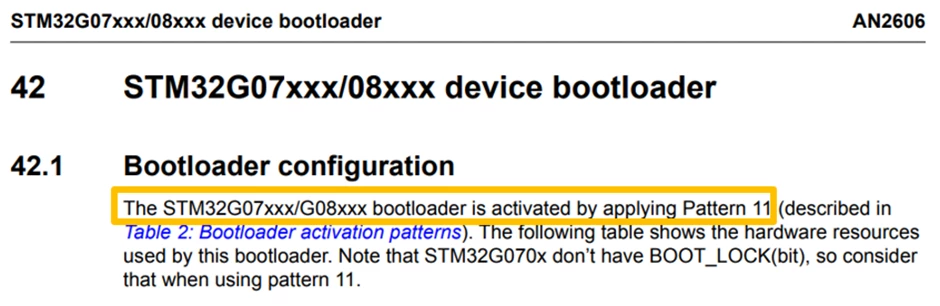
5. STM32G071 Bootloader Activation Pattern Selection
In this example, we will select activation pattern 11, row 2. However, feel free in your application to select any of the available activation patterns listed.
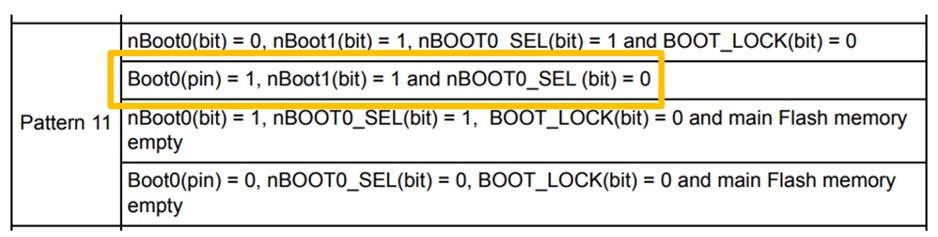
6. Nucleo-G071RB Modifications
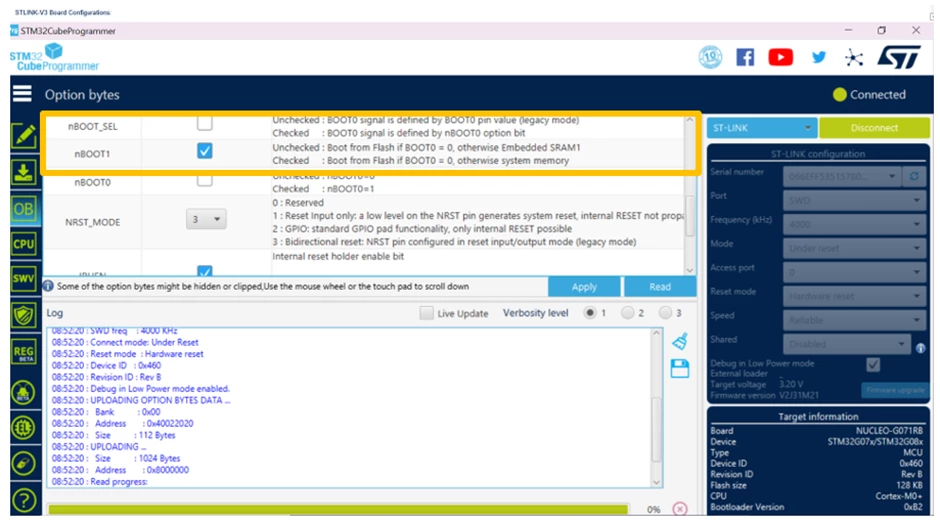
After connecting your target MCU board to STM32CubeProgrammer, on the left-hand side of the GUI select the “OB” tab and expand the “User Configuration” tab. Verify that Nucleo-G071RB’s option bytes bits nBoot1 = 1 and nBOOT0_SEL = 0.
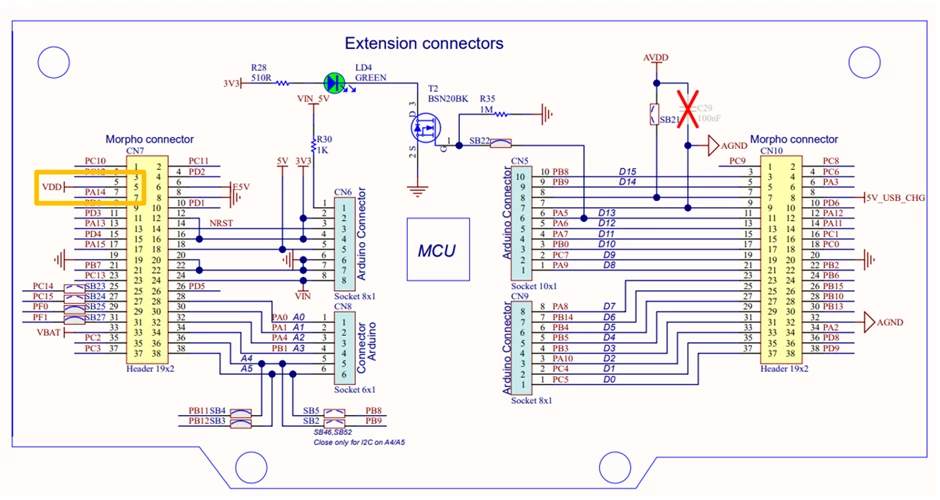
 Once disconnected from STM32CubeProgrammer, connect PA14 (BOOT 0 pin) to VDD
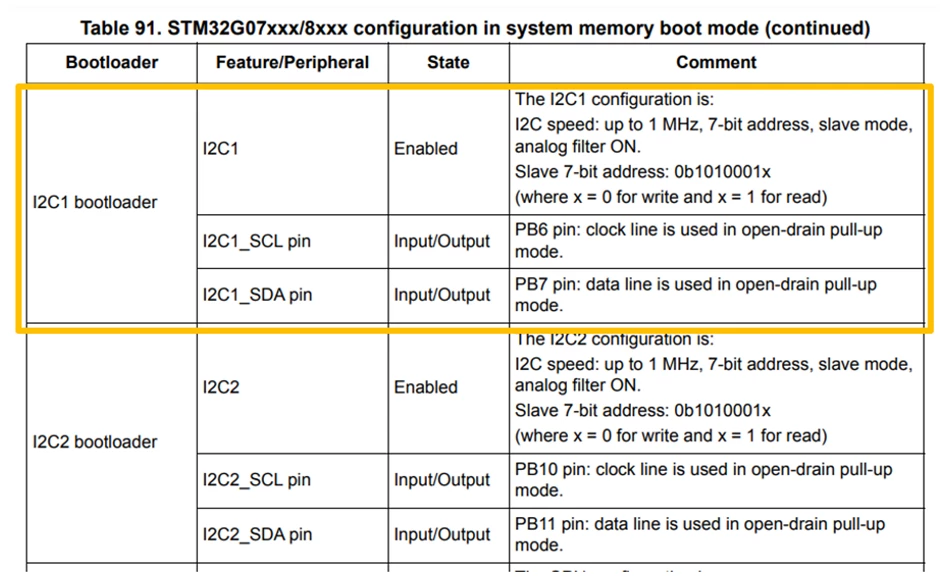
7. STM32G071’s I2C Entry Hardware Configurations
In this example, we will select I2C1 as our I2C bootloader entry point:
8. STLINK-V3 Board Jumper Configurations
MB1441 attached/mounted to MB1440B via CN1, CN3 and CN4 connectors
- JP10 – both ON
- JP1, JP2, JP11 and JP12 – ON
- JP5 and JP3 – ON
- JP4 – OFF
- JP6 and JP7 – OFF
- CN5 – OFF
- JP8 and JP9 – ON
Nucleo-G071RB and STLINK-V3 Board Connections
| Connection Established | Nucleo-G071RB | STLINK-V3 Set |
| GND | JP5 | CN6 – Pin 3 |
| T_VCC (Target Voltage) | CN7 – Pin 5 | CN6 – Pin 1 |
| I2C1_SCL (I2C Clock) | CN10 – Pin 24, PB6 | CN9 – Pin 7 |
| I2C1_SDA (I2C Data) | CN7 - Pin 21, PB7 | CN9 – Pin 10 |
You will then need to power the Nucleo-G071RB board through the STLINK USB connector, and the STLINK-V3SET through CN5, the USB-Micro B connector.
9. STM32CubeProgrammer Settings
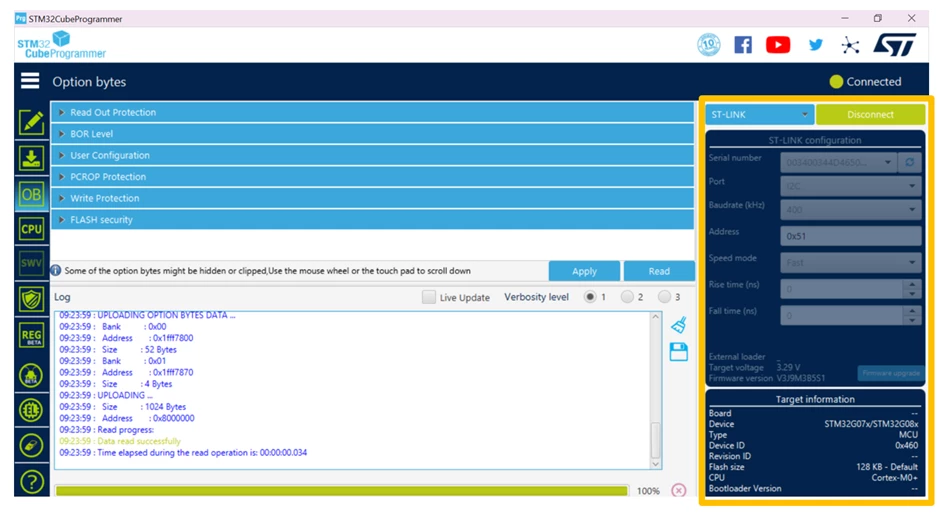
- Serial Number: The ST-LINK V3SET’s
- This field contains the serial numbers of all connected STLINK-V3 probes in case to use I2C bootloader
- Port: I2C
- Selects the I2C devices connected to the PC – you can use the refresh button to recheck the available devices
- Baudrate(kHz): 400
- Selects the I2C baud rate
- Address: Please note that the address given in AN2606 must be shifted to the right by 1 bit and put into STM32CubeProgrammer in hex: 0x51
- Adds the address of the slave bootloader in hex format
- Speed Mode: Fast
- Selects the speed mode of the transmission – Standard or Fast
- Rise Time (ns): 0
- Chooses values according to speed mode, 0-1000 (standard), 0-300 (fast)
- Fall Time (ns): 0
- Chooses values according to speed mode, 0-300 (standard), 0-400 (fast)
Congratulations! We have successfully used STM32CubeProgrammer and STLINK-V3SET to launch ST’s internal I2C bootloader on the Nucleo-G071RB board. The STM32CubeProgrammer GUI has various applications that can help you with your project. Some of the things you can do include but are not limited to reading from / writing to flash memory and RAM, reading / programming the device option bytes, and checking CPU register contents.
10. Relevant Links & Documentation
- AN2606 (STM32 Microcontroller System Memory Boot Mode)
- STM32CubeProgrammer
- UM2448 (STLINK-V3SET debugger/programmer for STM8 and STM32)
- Nucleo-G071RB
- Nucleo-G061RB Schematic
Our example here, we will use the Nucleo-G071RB as our STM32 reference board along with the STLINK-V3SET to show you how to leverage the STM32CubeProgrammer GUI to access the target’s I2C bootloader.