


How to create and edit a custom build preset with STM32CubeMX2
Summary
This article shows how to create a custom build configuration for STM32CubeIDE extension for VS Code, using the STM32CubeMX2 command-line interface.
Introduction
STM32CubeIDE extension for VS Code generates a CMake-based project from an *.ioc2 model file. A newly generated project contains a debug_GCC preset configuration in CMakePresets.json. Among several possibilities, using the CLI to add a custom preset is simpler than editing it manually. Creating the preset in VS Code is composed by directly editing files such as components.cmake, files.cmake, target.cmake, and flags.cmake, all inside the generated project folder.
While this approach works, future regeneration from CubeMX2 can overwrite those manual changes. STM32CubeMX2 contains a CLI, very well documented at Command lines interface - STM32CubeMX2 1.1.2 documentation, which performs the same change at the model level, inside the *.ioc2 file itself, so the custom configuration is kept upon regeneration. This article walks through the CLI-based flow on Windows, but the same could be tailored to other OS.
1. Prerequisites
- STM32CubeMX2
- An existing STM32CubeMX2 project (*.ioc2) already created through the GUI, with pins, clocks, and peripherals configured.
2. Locating the CLI and understanding the back-end model
The CLI is installed as a single binary, cube.exe, located by default at:
C:\Users\<username>\.local\stm32cube\bin\cube.exe
Add that folder to the PATH so the cube can be called from any terminal. Run commands such as: ‘cube –help’ or ‘cube –version’ to validate it is properly set
STM32CubeMX2 can be started with this command:
cube mx start
3. Command structure
The commands used in this workflow all live under cube mx ide-project:
| Command | Purpose |
| cube mx ide-project build-target list | List build targets already defined in the *.ioc2 |
| cube mx ide-project flag list | List compiler/linker flags for a build setup |
| cube mx ide-project flag add / flag remove | Modify flags for a build setup |
| cube mx project save | Persist in-memory changes to the *.ioc2 file |
| cube mx ide-project generate | Export the CMake project from the *.ioc2 |
Every STM32CubeMX2 project already defines a Debug and a Release build targets for each supported toolchain as soon as it is created. Running build-target list on a project returns entries like .debug_GCC+<device> and .release_GCC+<device> by default.
To create a new build target, the command is build-target add:
cube mx ide-project build-target add --name "MX2Optim.release+STM32C562RET6" --profile Release --toolchain GCC -p "C:\ST\MX2Projects\MX2Optim.ioc2"
The options:
- --name: a string in the format [projectName][.buildType][+targetType]. Include the +<device> suffix to match the naming convention used by the autocreated targets (as seen in build-target list).
- --profile: Debug or Release (defaults to Debug if omitted).
- --toolchain: GCC or IAR (defaults to GCC if omitted).
- -p: path to the *.ioc2 file.
Note: if the +<device> suffix from –name is omitted, the CLI still creates the target, but as an orphan entry with no toolchain-specific configuration attached. It appears in the build-target list as.release+STM32C562RET6, sitting apart from the properly configured .release_GCC+STM32C562RET6. Including the device suffix in --name prevents that.
4. Hands-on: adding the Release preset
The example below uses a project named MX2Optim, targeting an STM32C562RET6, saved at C:\ST\MX2Projects\MX2Optim.ioc2.
Open Command Prompt and run the software as administrator.
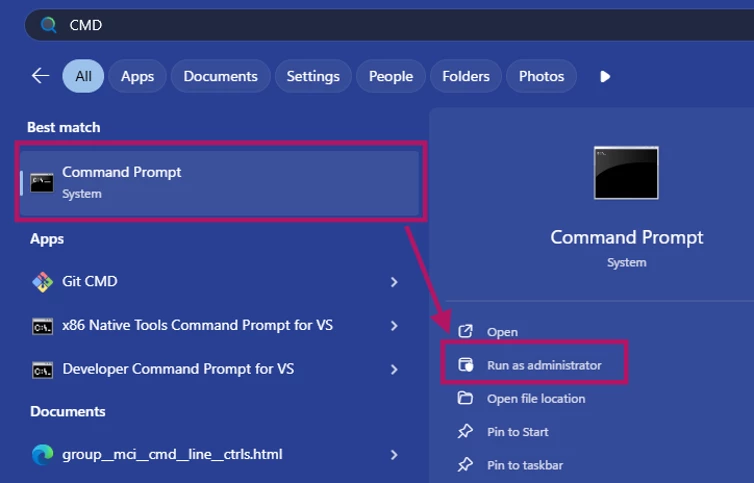
Start STM32CubeMX2 by typing the following:
cube mx start
Wait for it to be initialized, then check the existing preset targets by typing:
C:\Users\username>cube mx ide-project build-target list -p "C:\ST\MX2Projects\MX2Preset.ioc2"
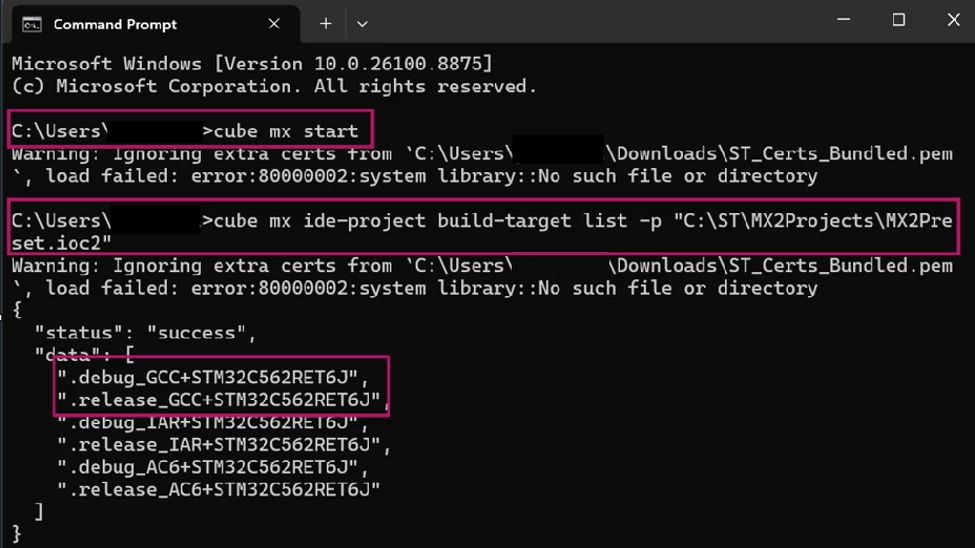
This confirms .debug_GCC+STM32C562RET6 and .release_GCC+STM32C562RET6 are already present.
Inspect the default Release flags before removing anything, the default Release/GCC setup on a new project typically carries -Os (size optimization) and -g (debug symbols):
cube mx ide-project flag list --setup release_GCC --tool c -p "C:\ST\MX2Projects\MX2Preset.ioc2"
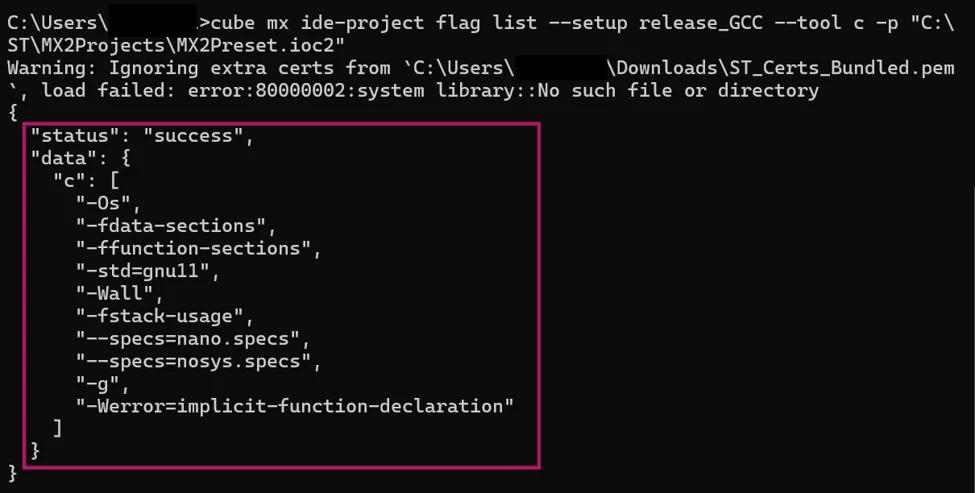
--setup takes the plain <buildType>_<toolchain> name (for example, release_GCC) without the +<device> suffix shown by build-target list.
-Os: Optimizes for code size rather than speed. This is the default optimization the Release preset ships with before you swap it for -O3.
-fdata-sections: Places each variable/data item into its own linker section, instead of grouping them all together. This lets the linker discard unused data later.
-ffunction-sections: Same idea, but for functions: each function gets placed into its own section. Usually paired with -fdata-sections.
-std=gnu11: Sets the language standard to C11 with GNU extensions enabled (as opposed to strict ISO C11). GNU extensions add things like statement expressions and certain built-ins that are not in the official C standard but are common in embedded code.
-Wall: Enables a broad set of compiler warnings (unused variables, type mismatches, etc.). Does not stop compilation.
-fstack-usage: Makes GCC emit a *.su file for each source file, reporting how much stack each function uses.
--specs=nano.specs: Links against Newlib-nano, a stripped-down version of the C standard library built for small embedded targets (much smaller footprint than full Newlib).
--specs=nosys.specs: Links against stub implementations of OS-dependent syscalls (_write, _read, _sbrk, etc.) that do nothing by default, since there is no operating system on a bare-metal MCU. These can be overwritten, (for example, to redirect printf to a UART).
-g: Includes debug symbols in the binary.
-Werror=implicit-function-declaration: Turns a specific warning into a hard error: calling a function without a prior declaration or prototype. This is a common source of undefined-behavior bugs in C, so it is escalated from warning to error to force you to fix it rather than ignore it.
4.1 Replace the optimization flag
Flag values that start with a dash (-O3, -Os, -g) are misread as unknown CLI options unless separated from the named options with --.
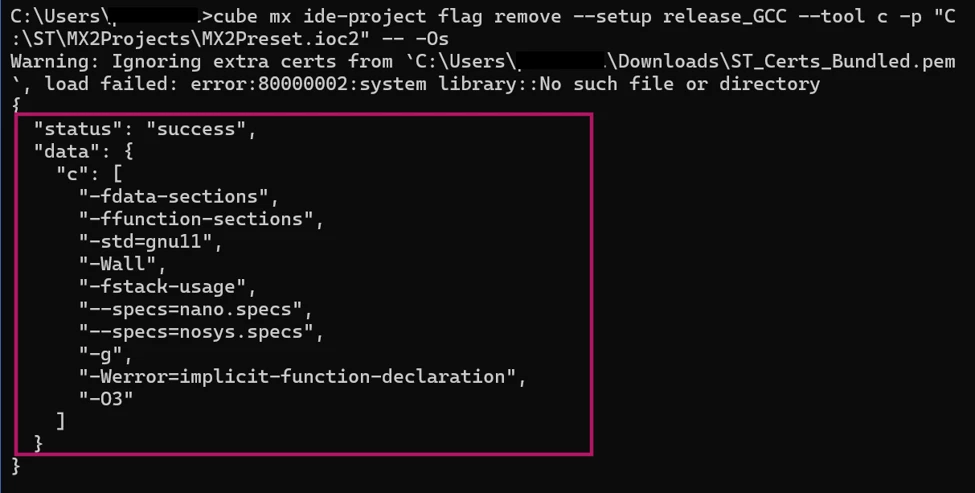
Remove the existing flags, for this particular example, Size Optimization (-Os) and Debug Symbols(-g):
cube mx ide-project flag remove --setup release_GCC --tool c -p "C:\ST\MX2Projects\MX2Preset.ioc2" -- -Os
cube mx ide-project flag remove --setup release_GCC --tool c -p "C:\ST\MX2Projects\MX2Preset.ioc2" -- -g
Add the Speed Optimization flag (-O3):
cube mx ide-project flag add --setup release_GCC --tool c -p "C:\ST\MX2Projects\MX2Preset.ioc2" -- -O3
The Preset flags should look as shown below after the commands:
4.2 Saving the project
cube mx project save -p "C:\ST\MX2Projects\MX2Preset.ioc2"

This writes the flag changes into the *.ioc2 file. Nothing in the generated project folder changes yet, as that happens at the generate step.
4.3 Generating the CMake project
Both build targets must be exported together, in the same command, into a destination folder that does not already contain a generated project. Existing files at the destination are preserved by default unless told otherwise. Generating a single target at a time leaves flags.cmake and CMakePresets.json on their prior (Debug-only) state, even with --force.
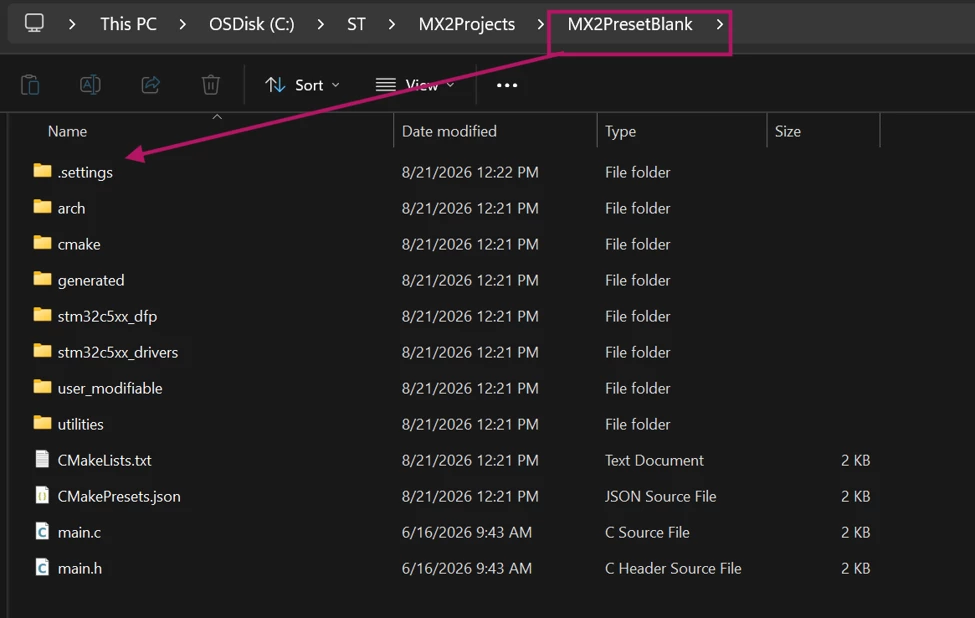
For the initial generation, use a fresh destination folder, for this a file named “MX2PresetBlank” was created:
cube mx ide-project generate -p "C:\ST\MX2Projects\MX2Preset.ioc2" --build-target .debug_GCC+STM32C562RET6J .release_GCC+STM32C562RET6J --destination "C:\ST\MX2Projects\MX2PresetBlank" --format CMake --source include-packs-from-local
After that, the following message should appear:

Going into the recently created folder, a generated project structured as such can be seen:
4.4 Verify the generated files
To verify the generated files, use the following commands in the Command Prompt:
type "C:\ST\MX2Projects\MX2PresetBlank\cmake\flags.cmake"

Alternatively, open "C:\ST\MX2Projects\MX2PresetBlank\cmake\flags.cmake" directly from File Explorer:
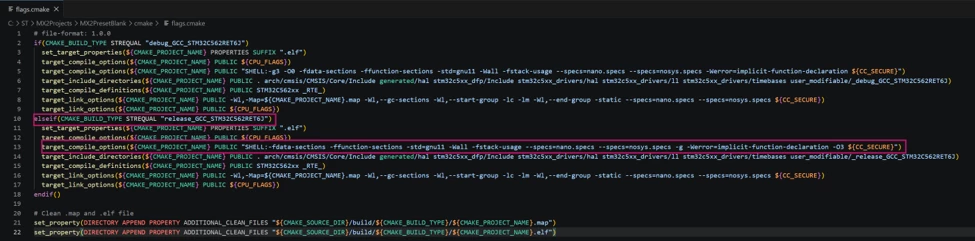
flags.cmake should now contain two if(CMAKE_BUILD_TYPE STREQUAL ...) blocks (one for debug_GCC_STM32C562RET6, one for release_GCC_STM32C562RET6) with -O3 present in the Release block and no -Os / -Og / -g.
4.5 Regenerating later into the same folder
From STM32CubeMX2 v1.1.0 onward, a --diff option controls what happens to files that already exist at the destination, which is what is needed when updating flags without recreating the folder each time:
| --diff value | Behavior |
| keep_user | Keeps the existing file (default) |
| overwrite | Overwrites the existing file with the newly generated one |
| overwrite_with_backup | Overwrites, keeping the previous version as <filename>_bckp |
cube mx ide-project generate -p "C:\ST\MX2Projects\MX2Optim.ioc2" --build-target .debug_GCC+STM32C562RET6 .release_GCC+STM32C562RET6 --destination "C:\ST\MX2Projects\MX2Optim_cmake" --format CMake --source include-packs-from-local --force --diff overwrite
4.6 Verifying in STM32CubeIDE for VS Code
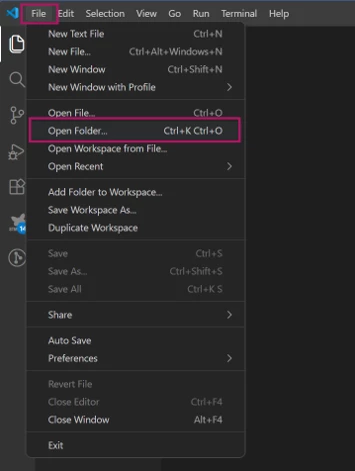
- File >> Open Folder, and select the generated project folder (MX2PresetBlank).
- Ctrl+Shift+P >> CMake: Select Configure Preset >> choose the Release preset (release_GCC_STM32C562RET6).
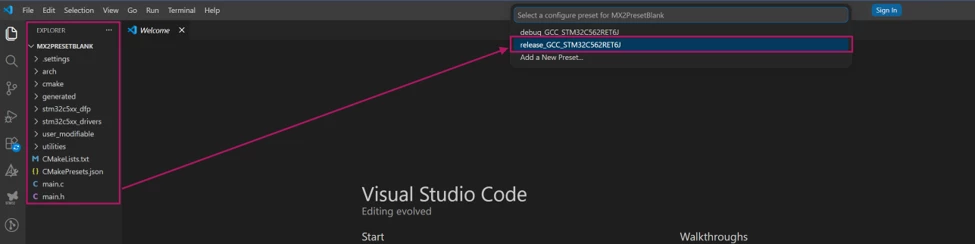
- Now, the project with the new preset can build successfully.
Conclusion
The STM32CubeMX2 CLI fully replaces a manual CMake-editing approach for adding an optimized Release preset, with the advantage that the configuration lives in the *.ioc2 model and survives future regeneration.
The rule to keep in mind is that both build targets need to be generated together into the destination folder; a fresh one the first time, and with --diff overwrite on later runs against that same folder.