

How to configure and use ISSI OctaRAM™ with STM32U5 over octo-SPI
Summary
This technical guidance describes how to bring up and use ISSI IS66WVO32M8DBLL OctaRAM with STM32 microcontrollers over the octo-SPI interface. It covers the memory characteristics, the octo-SPI operating conditions, the CubeMX configuration steps, and the firmware sequence needed to initialize the memory, configure the latency counter, and enable memory-mapped mode.
- Summary
- Introduction
- STM32U575 octo-SPI features and operating conditions
- 1. Prerequisites
- 1.1 Hardware
- 1.2 Software
- 1.3 Firmware
- 2. Configuration steps
- 2.1 Configure OCTOSPI1 GPIOs
- 2.2 Configure the clocks
- 2.2.1 System clock
- 2.2.2 OCTOSPI kernel clock
- 2.3 Configure OCTOSPI1 parameters
- 2.3.1 Configure delay block unit and PhaseSel
- 2.4 Configure the power supply
- 2.5 Enable UART for debug message
- 3. Generate the project
- 4. Firmware part
- 4.1 Read the device ID and the configuration register (CR)
- 4.2 Configure the latency counter
- 4.3 Enable memory-mapped mode
- 4.4 UART debug print function
- 4.4 Main function sequence
- Related links
Introduction
The IS66WVO32M8DBLL OctaRAM is a high-performance pseudo-SRAM manufactured by ISSI. It uses a self-refresh DRAM array organized as 32M words by 8 bits.
The device supports Octal Peripheral Interface (command, address, and data through 8 SIO pins), which reduces the number of required signals to 11 signal pins: SCLK, CS#, DQSM, and 8 SIOs.
Unlike traditional PSRAM, the OctaRAM has a specific address phase built with row and column addresses multiplexed over the 8 SIO lines across multiple clock cycles. The table below shows the mapping of row and column address bits to the clock cycles and SIO lines for 32M words x 8 bits.
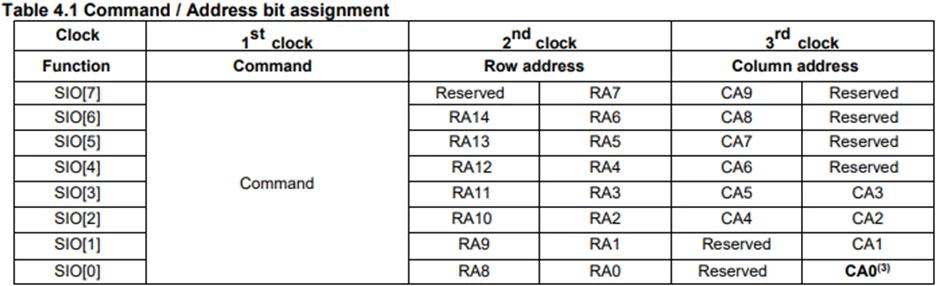
Because of this specific interface, multiple questions have been raised about how to configure and use OctaRAM with STM32 microcontrollers over the octo-SPI interface.
This technical guidance provides a step-by-step guide to interfacing the ISSI IS66WVO32M8DBLL OctaRAM with an STM32U5 device using the octo-SPI peripheral.
STM32U575 octo-SPI features and operating conditions
The STM32U5 octo-SPI peripheral provides access to external serial memories in single, dual, quad, and octal modes. It supports both SDR and DTR transfers, along with data strobe (DQSM), and memory-mapped mode.
According to the STM32U575 datasheet, the maximum supported OSPI frequency in DTR mode with DQS is 100 MHz, depending on the supply voltage (VDD) and the load capacitance (CLoad). The table below shows the different values.
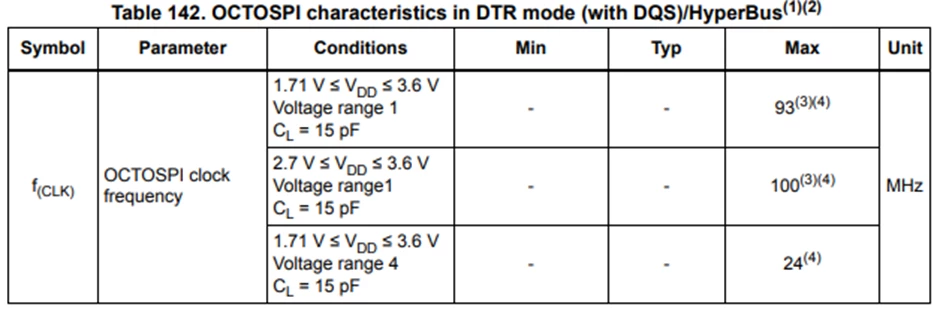
Reaching the maximum octo-SPI operating frequency requires the following configuration settings:
- Output speed set to OSPEEDRy[1:0] = 10.
- Delay block enabled for DTR with DQS.
- I/O compensation cell activated.
- Voltage scaling range 1.
- DHQC enabled.
1. Prerequisites
1.1 Hardware
- STM32U575I-EV evaluation board.
- MB1242 daughterboard with ISSI OctaRAM™ memory.
The STM32U575I-EV evaluation board embeds the possibility of evaluating more Octo‑SPI memory devices. Two 2x10‑pin high‑speed socket connectors are available to support the MB1242 ST memory daughterboard.
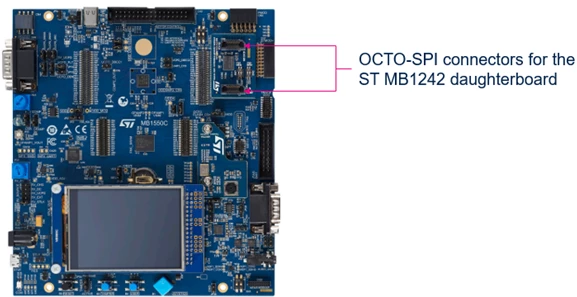
Depending on the MB1242 daughterboard and octo-SPI memory used, the octo-SPI1 is compatible with the VDD_MCU voltage range from 1.71 to 3.6 V.
The IS66WVO32M8DBLL OctaRAM™ memory used in this article is 3 V.
1.2 Software
1.3 Firmware
2. Configuration steps
This section describes the steps required to configure the Octo-SPI1 GPIOs, clocks, Octo-SPI1 parameter settings, and power supply.
2.1 Configure OCTOSPI1 GPIOs
After creating a new STM32CubeMX project for the STM32U575AII6Q device:
- Open the Pinout & Configuration tab.
- Under Connectivity, enable OCTOSPI1.
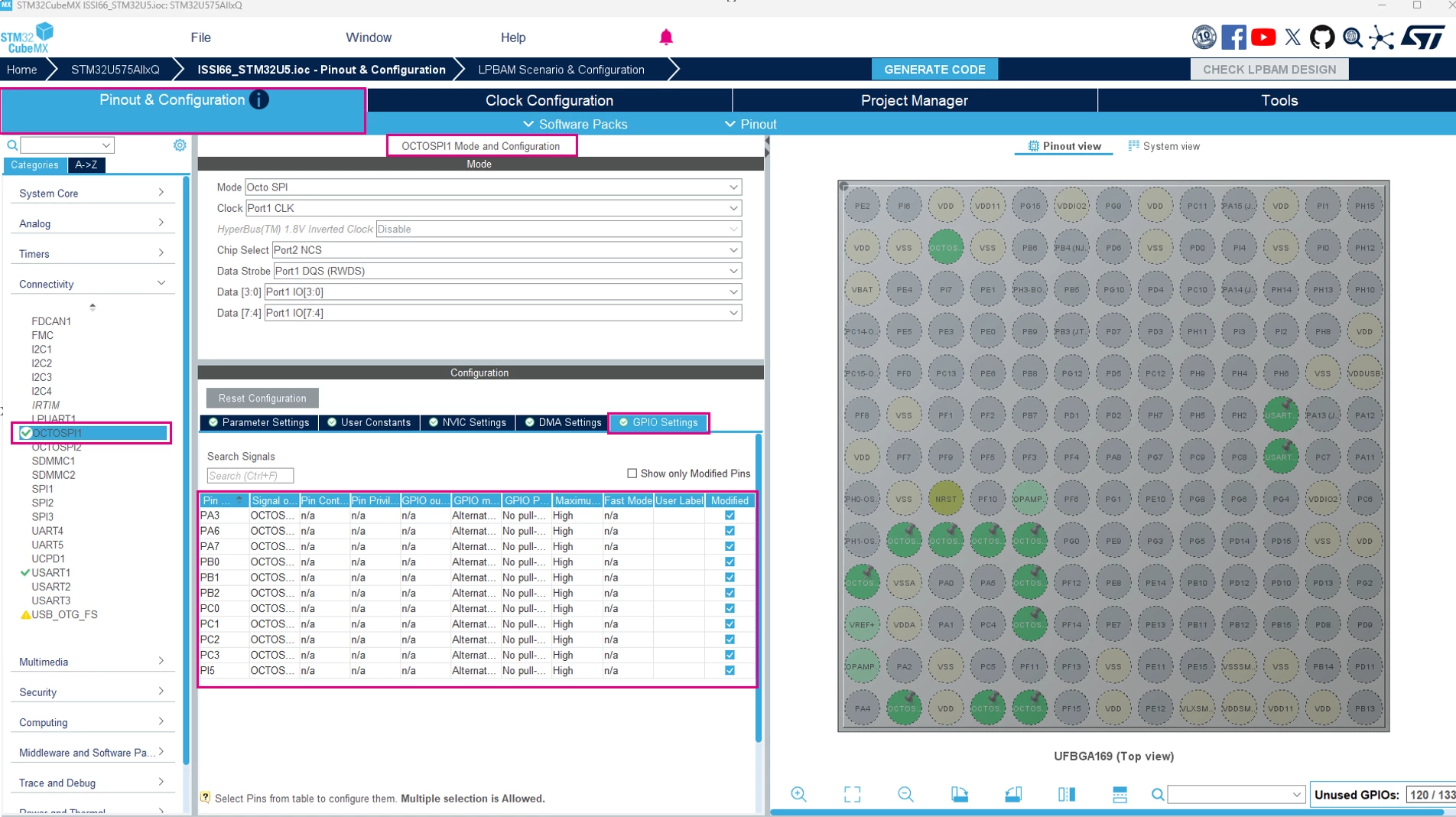
- Configure the GPIOs as shown in the figure below
To identify the pins used for OCTOSPI1 interface. Refer to Table 45. Hardware I/O configuration for the Octo‑SPI1 interface for the external MB1242 daughterboard of the UM2854.
2.2 Configure the clocks
2.2.1 System clock
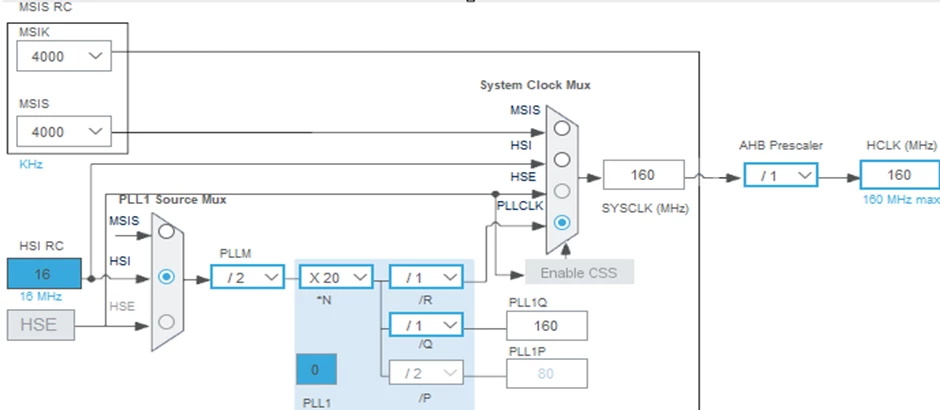
The STM32U5 series supports a maximum system operating frequency of up to 160 MHz.
Under Clock Configuration tab, select HSI as PLL source to obtain an HCLK of 160 MHz
2.2.2 OCTOSPI kernel clock
The OCTOSPI kernel clock can reach up to 200 MHz when PLL2_Q is selected as the clock source.
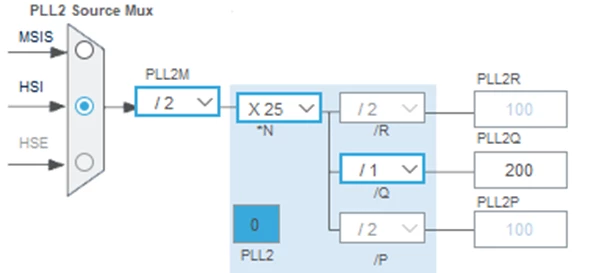
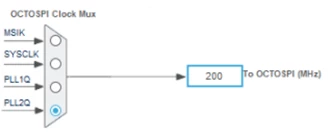
By applying a divide-by-2 prescaler in OCTOSPI->DCR2 (OCTOSPI_DCR2_PRESCALER = 1), the OCTOSPI1 clock frequency becomes 100 MHz.
2.3 Configure OCTOSPI1 parameters
After configuring the GPIOs and clocks, configure OCTOSPI1 according to the selected OctaRAM™ memory.
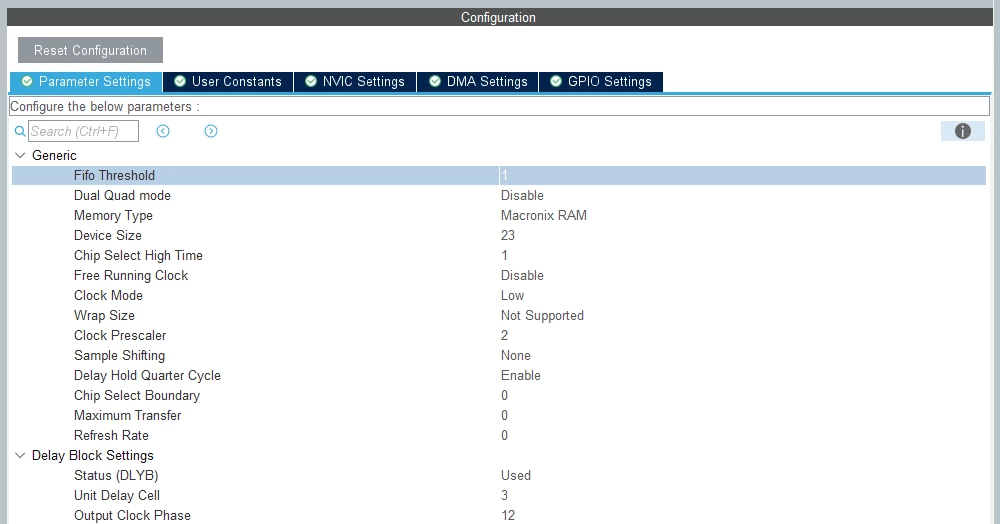
In the OCTOSPI1 Configuration window, select the Parameter Settings tab, and set the following:
- Memory type: select Macronix_RAM
Important limitation:
When using Macronix OctaRAM™ mode where XSPI_DCR1 register MTYP [2:0] = 011, only 13 bits of row address are decoded and sent to the memory. This limits addressable memory space to only 8 MB.
- Memory Size: 23 (Number of bytes in device = 2^[DEVSIZE+1]. -> 2^ [22+1] = 2^23 = 8M)
This value is selected because OctaRAM™ transactions are limited to 8 Mbytes.
- Clock Prescaler: 2 [ 200MHz -> 100 MHz]
- Delay Hold Quarter Cycle: Enabled
In DTR mode, it is mandatory to enable the DHQC to shift the output data by 1/4 of clock cycle to avoid hold-time issues.
- Delay Block: Used
The delay block module is integrated with the OctoSPI to introduce a delay on DQS signal. This block is designed to be used for both SDR and DDR modes.
In DTR mode, data and DQS signals are edge-aligned. Therefore, the DQS signal must be shifted by 1/4 of the clock cycle to center the data eye and ensure proper sampling, avoiding setup-time violations.
The delay block module is composed of 12 delay units, each with a unit delay of 128 programmable steps.
2.3.1 Configure delay block unit and PhaseSel
For an octo-SPI clock of 100 MHz, the clock period is 10 ns.
The required delay is therefore 1/4 of the clock cycle = 2.5 ns = 2500 ps.
According to the STM32U575 datasheet:

The unit delay and the phase for the output clock are calculated according to the following formulas:
- Unit delay = Initial delay + UNIT[6:0] × delay step.
- Phase for output clock = Input clock + PhaseSel[3:0] × unit delay.
To obtain a total delay of 2500 ps across the 12 delay cells:
- Delay to achieve using UNIT [6:0] = (2500 ps - Initial delay (1300 ps)) / 12 = 100 ps per cell
- Calculate the UNIT value: 100 ps / 41 ps = 2.43 ~= 3
- Therefore, PhaseSel = 12
See the screenshot below for a summary of the settings.
2.4 Configure the power supply
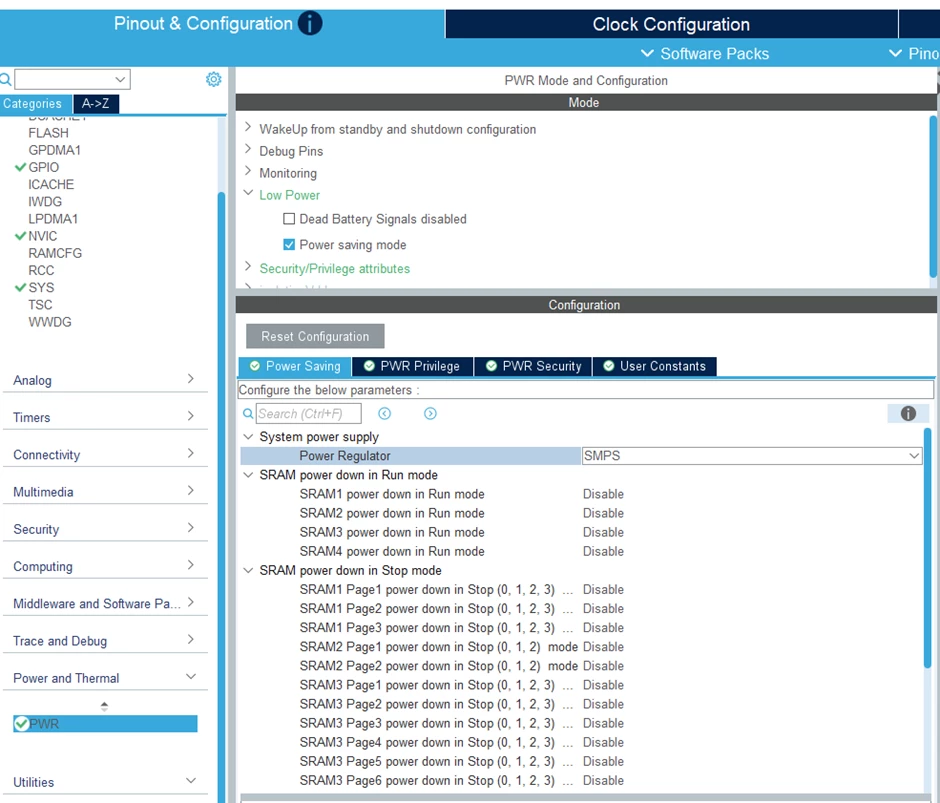
The STM32U575I-EV Evaluation board is based on an ultra-low-power STM32U575AII6Q microcontroller that features an embedded Switched-Mode Power Supply (SMPS) step-down converter within the UFBGA169 package.
- Open the PWR tab.
- Go to the Low Power Parameter.
- Enable [Power saving mode].
- Under System power supply select [SMPS] instead of LDO.
2.5 Enable UART for debug message
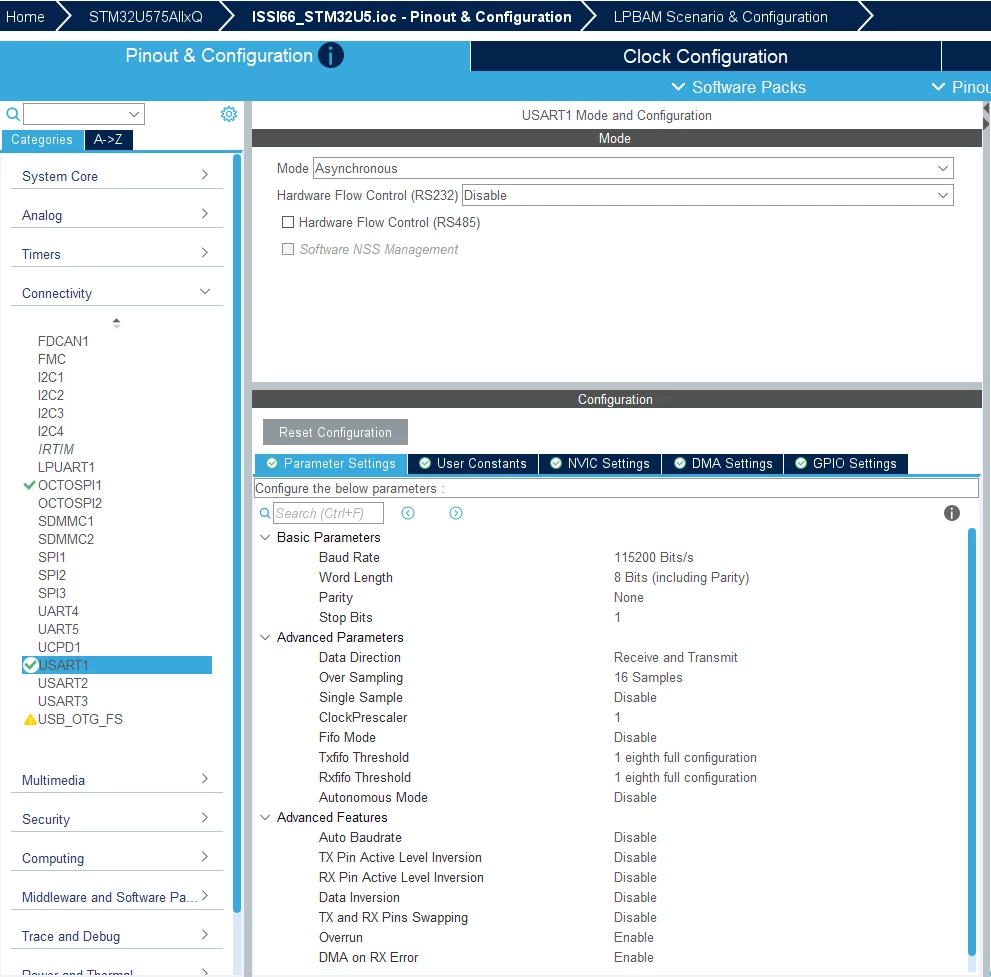
- Open the Pinout & Configuration tab.
- Under Connectivity, enable UART1.
- In the Mode dropdown, select Asynchronous
- Then in the Parameter Settings Configure the Baud Rate to 115200 Bits/s
5. Configure UART1 Pins
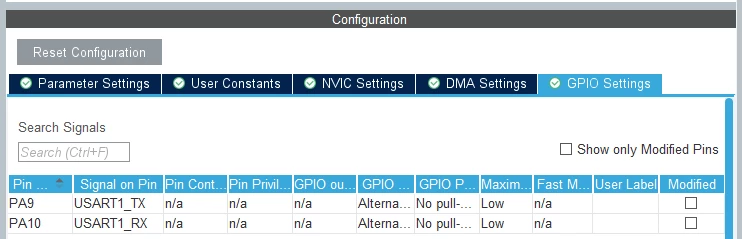
CubeMX will automatically assign default pins (often PA9 for TX and PA10 for RX), which you can change if needed.
3. Generate the project
Once the configuration is complete, generate the project by clicking the [Generate Code] button and open it in STM32CubeIDE.
4. Firmware part
Before any communication with the external memory, the OctaRAM™ memory requires additional configuration of parameters such as the latency counter, which is configured through the configuration register of the memory.
The latency counter defines the number of clock cycles inserted after the address phase and before the data phase. These cycles give the memory device time to fetch data.
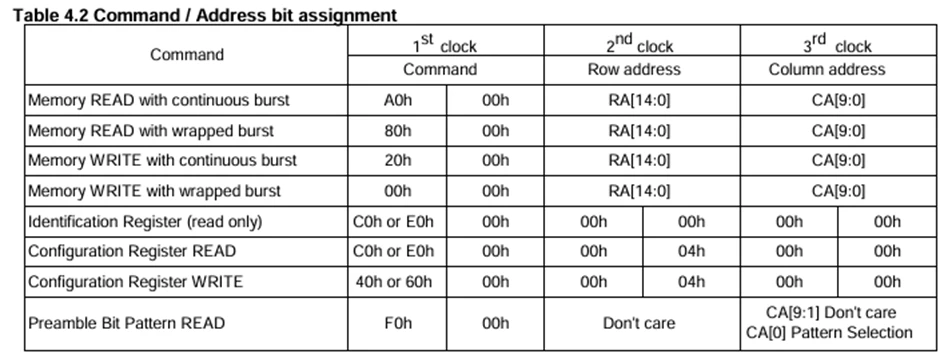
The OctaRAM™ memory uses a specific set of commands to access and configure its registers, and to perform write and read operations. The table below summarizes the available commands.
4.1 Read the device ID and the configuration register (CR)
The first step after peripheral initialization is to read the memory device ID. This verifies that the OctaRAM™ is correctly connected and responding on the octo-SPI bus.
The memory configuration register (CR) should be read to verify the default memory configuration.
This section describes the helper functions used to perform register read operation on the OctaRAM™ memory.
The IS66WVO32_ReadReg() function is used to read a 16-bit register value from the device.
The code below shows the register read function
uint16_t ID_reg = 0;
uint16_t CFG_reg = 0;

#define IS66WVO32_READ_REG_CMD 0xC000

#define IS66WVO32_ID_REG_ADDR 0x00000000
#define IS66WVO32_CONFIG_REG_ADDR 0x00040000


uint32_t IS66WVO32_ReadReg(OSPI_HandleTypeDef *Ctx, uint32_t Address, uint8_t *Value, uint32_t LatencyCode)
{
 OSPI_RegularCmdTypeDef sCommand={0};

 /* Initialize the read register command */
 sCommand.OperationType = HAL_OSPI_OPTYPE_COMMON_CFG;
 sCommand.FlashId 	 = HAL_OSPI_FLASH_ID_1;


 sCommand.InstructionMode = HAL_OSPI_INSTRUCTION_8_LINES;
 sCommand.InstructionSize = HAL_OSPI_INSTRUCTION_16_BITS;
 sCommand.InstructionDtrMode = HAL_OSPI_INSTRUCTION_DTR_ENABLE;
 sCommand.Instruction = IS66WVO32_READ_REG_CMD;

 sCommand.AddressMode = HAL_OSPI_ADDRESS_8_LINES;
 sCommand.AddressSize = HAL_OSPI_ADDRESS_32_BITS;
 sCommand.AddressDtrMode = HAL_OSPI_ADDRESS_DTR_ENABLE;
 sCommand.Address = Address;


 sCommand.AlternateBytesMode = HAL_OSPI_ALTERNATE_BYTES_NONE;


 sCommand.DataMode = HAL_OSPI_DATA_8_LINES;
 sCommand.DataDtrMode = HAL_OSPI_DATA_DTR_ENABLE;
 sCommand.NbData = 2;

 sCommand.DummyCycles = LatencyCode; //5 clocks
 sCommand.DQSMode = HAL_OSPI_DQS_ENABLE;

 /* Configure the command */
 if (HAL_OSPI_Command(Ctx, &sCommand, HAL_OSPI_TIMEOUT_DEFAULT_VALUE) != HAL_OK)
 {
 return HAL_ERROR;
 }

 /* Reception of the data */
 if (HAL_OSPI_Receive(Ctx, (uint8_t *)Value, HAL_OSPI_TIMEOUT_DEFAULT_VALUE) != HAL_OK)
 {
 return HAL_ERROR;
 }

 return HAL_OK;
}
4.2 Configure the latency counter
By default, the ISSI memory latency counter is set to 5 clocks at 3V. The STM32 octo-SPI specification requires at least 6 dummy cycles when using memories with DQS enabled.
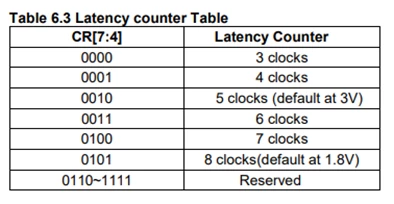
For this memory, the latency counter must be configured so that it is one cycle higher than the dummy cycles programmed in the octo-SPI peripheral. In other words, the octo-SPI dummy cycles must always be one less than the latency counter configured in the memory register.
Example Configuration:
- Latency counter (Memory): 7 clocks
- Dummy cycles (octo-SPI): 6 clocks
This is because the latency counter starts before the address phase has been fully transmitted. As a result, one latency cycle overlaps with the address transfer. The diagram below, extracted from the ISSI memory datasheet, illustrates the above description.
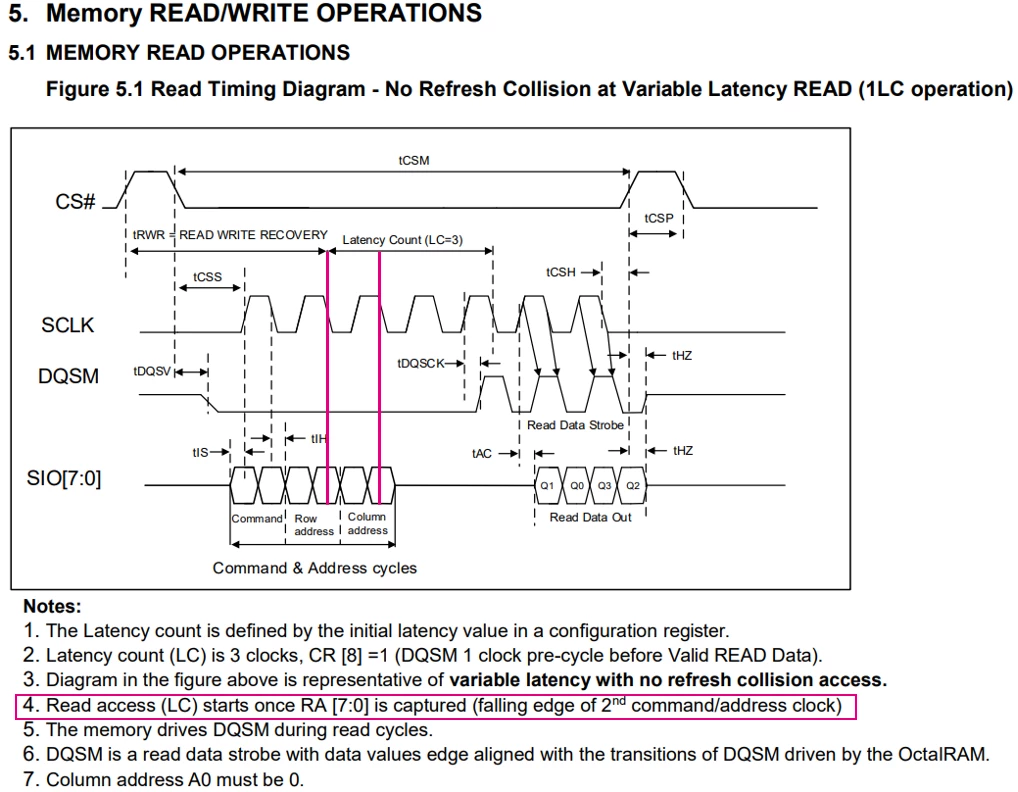
This section describes the helper functions used to perform register write operation on the OctaRAM memory.
The IS66WVO32_WriteReg() function is used to write a 16-bit register value from the device.
The code below shows the register write function
#define IS66WVO32_CONFIG_REG_ADDR 0x00040000

uint8_t cr_write[2] = {0x42, 0xF0}; // Set CR[7:4] to 4, corresponding to Latency counter of 7 clocks

uint32_t IS66WVO32_WriteReg(OSPI_HandleTypeDef *Ctx, uint32_t Address, uint8_t *Value)
{
 OSPI_RegularCmdTypeDef sCommand={0};

 /* Initialize the write register command */
 sCommand.OperationType = HAL_OSPI_OPTYPE_COMMON_CFG;
 sCommand.FlashId = HAL_OSPI_FLASH_ID_1;

 sCommand.InstructionMode = HAL_OSPI_INSTRUCTION_8_LINES;
 sCommand.InstructionSize = HAL_OSPI_INSTRUCTION_16_BITS;
 sCommand.InstructionDtrMode = HAL_OSPI_INSTRUCTION_DTR_ENABLE;

 sCommand.Instruction = IS66WVO32_WRITE_REG_CMD;

 sCommand.AddressMode = HAL_OSPI_ADDRESS_8_LINES;
 sCommand.AddressSize = HAL_OSPI_ADDRESS_32_BITS;
 sCommand.AddressDtrMode = HAL_OSPI_ADDRESS_DTR_ENABLE;
 sCommand.Address = Address;


 sCommand.AlternateBytesMode = HAL_OSPI_ALTERNATE_BYTES_NONE;

 sCommand.DataMode = HAL_OSPI_DATA_8_LINES;
 sCommand.DataDtrMode = HAL_OSPI_DATA_DTR_ENABLE;
 sCommand.NbData = 2;

 sCommand.DummyCycles = 0;
 sCommand.DQSMode = HAL_OSPI_DQS_ENABLE;

 /* Configure the command */
 if (HAL_OSPI_Command(Ctx, &sCommand, HAL_OSPI_TIMEOUT_DEFAULT_VALUE) != HAL_OK)
 {
 return HAL_ERROR;
 }

 /* Transmission of the data */
 if (HAL_OSPI_Transmit(Ctx, (uint8_t *)(Value), HAL_OSPI_TIMEOUT_DEFAULT_VALUE) != HAL_OK)
 {
 return HAL_ERROR;
 }

 return HAL_OK;
}
4.3 Enable memory-mapped mode
One of the key features of the OCTOSPI peripheral is memory-mapped mode. This feature allows the external memory to be seen as internal memory, mapped at address 0x90000000 or 0x70000000.
The code below shows how to enable memory-mapped mode
#define IS66WVO32_LINEAR_BURST_READ 0xA000
#define IS66WVO32_LINEAR_BURST_WRITE 0x2000

#define IS66WVO32_DUMMY_CLOCK_CYCLES_READ 6
#define IS66WVO32_DUMMY_CLOCK_CYCLES_WRITE 6

void IS66WVO32_EnableMemMapped(void);
void IS66WVO32_EnableMemMapped(void)
{
	OSPI_RegularCmdTypeDef sCommand={0};
	OSPI_MemoryMappedTypeDef sMemMappedCfg={0};

	sCommand.FlashId 			 	= HAL_OSPI_FLASH_ID_1;
	sCommand.InstructionMode 			= HAL_OSPI_INSTRUCTION_8_LINES;
	sCommand.InstructionSize 			= HAL_OSPI_INSTRUCTION_16_BITS;
	sCommand.InstructionDtrMode 		 = HAL_OSPI_INSTRUCTION_DTR_ENABLE;

	sCommand.AddressMode				= HAL_OSPI_ADDRESS_8_LINES;
	sCommand.AddressSize				= HAL_OSPI_ADDRESS_32_BITS;
	sCommand.AddressDtrMode 		 = HAL_OSPI_ADDRESS_DTR_ENABLE;
	sCommand.Address 		= 0x0;

	sCommand.AlternateBytesMode 		= HAL_OSPI_ALTERNATE_BYTES_NONE;

	sCommand.DataMode 					= HAL_OSPI_DATA_8_LINES;
	sCommand.DataDtrMode 				= HAL_OSPI_DATA_DTR_ENABLE;
	sCommand.NbData			 = 1;

	sCommand.DQSMode 					= HAL_OSPI_DQS_ENABLE;
	sCommand.SIOOMode 					= HAL_OSPI_SIOO_INST_EVERY_CMD;

	/* Memory-mapped mode configuration for Linear burst write operations */
	sCommand.OperationType 				= HAL_OSPI_OPTYPE_WRITE_CFG;
	sCommand.Instruction 				= IS66WVO32_LINEAR_BURST_WRITE;
	sCommand.DummyCycles 				= IS66WVO32_DUMMY_CLOCK_CYCLES_WRITE;
	if (HAL_OSPI_Command(&hospi1, &sCommand, HAL_OSPI_TIMEOUT_DEFAULT_VALUE) != HAL_OK)
	{

		Error_Handler();
	}
	/* Memory-mapped mode configuration for Linear burst read operations */

	sCommand.DQSMode 						= HAL_OSPI_DQS_ENABLE;
	sCommand.OperationType 					= HAL_OSPI_OPTYPE_READ_CFG;
	sCommand.Instruction 				 = IS66WVO32_LINEAR_BURST_READ;
	sCommand.DummyCycles 				 = IS66WVO32_DUMMY_CLOCK_CYCLES_READ;
	if (HAL_OSPI_Command(&hospi1, &sCommand, HAL_OSPI_TIMEOUT_DEFAULT_VALUE) != HAL_OK)
	{
		Error_Handler();
	}

	sMemMappedCfg.TimeOutActivation = HAL_OSPI_TIMEOUT_COUNTER_ENABLE;
	sMemMappedCfg.TimeOutPeriod = 0xfff;
	/*Enable memory mapped mode*/
	if (HAL_OSPI_MemoryMapped(&hospi1, &sMemMappedCfg) != HAL_OK)
	{
		Error_Handler();
	}

}
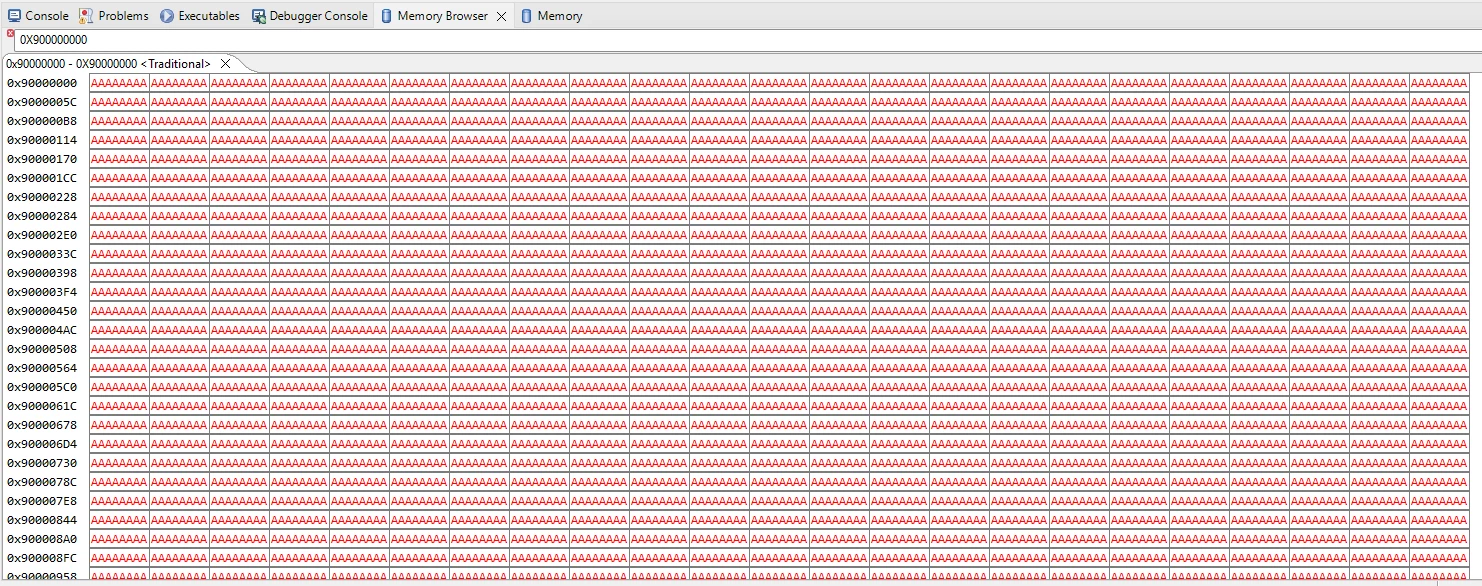
Write known patterns (for example, 0xAA, 0x55) or a buffer of 1,024 bytes, then read back to verify data integrity.
4.4 UART debug print function
Add retargeting function to redirect printf to UART.
#define PUTCHAR_PROTOTYPE int __io_putchar(int ch)

/**
 * @brief Retargets the C library printf function to the USART.
 */
PUTCHAR_PROTOTYPE
{
 /* Place your implementation of fputc here */
 /* e.g. write a character to the USART1 and Loop until the end of transmission */
 HAL_UART_Transmit(&huart1, (uint8_t *)&ch, 1, 0xFFFF);

 return ch;
}
4.4 Main function sequence
/**
 * @brief The application entry point.
 * @retval int
 */
int main(void)
{

 /* USER CODE BEGIN 1 */

	addr_start = HYPERRAM_BASE_ADDR;
	addr_end = HYPERRAM_BASE_ADDR + HYPERRAM_MEM_SIZE - 1;
	uint32_t	err_cnt = 0;
	__IO uint8_t*	 p_addr;
	 uint8_t		valr;
 /* USER CODE END 1 */

 /* MCU Configuration--------------------------------------------------------*/

 /* Reset of all peripherals, Initializes the Flash interface and the Systick. */
 HAL_Init();

 /* USER CODE BEGIN Init */

 /* USER CODE END Init */

 /* Configure the System Power */
 SystemPower_Config();

 /* Configure the system clock */
 SystemClock_Config();

 /* USER CODE BEGIN SysInit */
 /* USER CODE END SysInit */

 /* Initialize all configured peripherals */
 MX_GPIO_Init();
 MX_OCTOSPI1_Init();
 MX_USART1_UART_Init();
 /* USER CODE BEGIN 2 */

{

		printf("\r\n========================================\r\n");
		printf("\r\n OctalRAM demo - ISSI IS66WVO32M8\r\n");
		printf("\r\n========================================\r\n");

		printf("SYSCLK %d MHZ\r\n",HAL_RCC_GetSysClockFreq()/1000000); // Ospi_clk / ( hospi1.Init.ClockPrescaler + 1U))) / 1000000U
		printf("OCTOSPI1 Kernel clock %d MHZ\r\n", HAL_RCCEx_GetPeriphCLKFreq(RCC_PERIPHCLK_OSPI ) ) ;


		printf("\r\n[1] Read device identification and Configuration Register\r\n");

		IS66WVO32_ReadReg(&hospi1, 0x00000000, (uint8_t*)(&ID_reg), 5);
		printf(" Read Device ID:0x%x\r\n",ID_reg);

		IS66WVO32_ReadReg(&hospi1, 0x00040000, (uint8_t*)(&CFG_reg), 5);
		printf(" Configuration Register CR:0x%x\r\n",CFG_reg);

		printf("\r\n[2] Write configuration register\r\n");
		uint8_t cr_write[2] = {0x42, 0xF0}; // CR[7:4] 	= 4 => Latency counter 7 clocks

		// Write Configuration Register
		if (IS66WVO32_WriteReg(&hospi1, IS66WVO32_CONFIG_REG_ADDR, cr_write) != HAL_OK)
		{
			Error_Handler();
		}


		IS66WVO32_ReadReg(&hospi1, IS66WVO32_CONFIG_REG_ADDR, (uint8_t*)(&CFG_reg), 6);
		printf(" CR updated :0x%x\r\n",CFG_reg);

		printf("\r\n[3] Enable memory-mapped mode\r\n");

		/*Configure Memory Mapped mode*/

		IS66WVO32_EnableMemMapped();

		printf("writing 0xAA to address range [%8x] ... [%8x], then reading back\r\n", addr_start, addr_end);
		// write to address
		for (uint32_t i = addr_start; i <= addr_end; i++)
		{
			p_addr = (uint8_t*)i;
			*p_addr = 0xAA;

		}

		// read from address
		for (uint32_t i = addr_start; i <= addr_end; i++)
		{
			p_addr = (uint8_t*) i;
			valr = *p_addr;

			if(valr != 0xAA)
			{
				err_cnt++;
				printf("Errors:%4d @%08x readVal: %02x, expectVal: %02x\r\n", err_cnt, i, valr, 0xAA);

			}
		}
		printf("Write/read test PASSED with 0 errors\r\n");

}

 /* USER CODE END 2 */

 /* Infinite loop */
 /* USER CODE BEGIN WHILE */
 while (1)
 {
 /* USER CODE END WHILE */

 /* USER CODE BEGIN 3 */

 }
 /* USER CODE END 3 */
}
The terminal screenshot below shows the expected output.
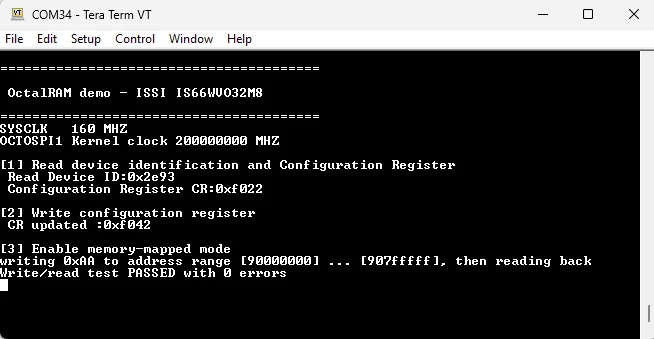
The Memory Browser shows the contents of the memory at address 0x90000000.
Related links
- Reference manual RM0456: STM32U5 series Arm®-based 32-bit MCUs
- Datasheet DS13737: STM32U575xx
- Errata sheet ES0499: STM32U575xx and STM32U585xx
- Application note AN5050: Getting started with Octo-SPI, Hexadeca-SPI, and XSPI interfaces on STM32 MCUs
- Datasheet: ISSI memory