


Getting started with the STM32U5 IoT Node and Azure IoT
Summary
This article provides the necessary information for getting started with the B-U585I-IOT02A IoT Node with Azure IoT
1. Hardware
The B-U585I-IOT02A discovery kit provides a complete demonstration and development platform for the STM32U585AI microcontroller, featuring an Arm® Cortex®-M33 core with Arm® TrustZone®, 2 Mbytes of flash memory and 786 Kbytes of SRAM. B-U585I-IOT02A board discovery kit enables a wide diversity of applications by exploiting low-power communication, multiway sensing, and direct connection to cloud servers.
It includes Wi-Fi® and Bluetooth® modules, as well as microphones, temperature and humidity, magnetometer, accelerometer and gyroscope, pressure, Time-of-Flight, and gesture-detection sensors.
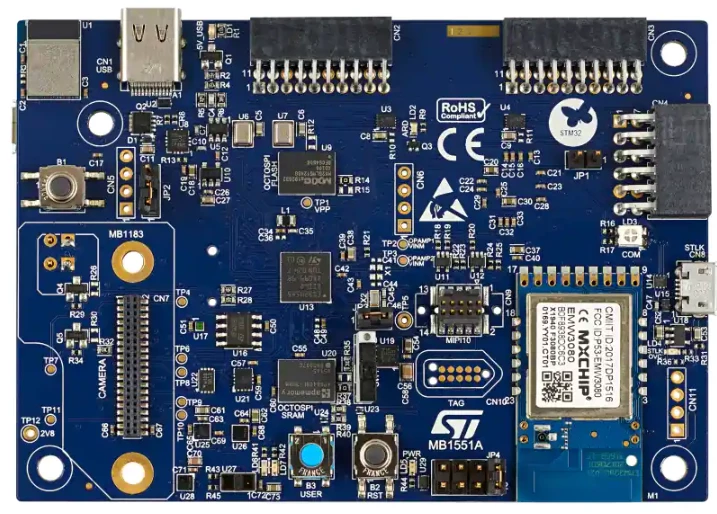
2. The B-U585I-IOT02A board
1- The board can be ordered from here.
2- The board user manual can be found here.
3- The board schematic can be found here.
3. STM32U5 security
1- Azure RTOS and STMicroelectronics U5 security
4. Quick Connect
Quick Connect is a combination of scripts and a prebuilt binary to make it simple to set up and connect the B-U585I-IOT02A board to Azure IoT, all in the space of a few minutes with minimum toolchain to install and configuration. The Quick Connect consists of two fundamental steps:
1- Run the Pre-Requisite Check Procedure to install all software requirements and configure your environment.
2- Run the Quick Connect Script contained in the X-CUBE-AZURE expansion package.
5. Additional links and tutorials
1- Configuring Azure IoT Central Notifications with the B-U585I-IOT02A
2- Connecting the B-U585I-IOT02A to Azure IoT hub
3- How to visualize B-U585I-IOT02A sensor data on Azure IoT hub
4- X-CUBE-AZURE detailed security information