

Associate III
Jul 17, 2025 12:36 AM UTC
Solved

STSW-ST25PC002 run as Java Application loads the application and closes after a second.

I have downloaded the source code of ST25PC-NFC (STSW-ST25PC002) and tried running it as it is. I am running JDK 23.0.1 and also downloaded and extracted JavaFX 23.0.1. Every time I run the MainApp, it loads the application for a second before it gets closed. I get the following exceptions (screenshot attached).
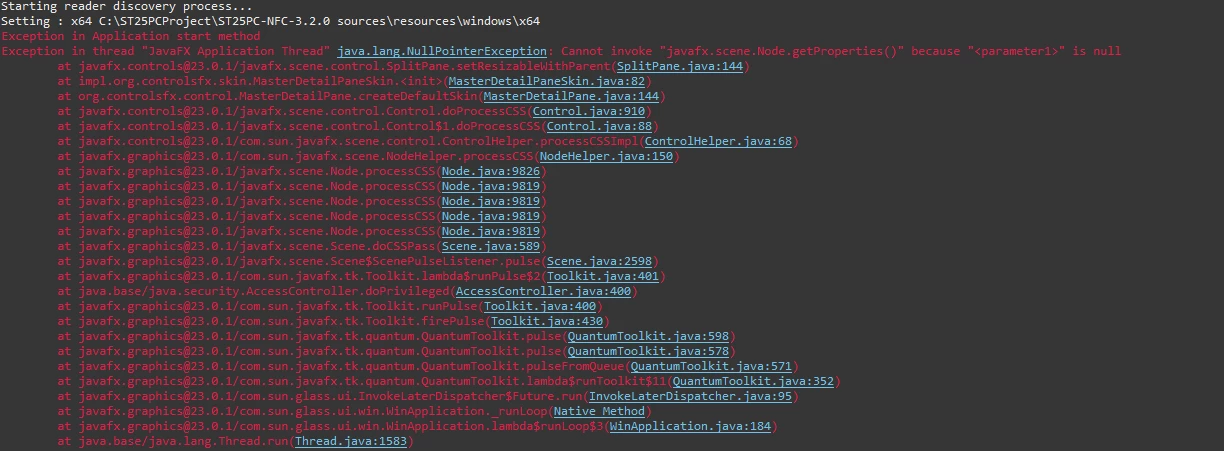
error_screenshot.png


This topic has been closed for replies.
Damien G.Best answer
ST Employee
Jul 25, 2025 9:22 AM UTC

Hello shahbaz,

Could you please perform those checks in the Eclipse Run configurations?

  1. Open the "Arguments" tab and make sure the VM arguments are set to:
    --module-path "C:\path\to\javafx-sdk-23.0.2\lib" --add-modules=javafx.controls,javafx.fxml,javafx.base,javafx.graphics,javafx.media,javafx.web,,javafx.swing
    (Where you correctly set the path to the JavaFX sdk)
  2. Open the JRE tab and make sure the correct jdk is selected (jdk-23.0.1)
  3. Open the Environment tab and add "path" entry with value:
    ${project_loc:ST25PC-NFC}\resources\windows\x64\;${env_var:path}

Thank you,

Damien

2 replies

Damien G.Best answer
ST Employee
Jul 25, 2025 9:22 AM UTC

Hello shahbaz,

Could you please perform those checks in the Eclipse Run configurations?

  1. Open the "Arguments" tab and make sure the VM arguments are set to:
    --module-path "C:\path\to\javafx-sdk-23.0.2\lib" --add-modules=javafx.controls,javafx.fxml,javafx.base,javafx.graphics,javafx.media,javafx.web,,javafx.swing
    (Where you correctly set the path to the JavaFX sdk)
  2. Open the JRE tab and make sure the correct jdk is selected (jdk-23.0.1)
  3. Open the Environment tab and add "path" entry with value:
    ${project_loc:ST25PC-NFC}\resources\windows\x64\;${env_var:path}

Thank you,

Damien

shahbazAuthor
Associate III
Jul 27, 2025 11:31 PM UTC

Hi Damien,

That works. Thank you for the help.

Regards,

Shahbaz.