Associate III
July 1, 2026
Solved

ST25R100 Sleep mode

  • July 1, 2026
  • 2 replies
  • 23 views

Hello, 

I currently using the STM32F401RCT and the ST25R100-CMET.

Its a battery powered device and want to put the ST25 chip in sleep.


in rfal_nfc.c I found rfalNfcDeactivate for disabling, but I don’t get it enabled.


//Power saving functions
void NFC_Enable(void)
{
printf("Enabling NFC chip\r\n");
rfalNfcInitialize();
rfalNfcDiscover(&discParamNfc);
}

void NFC_Disable(void)
{
printf("Disabling NFC chip\r\n");
rfalNfcDeactivate(RFAL_NFC_DEACTIVATE_IDLE);
}

Right now when I enable the chip it doesn’t detect tags. It does work and detect tags without the power saving functions.

I have been reading through this file: RF/NFC abstraction layer (RFAL) - User manual But haven’t found a solution.

Have I missed anything?

Kind regards, 

William



Best answer by Grégoire Poulain

Hi William_RnD,


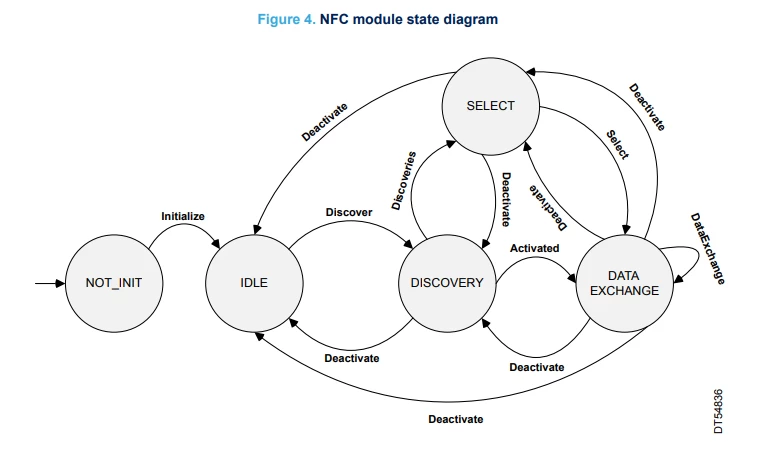
I believe there is a misunderstanding on the functionality of the device, state machine and APIs.
The RFAL NFC/HL mimics the state machine of NFC Forum NCI, and is also detailed in RFAL User manual.


  • rfalNfcDeactivate(IDLE) - will not de-initialize the NFC chip, nor place the ST25 IC in any power saving mode.
               In fact, it will trigger deactivation activities and turns the RF carrier, remaining in IDLE state
     
  • LowPower 
    In order to place the ST25R device in low power mode, please refer to following APIs:
    • rfalLowPowerModeStart() / rfalLowPowerModeStop()
       

In your example, directly manipulating the RF via API rfalFieldOff() bypassing the NFC/HL layer will leave the driver in inconsistent state (e.g when called in ACTIVE state).

The following sequence can be used

  1. In case you just want to turn the field Off - stop any further activity: rfalNfcDeactivate(RFAL_NFC_DEACTIVATE_IDLE);
  2. After that in case you want to set low power state, you can use: rfalLowPowerModeStart() / rfalLowPowerModeStop() APIs
  3. Then to resume, you can use restart the discover by: rfalNfcDiscover(&discParamNfc);

Hope it helps

Kind regards
GP

2 replies

Associate III
July 1, 2026

I gave up and did some trial and error with AI.


//Power saving functions
void NFC_Enable(void)
{
printf("Enabling NFC chip\r\n");

NFC_InitDiscParams();

ReturnCode err;
err = rfalNfcInitialize();
printf("rfalNfcInitialize ret=%d\r\n", err);

err = rfalNfcDiscover(&discParamNfc);
printf("rfalNfcDiscover ret=%d\r\n", err);
}

void NFC_Disable(void)
{
printf("Disabling NFC chip\r\n");
rfalFieldOff();
// Set state to NOTINIT so the worker does nothing
// We can't call rfalNfcDeactivate from IDLE — wrong state
// fieldOff is enough to stop RF emissions
}

static void NFC_InitDiscParams(void)
{
memset(&discParamNfc, 0, sizeof(rfalNfcDiscoverParam));

discParamNfc.compMode = RFAL_COMPLIANCE_MODE_NFC;
discParamNfc.techs2Find = RFAL_NFC_POLL_TECH_V; // NFC-V only — your tag type
discParamNfc.totalDuration = 1000U; // 1 second discovery cycle
discParamNfc.devLimit = 1U;
discParamNfc.notifyCb = NULL;

discParamNfc.isoDepFS = RFAL_ISODEP_FSXI_256;
discParamNfc.nfcDepLR = RFAL_NFCDEP_LR_254;
discParamNfc.GBLen = 0;
discParamNfc.maxBR = RFAL_BR_KEEP;
discParamNfc.nfcfBR = RFAL_BR_212;
discParamNfc.ap2pBR = RFAL_BR_424;
}

This works, but is is correct?

Kind regards, 

William

Grégoire Poulain
ST Employee
July 1, 2026

Hi William_RnD,


I believe there is a misunderstanding on the functionality of the device, state machine and APIs.
The RFAL NFC/HL mimics the state machine of NFC Forum NCI, and is also detailed in RFAL User manual.


  • rfalNfcDeactivate(IDLE) - will not de-initialize the NFC chip, nor place the ST25 IC in any power saving mode.
               In fact, it will trigger deactivation activities and turns the RF carrier, remaining in IDLE state
     
  • LowPower 
    In order to place the ST25R device in low power mode, please refer to following APIs:
    • rfalLowPowerModeStart() / rfalLowPowerModeStop()
       

In your example, directly manipulating the RF via API rfalFieldOff() bypassing the NFC/HL layer will leave the driver in inconsistent state (e.g when called in ACTIVE state).

The following sequence can be used

  1. In case you just want to turn the field Off - stop any further activity: rfalNfcDeactivate(RFAL_NFC_DEACTIVATE_IDLE);
  2. After that in case you want to set low power state, you can use: rfalLowPowerModeStart() / rfalLowPowerModeStop() APIs
  3. Then to resume, you can use restart the discover by: rfalNfcDiscover(&discParamNfc);

Hope it helps

Kind regards
GP