JDias
Associate II
March 28, 2019
Solved

Hello i am using CR95HF and i want know how to update the firmwrare with the STSW-M24RL007. I have the MLR24RL Discovery kit and ST25DV Discovery Kit THANKS

  • March 28, 2019
  • 1 reply
  • 806 views

..

    This topic has been closed for replies.
    Best answer by Brian TIDAL

    ​Hello,

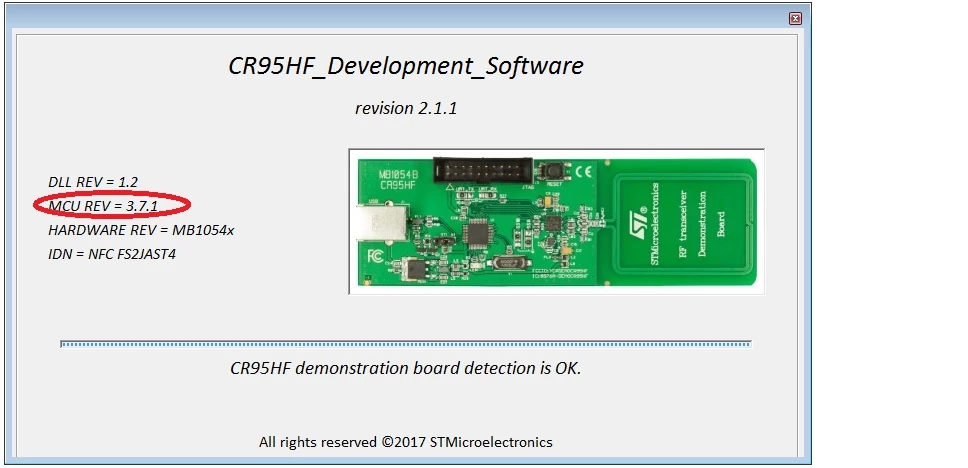
    STSW-M24LR007 contains the firmware version 3.7.1. Before upgrading the FW, you can check the current version with the PC software (STSW-95HF001). The FW version is displayed in the Splash Screen when the PC software starts (the FW version is also displayed in the Tools/Toolbox menu when clicking on Get MCU revision) 
    0690X0000089DR5QAM.jpg

    If the current FW version is already 3.7.1, there is no need to upgrade the FW.

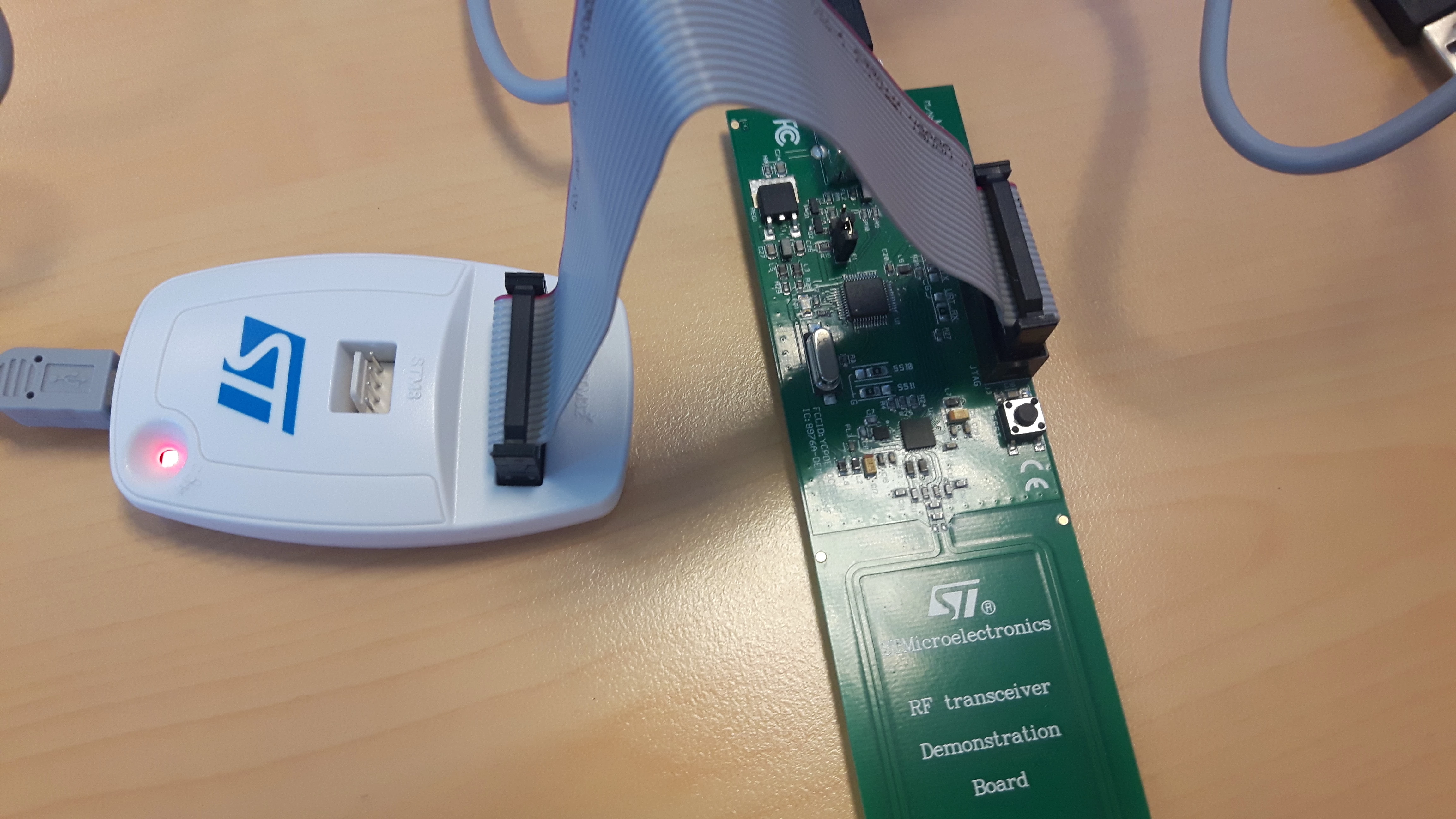
    For upgrading the FW, you need to connect a JTAG probe. Make sure to keep the USB connected for the power supply of the  board.

    On my side I use the ST-Link/v2 probe connected to the JTAG connector of the CR95HF demo board.
    0690X0000089DWPQA2.jpg

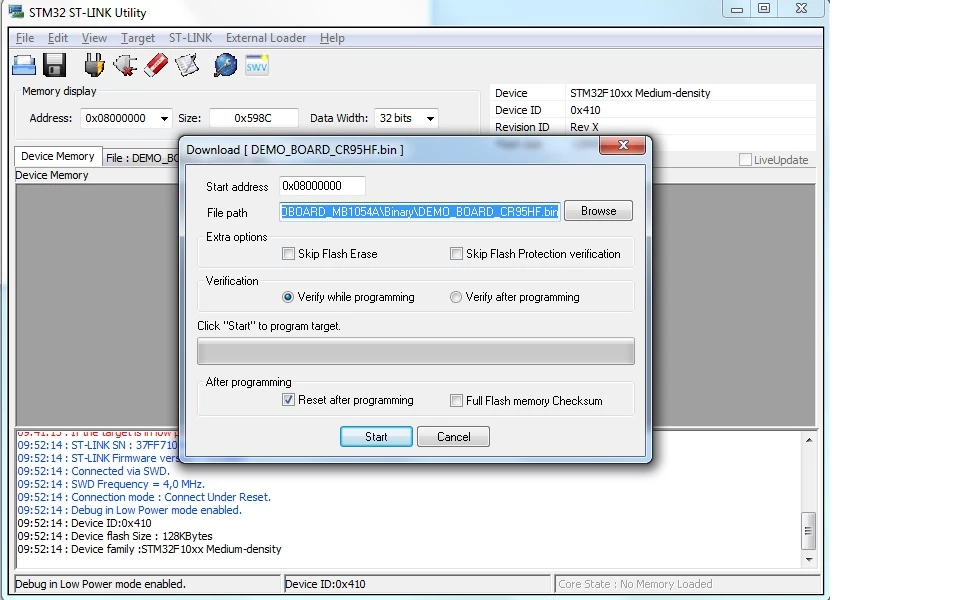
    Then start the  STM32 ST-LINK Utility, select "Target/Program and Verify" menu, choose DEMO_BOARD_CR95HF.bin from en.stsw-m24lr007\DEMOBOARD-CR95HF_FW_V3.7.1\Project\95HF_Example\CR95HF\CR95HF_DEMOBOARD_MB1054A\Binary and click on Start.
    0690X0000089DYQQA2.jpg

    The FW version can be checked again in the splash screen of the PC software.

    If you are using an other JTAG tool, make sure to write the FW at 0x08000000.

    Rgds

    BT

    1 reply

    Brian TIDAL
    Brian TIDALBest answer
    Technical Moderator
    March 29, 2019

    ​Hello,

    STSW-M24LR007 contains the firmware version 3.7.1. Before upgrading the FW, you can check the current version with the PC software (STSW-95HF001). The FW version is displayed in the Splash Screen when the PC software starts (the FW version is also displayed in the Tools/Toolbox menu when clicking on Get MCU revision) 

    0690X0000089DR5QAM.jpg

    If the current FW version is already 3.7.1, there is no need to upgrade the FW.

    For upgrading the FW, you need to connect a JTAG probe. Make sure to keep the USB connected for the power supply of the  board.

    On my side I use the ST-Link/v2 probe connected to the JTAG connector of the CR95HF demo board.

    0690X0000089DWPQA2.jpg

    Then start the  STM32 ST-LINK Utility, select "Target/Program and Verify" menu, choose DEMO_BOARD_CR95HF.bin from en.stsw-m24lr007\DEMOBOARD-CR95HF_FW_V3.7.1\Project\95HF_Example\CR95HF\CR95HF_DEMOBOARD_MB1054A\Binary and click on Start.

    0690X0000089DYQQA2.jpg

    The FW version can be checked again in the splash screen of the PC software.

    If you are using an other JTAG tool, make sure to write the FW at 0x08000000.

    Rgds

    BT

    In order to give better visibility on the answered topics, please click on Accept as Solution on the reply which solved your issue or answered your question.

    JDias
    JDiasAuthor
    Associate II
    March 29, 2019

    Hello Bruno,

    THANKS for your support and kind attention.