HA87
Associate II
January 13, 2023
Solved

Cannot set the maximum CPU frequency for STM32H743ZIT to 480 MHz

  • January 13, 2023
  • 6 replies
  • 7599 views

Hi,

I have migrated an old project of mine based on STM32H743ZIT MCU from

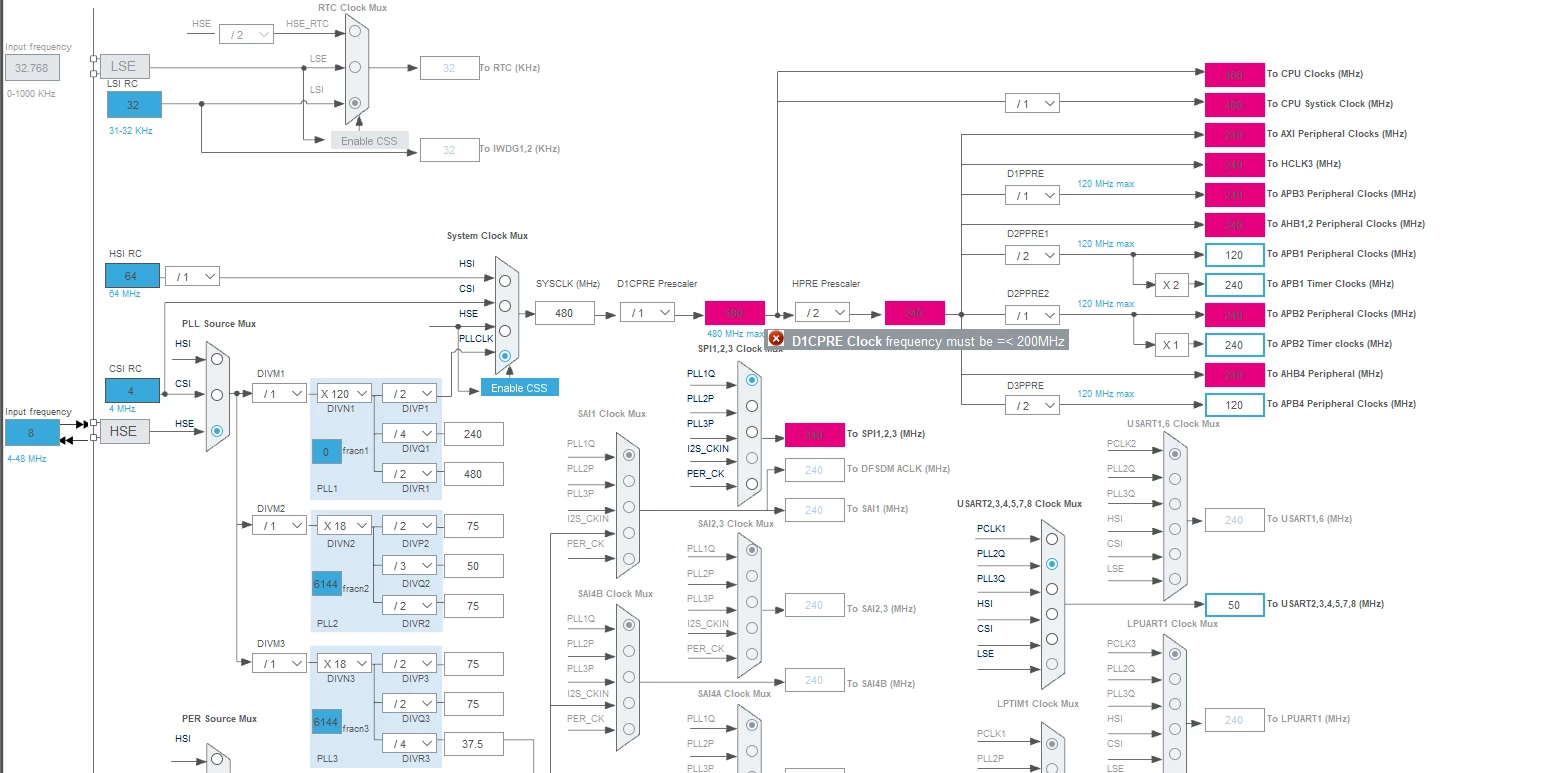
STM32CubeIDE v1.5.1 to v1.11.0. When I opened the IOC configuration, the clock configuration showed an error stating that I could not set the CPU clock to a value greater than 200 MHz despite the MCU supporting 480 MHz. This exact configuration worked on CubeIDE 1.5.1 The error that I get is:

D1CPRE clock must be <= 200 MHz

Here is a snapshot of my clock configuration.
0693W00000Y8BLHQA3.png 

So I started another empty project based on STM32H743ZIT MCU in Cube IDE 1.11.0 to test if this issue is due to the migration of the project, however, I found that I still have the same error there. I searched ST Community and I found some people have reported the same problem/bug:

https://community.st.com/s/question/0D53W00000hPphXSAS/stmh743zi2-cubemx-clock-setup-max-frequency-not-allowed

https://community.st.com/s/question/0D53W00001B11UhSAJ/stm32hz-mx-clock-configuration-480mhz

Based on the discussion in the previous questions, the solution to their problem was to change the VOS value in the RCC Power Estimation which I do not have in my configuration. Here is a snapshot of what I see:
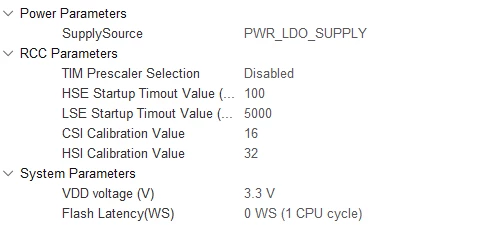
0693W00000Y8BL7QAN.png 

So is there a bug in the latest CubeIDE? How can I solve this issue or shall just ignore it and make CubeMX generate the code?

Thanks.

This topic has been closed for replies.
Best answer by Foued_KH

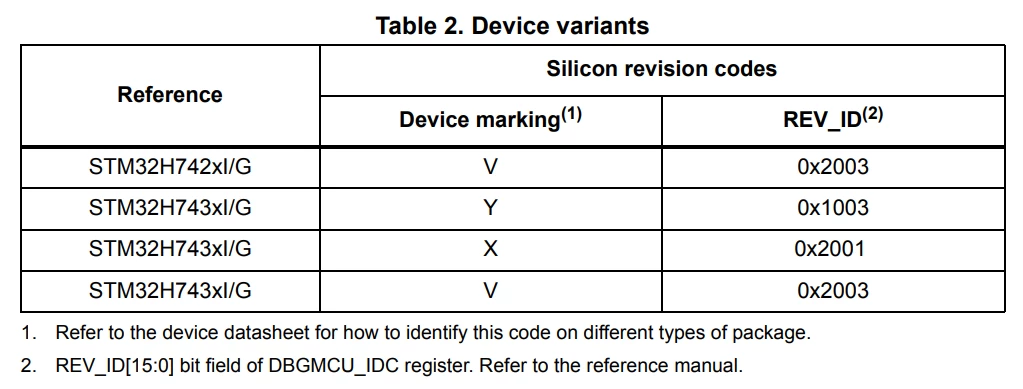
For the STM32H743 , we have 3 revision ( Screenshot from Eratta sheet)

0693W00000Y8BccQAF.png 

Use silicon revision V devices to reach a maximum frequency of 480 MHz.

For revision Y :

CSI Calibration Value 16

HSI Calibration Value 32

For revision V :

CSI Calibration Value 32

HSI Calibration Value 64

Foued

6 replies

Foued_KH
ST Employee
January 13, 2023

Hello @HA87​ ,

Please check this link ,you have the same issue as reported.

Foued

To give better visibility on the answered topics, please click on Accept as Solution on the reply which solved your issue or answered your question.
HA87
HA87Author
Associate II
January 13, 2023

@KHALSI_Foued​ Thanks for your fast reply. Indeed, I see the clock error disappears with the solution that you provided in the link.

One question, when I changed the HW revision from rev Y to rev. V. I see that CSI and HSI calibration values have changed to these values:

CSI Calibration Value 32

HSI Calibration Value 64

In the old STM project, they used to be as follows:

CSI Calibration Value 16

HSI Calibration Value 32

So which one should I choose?

Regards,

Foued_KH
ST Employee
January 13, 2023

The CSI and HSI Calibration Value depending on Product revision

Foued

To give better visibility on the answered topics, please click on Accept as Solution on the reply which solved your issue or answered your question.
HA87
HA87Author
Associate II
January 13, 2023

Yes, in principle those values are product revision dependent. However, this revision option was not available in the older version of STM32, and the values were 16 and 32. But now to bypass this bug, I had to choose rev V and these calibration values changed automatically. So the confusion that I have did the old STM32 CubeIDE to consider that there is only one revision and it is V? Or choosing this revision is just a workaround for this bug?