


SWenn.1
Senior III
July 1, 2022
Solved

Error failing to download file??

  • July 1, 2022
  • 4 replies
  • 4779 views

Hello....

I am using STM32CubeIDE 1.10.0. I purchased a LoRa-E5 from Seeed. The E5 has proprietary code on it that one must use a UART to talk to the device. I would like to basically erase the device and load my own code onto the device. I have created a very basic project in CubeIDE for the STM32WLE5JC which is the processor on the E5. At the moment my code does nothing more than toggle PA3 high and low. When I try to load the code onto the DUT I get the following error on the console:

Erasing memory corresponding to segment 0:

Erasing internal memory sectors [0 3]

Download in Progress:

Error: failed to download Segment[0]

Error: failed to download the File

Further reading seems to imply that the RPD bits are somehow set and I need to set them to Level 0. Can someone please confirm that yes this is actually the problem? And how using CubeIDE I go about doing this?

I am very unfamiliar with this environment and would prefer to use CubeIDE rather than command line, etc. I was under the impression that CubeIDE contained all the underlying tools (ie Flashing Tool, CLI, etc) so it seems logical it could be done using this.

thank you

UPDATE

after watching a youtube video I decided to give the STM32CubeProgrammer a try....By default it wanted to load onto my C drive which is full so I chose the D:/Application/ST/ drive which has in it STM32CubeIDE 1.10.0....During install it said it may write over things but I accepted anyway as I didn't think it would affect CubeMX. I was able to change the level back to 0 on the part BUT now CubeIDE/MX will not allow me to connect anymore to the STLINK-V3SET ...I get the following:
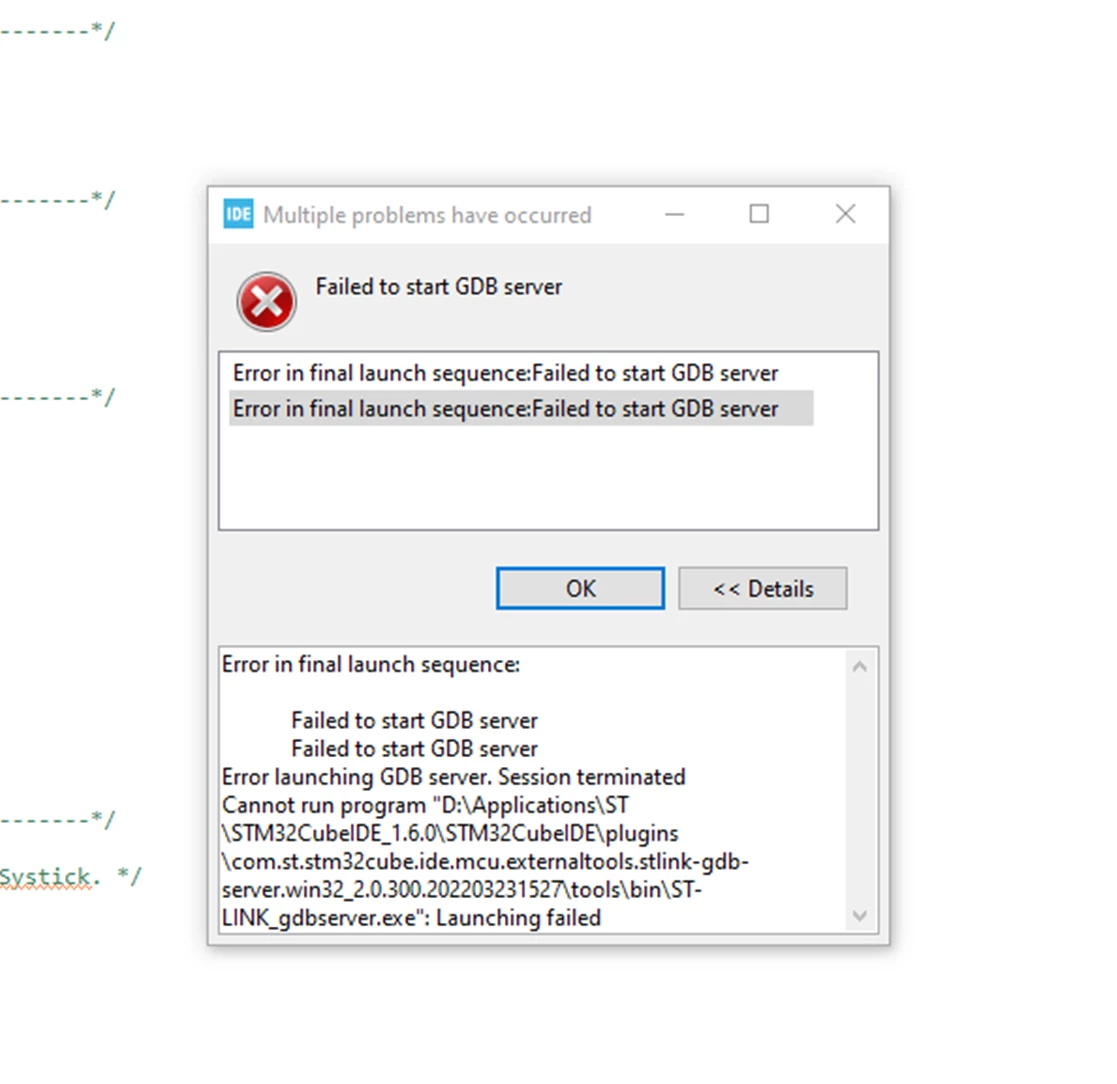
0693W00000QKIWOQA5.pngCan someone please tell me if I can get back to using the IDE somehow without uninstalling and re-installing???

This topic has been closed for replies.
Best answer by SWenn.1

Issue solved....three things I did and not sure it wasn't a combination that solved the problem:

  1. Installed 1.9.0 CubeIDE
  2. Turned off AVG and Windows Firewall
  3. re-installed in a completely new folder (thinking maybe some old registry stuff prohibiting)

In any event the gdb server executable now exists on my drive and I can use the IDE to load and debug on both the Seeed target and a Nucleo

4 replies

MM..1
Chief III
July 1, 2022

0693W00000QKIVzQAP.pngRemoving RDP warning on image. If you dont like CLI you need install gui Cubeprogrammer.

But why waste time and space for one CLI cmd?

Locate folder in CubeIDE with STM32_Programmer_CLI.exe ... use it

SWenn.1
SWenn.1Author
Senior III
July 1, 2022

Please see above as between you pushing this up I installed the prgrammer and now have a differetn issue????

MM..1
Chief III
July 1, 2022

Try recreate launch ... delete launch files in project folder and in IDE create new RUN/DEBUG config

SWenn.1
SWenn.1Author
Senior III
July 1, 2022

I deleted all ST applications, and re-installed CubeIDE 1.10.0 and still no luck...I then did as you suggested (now I am on a Nucleo board trying it and getting the same results), that is deleted the .launch file located in the project to no avail...Then I deleted the .launch and the whole Debug folder, rebuilt and did a Run but still not working....Still getting :

0693W00000QKIeXQAX.png

MM..1
Chief III
July 2, 2022

Try locate gdb server folder and run bat or exe ... returned info maybe help you .

SWenn.1
SWenn.1AuthorBest answer
Senior III
July 2, 2022

Issue solved....three things I did and not sure it wasn't a combination that solved the problem:

  1. Installed 1.9.0 CubeIDE
  2. Turned off AVG and Windows Firewall
  3. re-installed in a completely new folder (thinking maybe some old registry stuff prohibiting)

In any event the gdb server executable now exists on my drive and I can use the IDE to load and debug on both the Seeed target and a Nucleo