


june
Associate III
May 2, 2022
Question

[Cube MX 6.5.0] The user label has not been set. Did you forget something?

  • May 2, 2022
  • 3 replies
  • 2104 views

H723ZGT6 Nucleo-144

CubeMX 6.5.0

CubeMX FW 1.10.0

uVision 5.35.0.0

​

​

STCubeMX has been updated

6.3.0-> 6.5.0

I also updated the FW version

1.9.1-> 1.10.0

​

​After that, the user label will no longer be reflected.

I'm using CubeMX to import a previous project and using the latest version to generate the code.

​

Apparently, the label is peeling off at the timing of code generation.

​

This is the state before code generation.

User labels are well reflected here
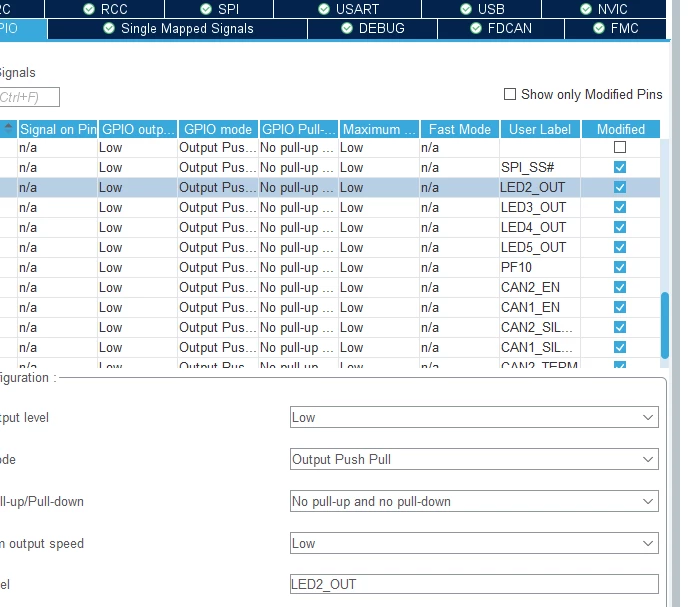
0693W00000Lzdq2QAB.png​

​

After generating the code, let's take a look at uVision.

The user label has come off.
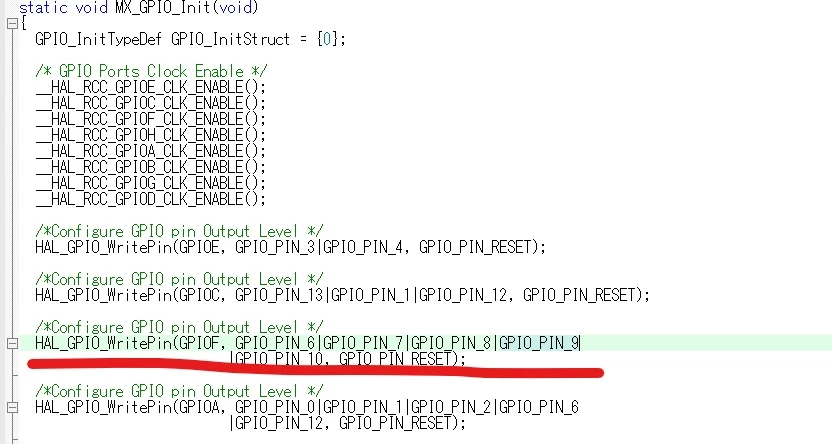
0693W00000LzdtuQAB.jpg​

This is an old project, but it reflects the user label.0693W00000LzduEQAR.png​
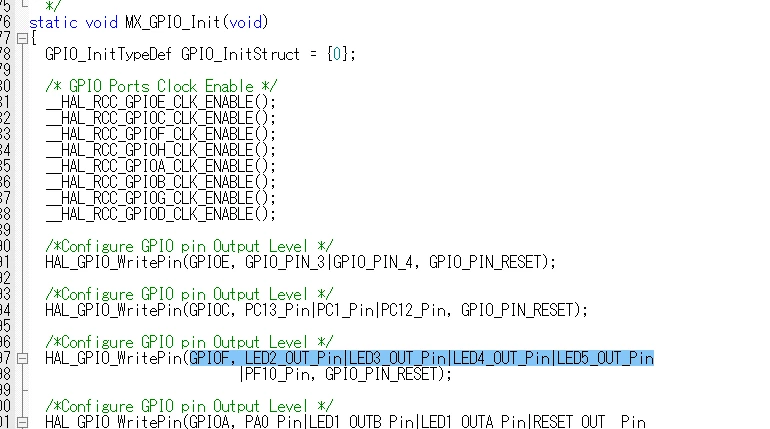
Did you forget to set something when you generated the code?

Please let me know if you have any ideas.

This topic has been closed for replies.

3 replies

TDK
May 2, 2022

Are the labels defined in main.h? Does it happen with newly created projects as well?

"If you feel a post has answered your question, please click ""Accept as Solution""."
june
juneAuthor
Associate III
May 6, 2022

Sorry for the late reply.

> Are the labels defined in main.h? 

Yes. It is defined.

> Does it happen with newly created projects as well?

The newly created project did not have this issue.

The user label was correctly reflected in MX_GPIO_Init.

Do I need to rewrite it to make it a user label?

june
juneAuthor
Associate III
May 6, 2022

I tried the following method and it worked.

​

"After resolution"

1. Open the original project of FW Ver1.9.1.

Migrate to FW Ver1.10.0.

2. Create a new project.

Import the project that has been migrated to 1.10.0.

3. Generate code.

​

​

"Before resolution"

1. Create a new project

Import the original project of FW Ver1.9.1.

2. Generate code with FW Ver1.10.0.

​

Original project

It seems that I had to move to 1.10.0.

​

Thanks for your cooperation.