

Mecanix
Associate III
October 26, 2021
Solved

TouchGFX 4.18 and STM32CubeIDE - Unable to compile (Videos.s)

  • October 26, 2021
  • 8 replies
  • 12307 views

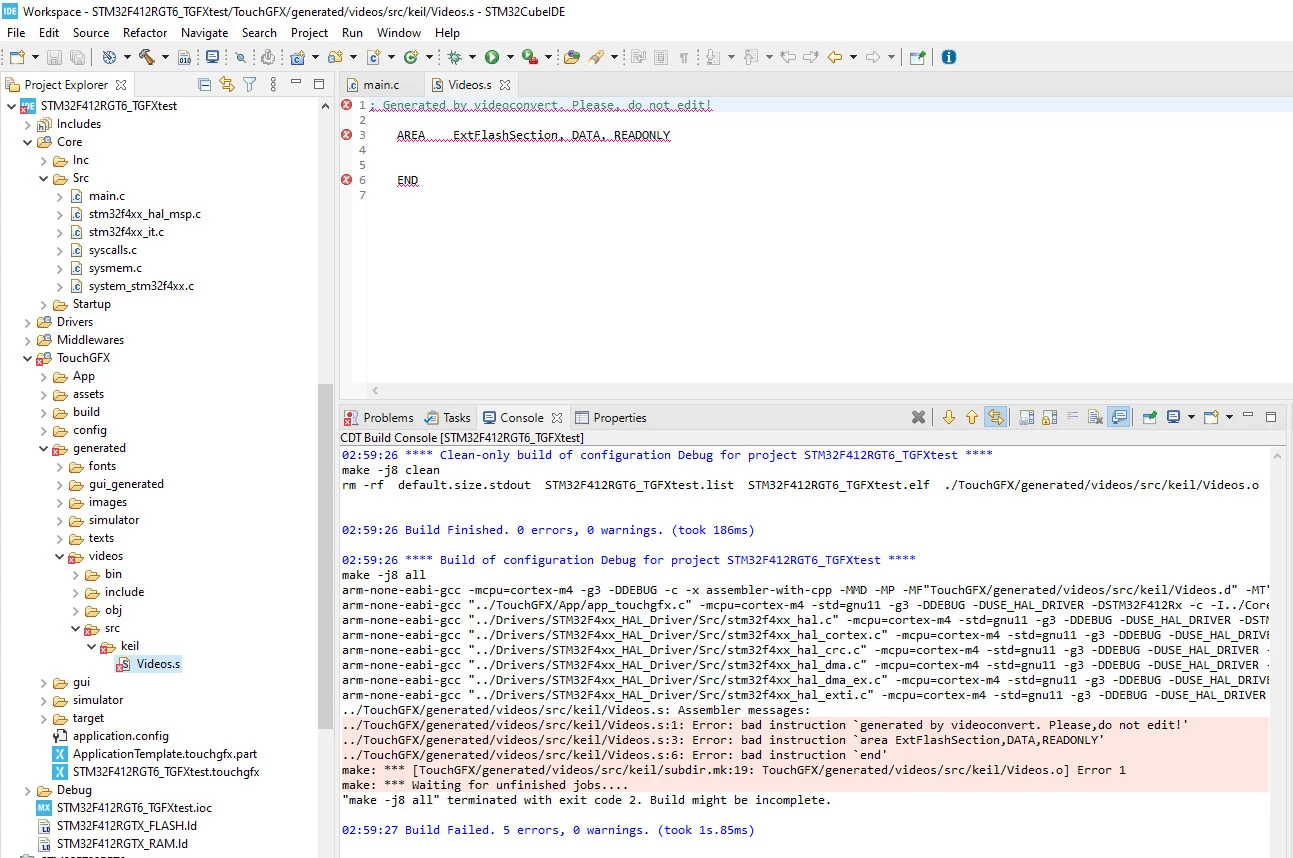
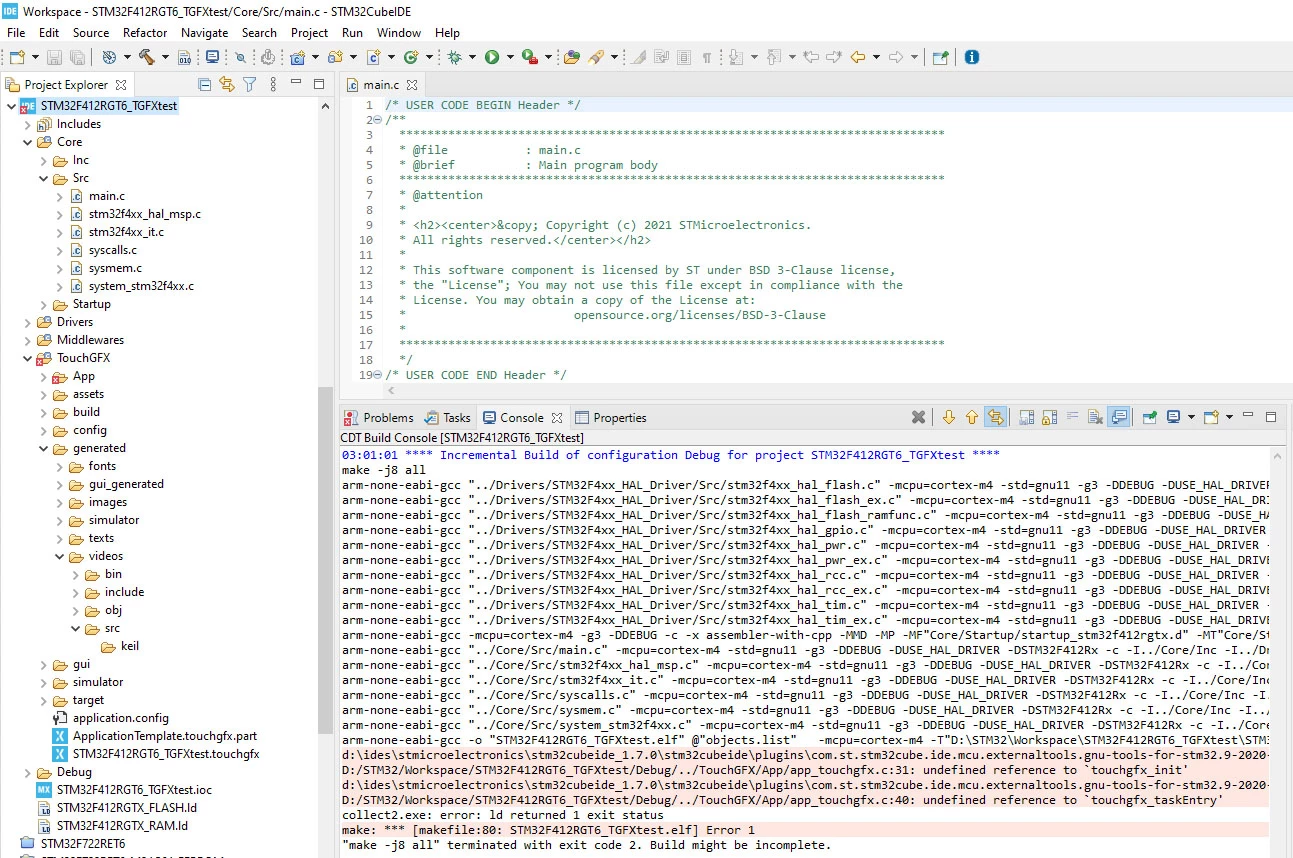
Hi, I've just managed to get 4.18 to show into STM32CubeIDE and fairly happy about that. However quite shattered to find out that some of the same 4.17 bugs remains... among a new one that is new to me (Videos.s). All in all, the default generated code does not compile and consequently makes TouchGFX unusable. Quite unfortunate.

Anybody had any luck getting around the now old 'touchgfx_init' and 'touchgfx_taskentry' bugs?

ps. the videos.s bug (1st screenshot) can somehow be fixed by simply deleting the entry from the resource tree.
0693W00000FDpapQAD.jpg 

0693W00000FDpazQAD.jpg

This topic has been closed for replies.
Best answer by Romain DIELEMAN

Could you share your project ? This confuses me a bit because I am able to make it run with those steps (refer to Board Bring Up articles in the documentation):

  • Open STM32CubeMX
  • Create a project with the correct MCU (STM32F412RGT6)
  • Set whatever is needed for your project (flash, RAM,clock configuration, ...). Enabling CRC is necessary
  • Add TouchGFX with the "Select Component" option in the "Software Packs" tab
  • Make sure you enable X-Cube-TouchGFX_4.18.0 in the added Software Packs section at the bottom of the tree view in STM32CubeMX, set whatever is relevant (only changed the widht and height by reflex just to have a temporary clearer project in TouchGFX Designer)
  • Under the Project Manager tab select the right toolchain (STM32CubeIDE) and uncheck the "Generate Under Root" option
  • Generate code and close STM32CubeMX
  • Navigate to the project folder and go to the /TouchGFX folder. Open the generated ApplicationTemplate.touchgfx.part with TouchGFX 4.18 (if no TouchGFX folder was generated make sure you have actually enabled TouchGFX in STM32CubeMX)
  • Do whatever you want in TouchGFX Designer and generate code (additionally, remember to always generate code from TouchGFX after doing changes in STM32CubeMX)
  • Navigate to the project folder and go to the /STM32CubeIDE folder. Double click on either the .cproject or .project to open it with STM32CubeIDE.
  • Try to build.

/Romain

8 replies

Mecanix
MecanixAuthor
Associate III
October 26, 2021

Steps to reproduce:

  1. Create new project > Select "STM32F412RGT6" as the part
  2. Enable SYS Serial wire > Enable CRC > Add Software Pack > Select TouchGFX 4.18 (leave everything default)
  3. Generate Code > Close *.ioc
  4. Double click on the generated "ApplicationTemplate.touchgfx.part" file
  5. in TouchGFX application (Generator) > Generate code > Close TouchGFX application
  6. Build project > *ERRORS ABOVE OCCURS* ://
Romain DIELEMAN
ST Employee
October 27, 2021

Hi,

From the steps you shared I am unsure if you started your project from STM32CubeIDE or from STM32CubeMX ? Could you right click on your project in the tree view in STM32CubeIDE and see if you have an option called "Convert to C" ? If not it would be called "Convert to C++" which means that your project is not a C++ project, where TouchGFX will not work. Those errors 'touchgfx_init' and 'touchgfx_taskentry' indicate that, but it might be something else.

Concerning the video widget from your steps it seems to me that you have not set it in the TouchGFX Generator in the STM32CubeMX view. It is not enough to just use the video widget in TouchGFX Designer.

I would recommend to always start a project from STMCubeMX instead but that it a personal preference to avoid those kind of errors (remember to not generate code under root as well).

/Romain

Romain DIELEMAN
ST Employee
October 27, 2021

What remaining bugs from TouchGFX 4.17 are you referring to ?

Concerning the Videos.o issue, if you look at the error message you can see it is located in a Keil folder. Since you use STM32CubeIDe you can remove the library path and delete that folder (it is automatically generated by TouchGFX generator in case you use Keil one day. But to be honest this is an error from our side it should not be always generated, but only when using Keil. Thanks for reporting this it will be fixed in TouchGFX 4.18.1).

/Romain

Mecanix
MecanixAuthor
Associate III
October 27, 2021

@Romain DIELEMAN​ 

Here goes the trace for a New Project from STM32CubeIDE 1.7.0 and TouchGFX 4.18.0 set to C++ as targeted Language. All pretty funky stuff...

Next trial: Have MX updated to 4.18, I'll see if starting project from this environment helps things a bit. I'll report back shortly.

0693W00000FDsSZQA1.jpg0693W00000FDsSyQAL.jpg

Mecanix
MecanixAuthor
Associate III
October 27, 2021

Here goes the trace for a New Project from STM32CubeMX 6.3.0 and TouchGFX 4.18.0 and then Opened into STM32CubeIDE 1.7.0

"ApplicationTemplate.touchgfx.part" does not come up, project does not build, errors, all of that recurrent good fun!

As you can see nothing really works anymore, and that since Version 4.16.0 to my limited knowledge.

Wait a few more months hopefully in anticipation that these bugs eventually gets picked up by the ST's devs?

0693W00000FDtHYQA1.jpg0693W00000FDtJYQA1.jpg 

Romain DIELEMAN
Romain DIELEMANBest answer
ST Employee
October 27, 2021

Could you share your project ? This confuses me a bit because I am able to make it run with those steps (refer to Board Bring Up articles in the documentation):

  • Open STM32CubeMX
  • Create a project with the correct MCU (STM32F412RGT6)
  • Set whatever is needed for your project (flash, RAM,clock configuration, ...). Enabling CRC is necessary
  • Add TouchGFX with the "Select Component" option in the "Software Packs" tab
  • Make sure you enable X-Cube-TouchGFX_4.18.0 in the added Software Packs section at the bottom of the tree view in STM32CubeMX, set whatever is relevant (only changed the widht and height by reflex just to have a temporary clearer project in TouchGFX Designer)
  • Under the Project Manager tab select the right toolchain (STM32CubeIDE) and uncheck the "Generate Under Root" option
  • Generate code and close STM32CubeMX
  • Navigate to the project folder and go to the /TouchGFX folder. Open the generated ApplicationTemplate.touchgfx.part with TouchGFX 4.18 (if no TouchGFX folder was generated make sure you have actually enabled TouchGFX in STM32CubeMX)
  • Do whatever you want in TouchGFX Designer and generate code (additionally, remember to always generate code from TouchGFX after doing changes in STM32CubeMX)
  • Navigate to the project folder and go to the /STM32CubeIDE folder. Double click on either the .cproject or .project to open it with STM32CubeIDE.
  • Try to build.

/Romain

Mecanix
MecanixAuthor
Associate III
October 27, 2021

@Romain DIELEMAN​ 

Well. I don't know what else to say other than passing my most sincere apologies to your team and yourself, Romain.

The bullet method above works and compile perfectly fine if followed to the letter (thanks x100). Quite different from what I used to be doing, which was creating a new project out of STM32CubeIDE and dbl-clicking on the ApplicationTemplate.touchgfx.part from STM32CubeIDE itself and working my way in TouchGFX and STM32CubeIDE solely. I swear this used to work before, never had to use MX until today.

MX. So be it. Thanks for sharing The Official Method of getting a blank project init and compiling.

One last thing; can you please confirm that the resource tree (files/folders generation) is up to spec on the visual below, see circled in red. If this is all dandy I'll therefore employ your method for all new projects and circulate the info around so we're all on the same folder-structure here.

0693W00000FDxnrQAD.jpg 

0693W00000FDxo1QAD.jpg 

Mecanix
MecanixAuthor
Associate III
October 27, 2021

As a recommendation, if I may, it would be paramount for STMicroelectronics to settle on 1 (one) official method to generate those templates and dev/debug around that documented method. The ecosystem as it stands is a gigantic mess if you want my take; CubeIDE, CubeMX, Keil (whatever that is), others, its all over the place and anyone's guess as to how and where to get an empty project stable.

To add to the fire, of course ;) Although I'm pretty convinced most if not all of the dev out there shares the same sentiment.

All the best to you guys. I'll give this a few months wait at this end.

Romain DIELEMAN
ST Employee
October 27, 2021

The documentation for TouchGFX recommends to start a project from STM32CubeMX when working with TouchGFX.

STM32CubeIDE, Keil and EWARM are just embedded workbench/platforms which can be used to edit, compile and run your projects. STM32CubeIDE is a free toolchain from ST but not every company uses it. Our TBSes include projects for all those toolchains and also a Makefile for arm-gcc which is used by TouchGFX Designer for the "run on target" functionality.

Concerning the initial issue with projects not converted to C++ automatically by STM32CubeIDE, I have been told (also tried an alpha version) it would be fixed in the next release of STM32CubeIDE (1.8).

/Romain

Mecanix
MecanixAuthor
Associate III
October 27, 2021

One would be silly not to consider STM32CubeIDE as the official 'go-to' dev platform for ST's. 1.5 years in its generation and never had a crash, memory leak, freeze, anything at all. Manages workspaces, 3rd party pckg, import/export, I could continue like this for a while - in the sense that its pretty damn hard finding anything negative to say about it.

That might come across as rude but if I'd had decision power at ST I'd literally trash the rest and center my ecosystem around STM32CubeIDE. All of it... dev, compilers, packages, weekend dating, online casino accounts, national voting system, dentist appointments, e v e r y t h i n g!

Guess you can tell I'm in a better mood. Thanks for everything, Romain

awiernie
Associate III
October 27, 2021

I have the same issue here with my existing project after upgrading to touchgfx 4.18. I did never use Keil but keil and iar always had been generated.

Romain DIELEMAN
ST Employee
October 27, 2021

Hi,

The keil and iar folders are always generated in case you use those toolchains one day. We discussed it earlier today internally and it is something that will be fixed in TouchGFX 4.18.1 as it is not relevant to generate it if you will never use it.

Do you also face the error from STM32CubeIDE or was the issue just that the folders are generated. Are you working on a custom project or did you use a TouchGFX Board Setup for one of the ST development boards available in TouchGFX Designer ?

/Romain

awiernie
Associate III
October 28, 2021

I cannot remember the exact history of my project. The project was originally generated using an NXP demo project just before ST aquired Touchgfx. Later the board was switched to ST development board and after importing into CubeIDE it was switchted to a custom board by importing a new ioc file.

The issue was, that the file was generated and the project could not be built because of the same error as reported in the origjnal post (unable to compile Videos.s). I had to exclude the source location "generated/videos/src/keil/" in the TouchGFX directory.

I wonder where it finds "Keil" in order to generate this file.

RRuoc.1
Associate II
October 28, 2021

Hello,

I use a STM32H750B-DK Board and have the same problem as Mecanix decribes it in his/her first post and picture. Altough I generated code over the CubeMX and it is C++ code. Additional I also tried the steps from this proposal:

" Concerning the video widget from your steps it seems to me that you have not set it in the TouchGFX Generator in the STM32CubeMX view. It is not enough to just use the video widget in TouchGFX Designer."

If I generate code over with the TouchGFX tool and build it in the IDE, there is no problem. It seems very strange to me.

Additonaly i I use the same version of the STM32 tools as Mexicanix.

Romain DIELEMAN
ST Employee
October 28, 2021

That is because the STM32H750-dk is one of the 4 boards we have set for now with Hardware Video decoding initialized :thumbs_up: Not all boards support hardware decoding, but in the very near future we will also set Software Video decoding for all relavent boards and their respective TBSes.

/Romain

RZahor
Associate II
November 10, 2021

Hi,

Same issue here. I have to delete videos.s after every code generation.

In total, with two active bugs in TGFX, I have to do about 5 manual fixes every time I generate code.

I hope it will be fixed soon.

Roy

Romain DIELEMAN
ST Employee
November 10, 2021

Hi,

What active bugs are you facing ? TouchGFX 4.18.1 should come out end of November/early December.

/Romain

RZahor
Associate II
November 15, 2021

Hi,

Sorry for the delay...

The other bug is the one I sent you in a PM, regarding component name not being saved in the TGFX designer. Do you believe 4.18.1 will include a fix for this bug as well?

Thank you very much,

Roy

VShet.2
Associate III
November 15, 2021

Hi @Romain DIELEMAN​ ,

I am facing compilation issue related to viseos.s file as mentioned in original question in this thread. This happens only if you create project from cubeMX with "Generate under root" check box ticked in project manager. Otherwise it works fine. This issue was not present in earlier version 4.17.

I already have my project created with that check box ticked. Is there a fix for this when you are upgrading touchGFX to 4.18 from 4.17 and the original project is created with "Generate under root" check box ticked in project manager ??

Thanks,

Vatsal