Turn on suggestions
Auto-suggest helps you quickly narrow down your search results by suggesting possible matches as you type.
Showing results for
- STMicroelectronics Community
- STM32 MCUs
- STM32 MCUs TouchGFX and GUI
- How to change screen when clicking animation?
Options
- Subscribe to RSS Feed
- Mark Topic as New
- Mark Topic as Read
- Float this Topic for Current User
- Bookmark
- Subscribe
- Mute
- Printer Friendly Page
How to change screen when clicking animation?

Options
- Mark as New
- Bookmark
- Subscribe
- Mute
- Subscribe to RSS Feed
- Permalink
- Email to a Friend
- Report Inappropriate Content
2021-04-05 1:36 AM
I made the animation run as TouchGFX Designer on the STM32F769I-DISCO board.
When i click the animation, I want to do another action(change the screen)
what should i do?
It would be better if there were related links or samples.
Labels:
- Labels:
-
STM32F7 series
-
TouchGFX
This discussion is locked. Please start a new topic to ask your question.
4 REPLIES 4

Options
- Mark as New
- Bookmark
- Subscribe
- Mute
- Subscribe to RSS Feed
- Permalink
- Email to a Friend
- Report Inappropriate Content
2021-04-06 12:09 AM
Hello jackson.kang,
I'm not sure I follow what you are asking for, so if I don't answer correctly, could you provide more information (maybe some screenshot) ?
If you want to trigger an action when the button is clicked, simply use the Interaction tab in the Designer and create your interaction.
You can have a look at this page ("Step 4" section) : https://support.touchgfx.com/docs/tutorials/tutorial-02
/Alexandre
Options
- Mark as New
- Bookmark
- Subscribe
- Mute
- Subscribe to RSS Feed
- Permalink
- Email to a Friend
- Report Inappropriate Content
2021-04-06 5:39 PM
v
Options
- Mark as New
- Bookmark
- Subscribe
- Mute
- Subscribe to RSS Feed
- Permalink
- Email to a Friend
- Report Inappropriate Content
2021-04-06 11:59 PM
Thank of your answer!
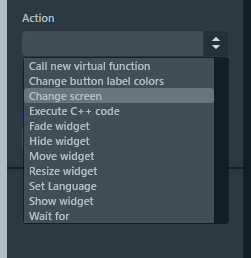
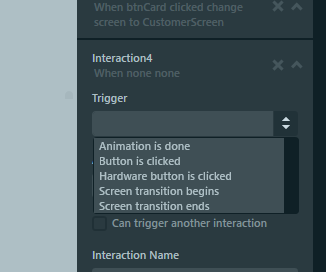
I tested the "change screen" with "Animation is done" and "Button is clicked" in the trigger of the interaction.
However, i want to do the change screen when i click on the animation while the animation is running.
Options
- Mark as New
- Bookmark
- Subscribe
- Mute
- Subscribe to RSS Feed
- Permalink
- Email to a Friend
- Report Inappropriate Content
2021-04-07 1:33 AM
Hello jackson.kang,
Could you enclose your project in this thread ? Or maybe if it's something you don't want to disclose, you can send it to me by private message.
/Alexandre

Related Content
- LVGL with LCD display using LTDC in Others: STM32 MCUs related
- Screen transition with fade vs container move+fade animation in STM32 MCUs TouchGFX and GUI
- Dynamic Bitmap Background Transparency Implementation in STM32 MCUs TouchGFX and GUI
- Transition Screen abnormal in STM32 MCUs TouchGFX and GUI
- TouchGFX: Performance Issues SwipeContainer with DynamicGraphs in STM32 MCUs TouchGFX and GUI