

Question
Can I Simulate a TouchGFX button click with ClickEvent? How?
I am trying to "press" a button without actually touching the touchscreen of my development board.
Reading the TouchGFX documentation, I found that there is a method called
ClickEvent, that seems like it might do the trick.
I tried calling the following:
// ClickEvent(ClickEventType type, int16_t x, int16_t y, int16_t force =0)
ClickEvent(ClickEvent::PRESSED,396,420);
The X and Y coordinates were obtained from TouchGFX Designer, as you can see in the following image.
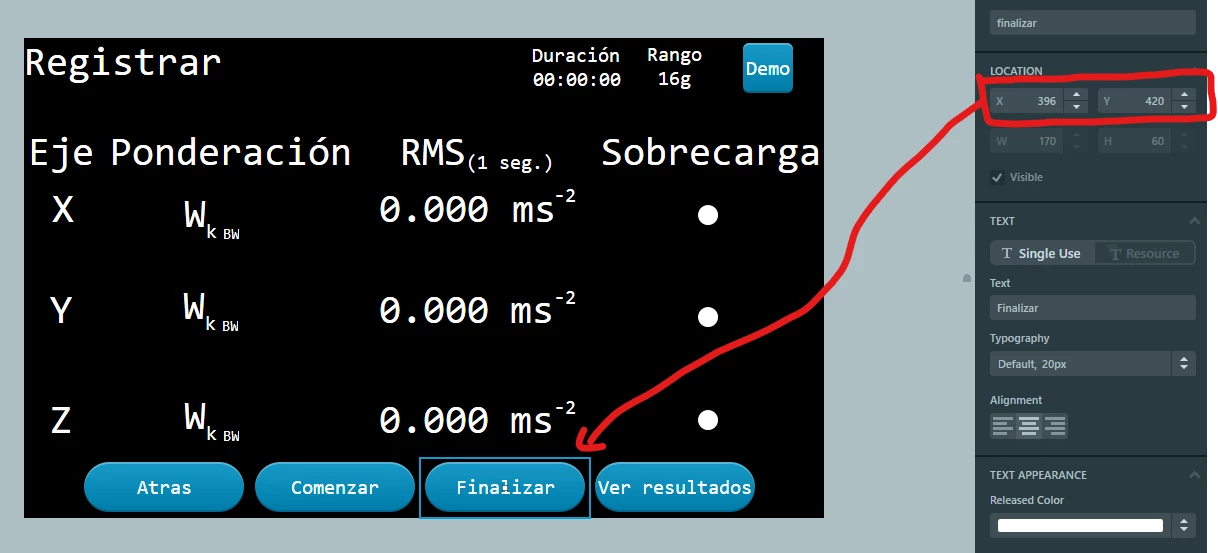 Even though it compiles, I can't seem to get this to work.
I am not sure if I am using this the correct way, or maybe there is another way generating a click.
PD: I am using TouchGFX version 4.13
Thanks
