February 12, 2021
Question

Dear ST Developers, I think, that my problem is your bug

  • February 12, 2021
  • 25 replies
  • 5115 views

Hello!

Problem is described here https://community.st.com/s/question/0D53W00000YU9O3SAL/loading-object-code-error

I try to find reason of problem by creating new clear project.

I created project in cubeMX 6.1.1, configured SDRAM, LTDC, QSPI, DMA2D

Than I added to H743.SCT this section

LR_EROM1 0x90000000 0x2000000 { ; load region size_region
 ER_EROM1 0x90000000 0x2000000 { ; load address = execution address
*.o (ExtFlashSection)
 ;*.o (TextFlashSection)
*.o (FontFlashSection)
 }
}

Keil project downloading and startin without any problems

This project is here https://cloud.mail.ru/public/uUgS/jxTK5fmg1

NEXT STAGE
0693W000008G1yaQAC.png 

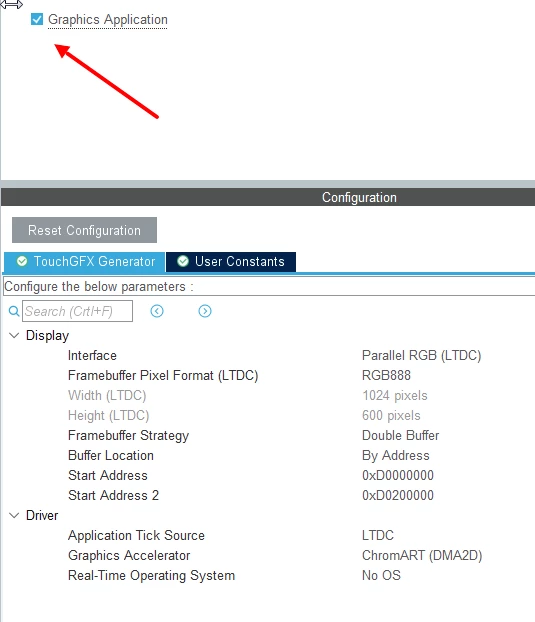
Than I edit project in TouchGFX editor, add one button, generate code, and build it in KEIL.

Than I download it to flash.

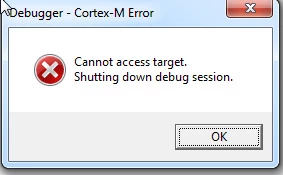
Then starting debug I get error, on this stage
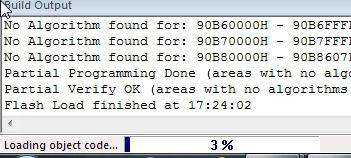
0693W000008G1zEQAS.jpg 

this error

0693W000008G1zTQAS.jpg 

this error is not occured when I delete from H743.sct this code

LR_EROM1 0x90000000 0x2000000 { ; load region size_region
 ER_EROM1 0x90000000 0x2000000 { ; load address = execution address
*.o (ExtFlashSection)
 ;*.o (TextFlashSection)
*.o (FontFlashSection)
 }
}

But I need this code for keep pictures in QSPI.

HERE IS MODIFIED PROJECT

https://cloud.mail.ru/public/sw7P/yqm4vR2Wd

Please, anybody, who have H743 board, please, try to download both projects an answer me - what reason of problem?

This topic has been closed for replies.

25 replies

MM..1
Super User
February 12, 2021

This question is into KEIL support and not ST bug. But i mean KEIL is good, but for example debug with more configs is impossible, attach to running MCU is one miracle and price for unlock is ...

Tesla DeLorean
Guru
February 12, 2021

You need to select a Flash Algorithm for the external QSPI Flash

0693W000008G2MDQA0.jpg

Tips, Buy me a coffee, or three.. PayPal Venmo (See Profile) Up vote any posts that you find helpful, it shows what's working..
February 13, 2021

No!

IT is TouchGFX problem.

If I set TouchGX off in CUbeMX - problem disappeared.

MM..1
Super User
February 13, 2021

Sorry , when you turn it off, sections ExtFlashSection... is empty = problem disappeared.

***Edited by Moderation: please refrain from using any and all language that may be considered inflammatory or insulting, as described on our Ground Rules of Participation***

February 13, 2021

"when you turn it off, sections ExtFlashSection... is empty = problem disappeared."

Really? YOu really think, that I so stupid?

After setting touchgfx off, I set ExtFlashSection to *.SCT MANUALLY!!!!!

I add

LOCATION_PRAGMA("ExtFlashSection")
KEEP extern const unsigned char _blue_buttons_round_edge_small[] LOCATION_ATTRIBUTE("ExtFlashSection") = // 170x60 ARGB8888 pixels.
{
 0x00, ...................
}

But problem (if touchgfx is off) not appears!

MM..1
Super User
February 13, 2021

Sorry your example lines result

..\main.c(39): error: #77-D: this declaration has no storage class or type specifier
 KEEP extern const unsigned char _blue_buttons_round_edge_small[] = { 0x00, 0X05 };
..\main.c(39): error: #65: expected a ";"
 KEEP extern const unsigned char _blue_buttons_round_edge_small[] = { 0x00, 0X05 };

when i remove KEEP result warning extern have init, and when i remove extern compile ok,

but optimizer remove it from link when is not used...

i use this syntax

const unsigned char _blue_buttons_round_edge_small[] __attribute__((section ("ExtFlashSection"))) = { 0x00, 0X05 };
 

result to this

compiling main.c...
linking...
.\OUT\test.sct(21): warning: L6329W: Pattern *.o(ExtFlashSection) only matches removed unused sections.

Romain DIELEMAN
ST Employee
February 15, 2021

Hi,

I havent downloaded you project (not really allowed to, shady link), could you give more info on how you configured TouchGFX in your project ? If you look at the application template available in TouchGFX Designer for the H747-eval, you can see in the folder /projectName/TouchGFX/target files that we have set ourselves. Those are not generated by TouchGFX Generator. There are more steps involved than just setting it in CubeMX.

/Romain

February 15, 2021

.....

How it is difficultly...

Look:

I've attached CUbeMX project.

I ask somebodyx who have CubeMX+Keil+TouchGFX Designer to do next:

  1. Generate project for Keil from CubeMX project
  2. Open TouchGFX project in TOuchGFX Designer and add one button
  3. Build project in Keil
  4. Run project with debugger

Please....

Tesla DeLorean
Guru
February 15, 2021

Doesn't seem to come into Cube 6.0.1 cleanly, and I'm not installing all this stuff.

Decide what end the problem is on, and focus on that. Your complaint seems to be it fails at the Download/Run end of the Keil tool chain. Perhaps focus on what's materially causing that failure. Who has a board this will load on to with QSPI? Not going to work on a stock Nucleo-H743ZI board.

Look at the .MAP, or the .AXF, this is where the smoking gun will be.

Turn off "Run to main()", and walk the code in.

Check if it tries to copy or access QSPI memory space during startup.

Check what TouchGFX is doing with it's assorted structures.

Tips, Buy me a coffee, or three.. PayPal Venmo (See Profile) Up vote any posts that you find helpful, it shows what's working..