

NFahi.1
Associate
February 5, 2021
Solved

Problem READING PIN

  • February 5, 2021
  • 3 replies
  • 1760 views

Hello everyone, I am trying to read one pin with the HAL libraries, but i can not. This is my configuration: 
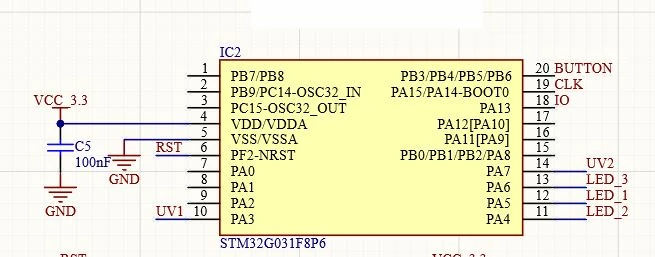
0693W000007E72oQAC.jpg 

1) I want to read the "BUTTON" pin ( PB3/PB4/PB5/PB6 ) 

2 I am doing this: 

 GPIO_InitStruct.Mode = GPIO_MODE_INPUT;

 GPIO_InitStruct.Pull = GPIO_NOPULL;

 GPIO_InitStruct.Speed = GPIO_SPEED_FREQ_HIGH;

 GPIO_InitStruct.Pin = GPIO_PIN_5;

 HAL_GPIO_Init(GPIOB, &GPIO_InitStruct);

if(HAL_GPIO_ReadPin(GPIOB,GPIO_PIN_5)){

THE PROGRAM NEVER ENTERS HERE, NO MATERS THE STATE OF THE PIN

}

What i am doing wrong??

Thanks a lot!

This topic has been closed for replies.
Best answer by KnarfB

no. LED2 is on GPIOA.

__HAL_RCC_GPIOB_CLK_ENABLE();

To get an idea how HAL works, don't hesitate generating code in STCubeIDE and studying it before rolling your own.

3 replies

KnarfB
Super User
February 5, 2021

Did you enable the GPIOB clock?

NFahi.1
NFahi.1Author
Associate
February 5, 2021

I just did this :

 LED2_GPIO_CLK_ENABLE();

But i dont know if this is for gpioB

KnarfB
KnarfBBest answer
Super User
February 5, 2021

no. LED2 is on GPIOA.

__HAL_RCC_GPIOB_CLK_ENABLE();

To get an idea how HAL works, don't hesitate generating code in STCubeIDE and studying it before rolling your own.