SSohe.1
Associate
January 16, 2021
Solved

CubeIDE doesn't set the toolchain for STM32H7, but it does for other boards

  • January 16, 2021
  • 2 replies
  • 2491 views

Hello, maybe a newbie question but I just received my very first STM32 board (Nucleo H745ZI-Q) to learn embedded programming (mostly for fun and maybe for neuroscience applications in the future) and have been trying to generate code using the default settings in CubeIDE. The code generation goes smoothly using the default settings, but then in the project properties window, no toolchain is set for the generated project (attached screenshot) and I can't compile the code. However, Using the same IDE, I noticed that I can generate code for other boards like STM32F1, and In this case, the toolchain is set correctly and everything works fine.

Does CubeIDE 1.5.1 support Nucleo H7 series boards? Already tried re-installing the IDE.

This topic has been closed for replies.
Best answer by Cartu38 OpenDev

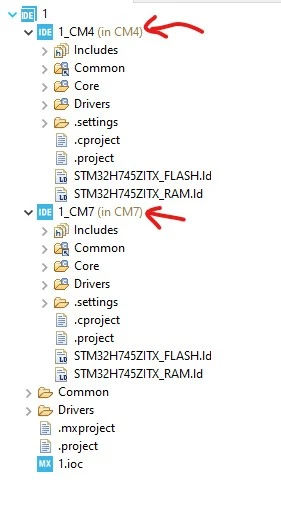
All is working fine. You've acquired a board embedding a device which is a dual cpu one. STM32CubeIDE is creating x3 projects.

You've asked for top most project properties here. Such is not an applicative project but helping to manage device complexity.

As children of such project you should have x2 more. These ones are applicative projects. Basically one per cpu (Cortex-M4 & Cortex-M7). Asked for such projects properties ... you will see toolchain setup.

0693W000007BXxzQAG.jpg

2 replies

Cartu38 OpenDev
Cartu38 OpenDevBest answer
Graduate II
January 16, 2021

All is working fine. You've acquired a board embedding a device which is a dual cpu one. STM32CubeIDE is creating x3 projects.

You've asked for top most project properties here. Such is not an applicative project but helping to manage device complexity.

As children of such project you should have x2 more. These ones are applicative projects. Basically one per cpu (Cortex-M4 & Cortex-M7). Asked for such projects properties ... you will see toolchain setup.

0693W000007BXxzQAG.jpg

SSohe.1
SSohe.1Author
Associate
January 17, 2021

Thanks, works like a charm!