
Byede.1
Associate II
November 13, 2020
Question

Debug and driver folders are not created in code generation

  • November 13, 2020
  • 11 replies
  • 7148 views

Dear Sir,

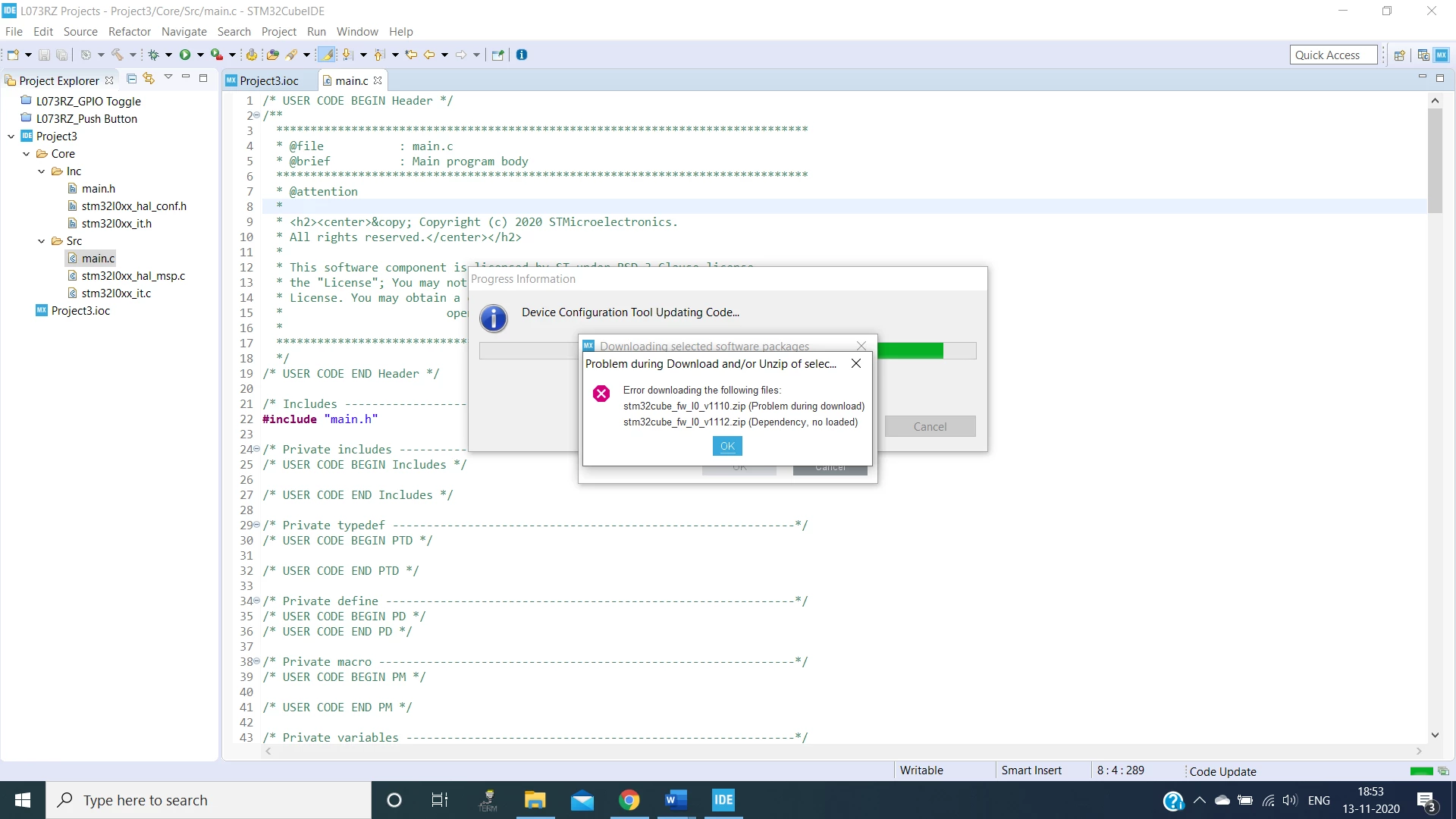
 Debug and driver folders are not created in code generation

Debug option is also not highlighted in menu button.

Below is the screenshot of that
0693W000005BK6VQAW.png 

please help.

    This topic has been closed for replies.

    11 replies

    ST Technical Moderator
    November 19, 2020

    Hello @Byede.1​ ,

    Please provide a log file that will help our CubeMX team to analyse the issue.

    Imen

    In order to give better visibility on the answered topics, please click on 'Best answer' on the reply which solved your issue or answered your question. Thanks
    Byede.1
    Byede.1Author
    Associate II
    November 20, 2020
    Dear Mam,
    Thanks for the reply.
    Here i attached a document with clear screenshots of every step. Kindly go through it.
    My problem is automatic code is not generated in STM32Cube IDE for any controller.
    Please instruct me to resolve the issue.
    *Thanks & RegardsY. Bala Nagendra *
    Byede.1
    Byede.1Author
    Associate II
    November 20, 2020
    • Dear Mam,
    •  
    • Thanks for the reply.
    •  
    • Here i attached a document with clear screenshots of every step. Kindly go through it.
    •  
    • My problem is automatic code is not generated in STM32Cube IDE for any controller.
    •  
    • Please instruct me to resolve the issue.

    • *Thanks & Regards
    • Y. Bala Nagendra *
    • Like
    • Reply
      • Select as Best
      •  

    ST Technical Moderator
    November 20, 2020

    Hi @Byede.1​ ,

    Can you please share the ioc file, as well the log file that can be found in your user directory under the .stm32cubemx folder.

    Imen

    In order to give better visibility on the answered topics, please click on 'Best answer' on the reply which solved your issue or answered your question. Thanks
    Byede.1
    Byede.1Author
    Associate II
    November 20, 2020

    Dear Mam,

    Please see attachment.

    Byede.1
    Byede.1Author
    Associate II
    November 20, 2020

    Dear Mam,

    Please see attachment.

    Nesrine.JLASSI
    Visitor II
    November 23, 2020

    Hello @Byede.1​ 

    Tested the same scenario without getting issue.

    I would like to know if you use a proxy or not because; if you don't use a proxy, with Direct and Native, you don't have to fill in the fields (you have to leave them all empty), on the other hand if you use a proxy, you have to fill in HTTP and HTTPS.

    Best regards,

    Nesrine

    Byede.1
    Byede.1Author
    Associate II
    November 23, 2020
    Dear San,
    Where i can find proxy settings in STM32 CubeIDE.
    *Thanks & RegardsY. Bala Nagendra *
    Nesrine.JLASSI
    Visitor II
    November 23, 2020

    Hello @Byede.1​ 

    Go to window ==> preference

    0693W000005CJbyQAG.pngBest regards,

    Nesrine

    Byede.1
    Byede.1Author
    Associate II
    November 23, 2020
    Dear San,
    Iam completely new to STM32 CubeIDE.
    Here is the screenshot of windows==> Preferences.
    [image: image.png]
    Tell me what i can set.
    *Thanks & RegardsY. Bala Nagendra *
    Nesrine.JLASSI
    Visitor II
    November 29, 2020

    Hi @Byede.1​ 

    If you are using Proxy, you should go to windows==> Preferences ==> Network Connections then you have to fill in HTTP and HTTPS (Host and port).

    If you don't use a Proxy, with Direct and Native "Active Provider", you don't have to fill in the fields (you have to leave them all empty).

    Best regards,

    Nesrine

