
BHure.1
Associate III
October 16, 2020
Question

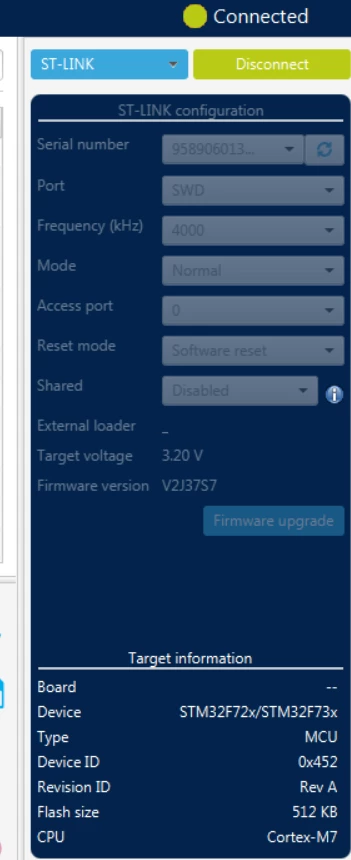
Stm32CubeProgrammer is not recognizing the Board (instead of STM32H750 it says --). The device is wrong as well - it says STM32F72x/STM32F73x although it is STM32H750. What can i do?

  • October 16, 2020
  • 15 replies
  • 4357 views

0693W000004K7VbQAK.png

This topic has been closed for replies.

15 replies

Tesla DeLorean
Guru
October 17, 2020

Assume we're not all psychic..

What are you connecting to what, exactly? How is it connected? Be SPECIFIC

Wild guess here is that you're connecting to the ST-LINK/V3's STM32F723 with an external ST-LINK/V2

Tips, Buy me a coffee, or three.. PayPal Venmo (See Profile) Up vote any posts that you find helpful, it shows what's working..
BHure.1
BHure.1Author
Associate III
October 17, 2020

Right. Sorry for the lack of details, I wanted to be as specific as possible.

The board is STM32H750. CubeProgrammer is not recognizing it correctly and the device should not be F723.

I am using ST-LINK V2 connected to the SWD of the board and power it up via the VIN and Ground (5V) and selected the JP8 to E5V.

Tesla DeLorean
Guru
October 17, 2020

That's a chip​, it is on a DK/DISCO board right?

You're not connected to the right spots to get to the primary target.​

Tips, Buy me a coffee, or three.. PayPal Venmo (See Profile) Up vote any posts that you find helpful, it shows what's working..
TDK
October 17, 2020

The board has an on-board ST-Link which you should use to program it on USB connector CN14. You don't need an external programmer. This is true for the vast majority of ST boards.

"If you feel a post has answered your question, please click ""Accept as Solution""."
BHure.1
BHure.1Author
Associate III
October 17, 2020

When I tried the first time, the STLK onboard connection worked. The PC was seeing the board and I was ready to try the flashing.

However, after I ran target flash from TouchGFX, it went unresponsive. If i connect the USB to STLK and put JP8 to STLK nothing happens.

The only way I can power up the board is with E5V on JP8. But, the PC is not recognizing the board (according to the picture above).

Tesla DeLorean
Guru
October 17, 2020

If it worked once, then it is more probable that the LDO/SMPS and VOS settings/code are wrong. The recovery method there is to strap BOOT0 HIGH and power cycle the board a couple of times until you can erase the H7

Erasing the firmware on the F723 is going to be exceedingly unhelpful in the context of recovering the bricked H750

Tips, Buy me a coffee, or three.. PayPal Venmo (See Profile) Up vote any posts that you find helpful, it shows what's working..
BHure.1
BHure.1Author
Associate III
October 17, 2020

F723 is present on the board? It is not very clear for me what is the F72X thing

Tesla DeLorean
Guru
October 17, 2020

FFS, this is an uphill ski, I've told you it implements the on-board ST-LINK/V3

Here's a picture to save me 1000 words..

0693W000004K8c9QAC.jpg 

Tips, Buy me a coffee, or three.. PayPal Venmo (See Profile) Up vote any posts that you find helpful, it shows what's working..
BHure.1
BHure.1Author
Associate III
October 18, 2020

Hey clive1,

Thanks for point out. Now I understand why CubeProgrammer detects it.

Tried to shortcut R144, power it by STLK and USB, got no result.

How can I reset the LDO/SMPS and VOS settings? As long as I cannot connect to the board, CubeProgrammer does not let me change anything.

TDK
October 18, 2020

...

Disconnect everything from the board. Plug a USB connector into CN14. Open STM32CubeProgrammer. Try to connect to the chip.

What happens?

"If you feel a post has answered your question, please click ""Accept as Solution""."
