

NMena.1
Associate
October 9, 2020
Solved

TextArea font : how to change dynamically a font

  • October 9, 2020
  • 3 replies
  • 2233 views

Hello,

On my project I want to change font of a TextArea according to some value.

First of all I created a topography to apply in TouchGFX.

I guess this is the good way to do.

Secondly I wondering how I can apply it on my TextArea ? How find the typography name and how to apply it ? I tried something like that :

Cont_LM_Simple_2_txt_lift_current_kg.setTypedText(touchgfx::TypedText());

But I didn't not managed to find how to set up my new typography.

[EDIT] Code insert
This topic has been closed for replies.
Best answer by AJT141

Hello,

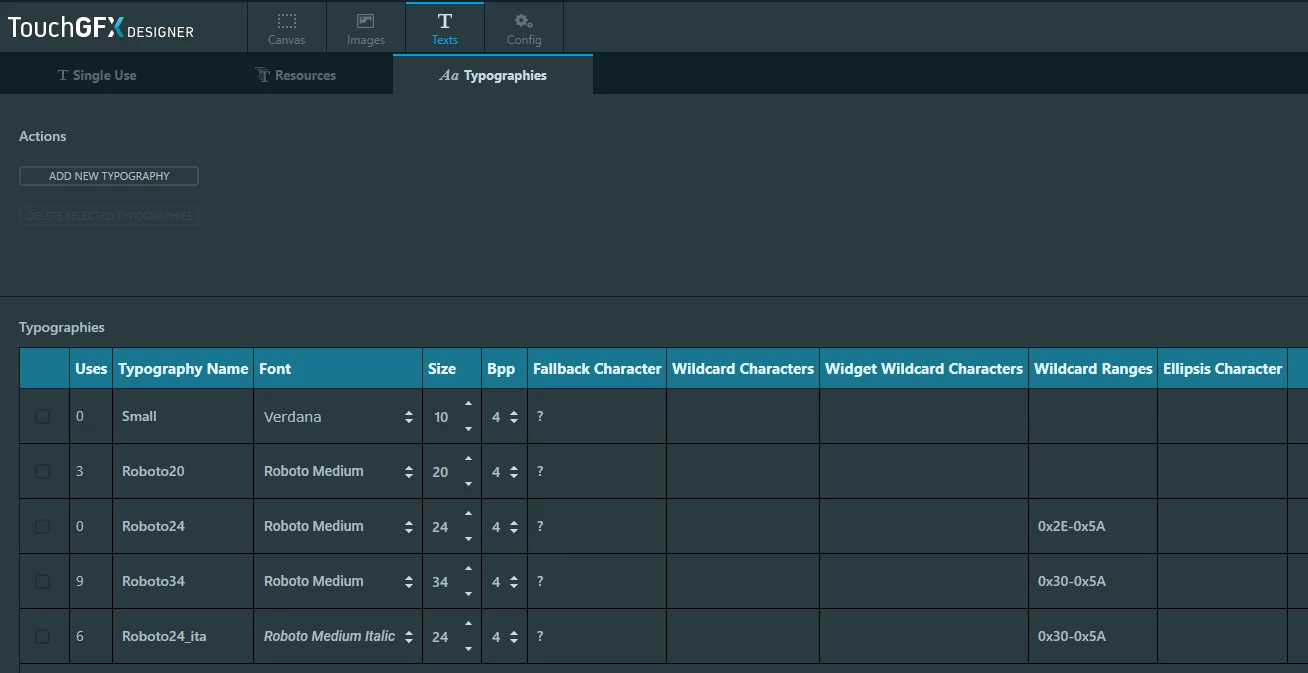
First here is the screen in touchGFX designer where you can add you own typography (Roboto are my own typographies there) :

0693W000004JDMJQA4.png Then if you want to use Roboto Meidum 20 typo (in my case) whereas the original typo is Verdana 10. You should do this to change the font :

Cont_LM_Simple_2_txt_lift_current_kg.setTypedText(touchgfx::TypedText(T_SINGLEUSEID4));
Cont_LM_Simple_2_txt_lift_current_kg.invalidate();

Do not forget to invalidate the text area.

Here I wrote "T_SINGLEUSEID4" because in my case it designates roboto20 font. For you, it's not gonna be the same.

All these enums are declared in "TextKeysAndLanguages.hpp" file where you can include with this line

#include <texts/TextKeysAndLanguages.hpp>

Hope it can help.

Regards,

AJT141

PS : do not forget to use the </> code snippet button to insert code.

[EDIT!]


I forgot to say that if you didn't use once your personal typography in touchGFX deisgner, you won't be able to use the correct TEXTS enum in your code because touchGFX won't create it ;)

3 replies

AJT141
AJT141Best answer
Associate III
October 9, 2020

Hello,

First here is the screen in touchGFX designer where you can add you own typography (Roboto are my own typographies there) :

0693W000004JDMJQA4.png Then if you want to use Roboto Meidum 20 typo (in my case) whereas the original typo is Verdana 10. You should do this to change the font :

Cont_LM_Simple_2_txt_lift_current_kg.setTypedText(touchgfx::TypedText(T_SINGLEUSEID4));
Cont_LM_Simple_2_txt_lift_current_kg.invalidate();

Do not forget to invalidate the text area.

Here I wrote "T_SINGLEUSEID4" because in my case it designates roboto20 font. For you, it's not gonna be the same.

All these enums are declared in "TextKeysAndLanguages.hpp" file where you can include with this line

#include <texts/TextKeysAndLanguages.hpp>

Hope it can help.

Regards,

AJT141

PS : do not forget to use the </> code snippet button to insert code.

[EDIT!]


I forgot to say that if you didn't use once your personal typography in touchGFX deisgner, you won't be able to use the correct TEXTS enum in your code because touchGFX won't create it ;)

NMena.1
NMena.1Author
Associate
October 9, 2020

Hello,

Yes I finally managed.

Issue was that I didn't use it as you mentioned in your EDIT.

Thank you.

N.

A.Qasim
Associate II
May 26, 2022

Can you share the code you were able to run for successful operation of font changing.
