

Question
When activeted SDRAM, touch part dont work and screen is frezee
I am using below development tools
MCU: STM32H7B3IIT6
IDE: STM32CubeIDE Version: 1.8.0
GUI: TouchGFX Version: 4.18.1
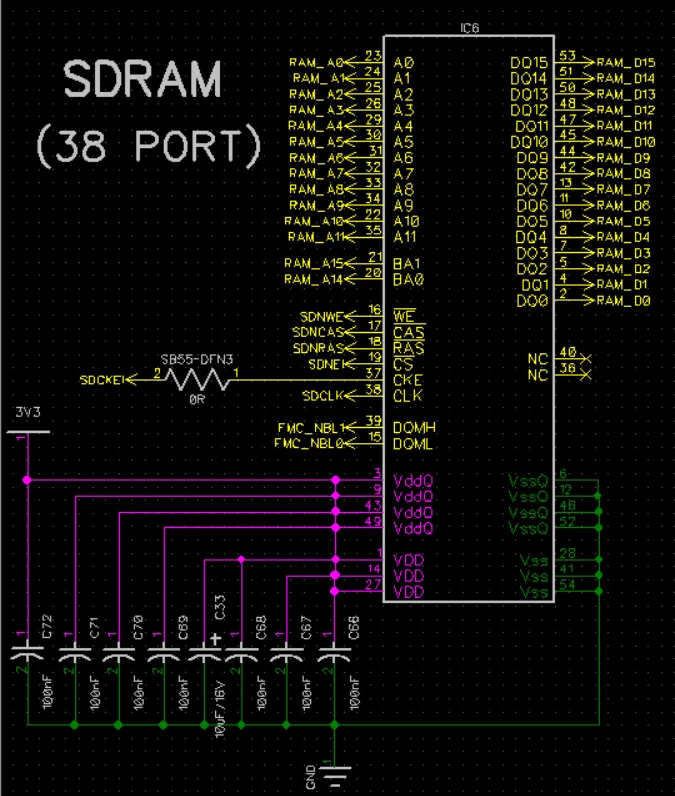
SDRAM: IS45S16800F-7CTLA1-TR
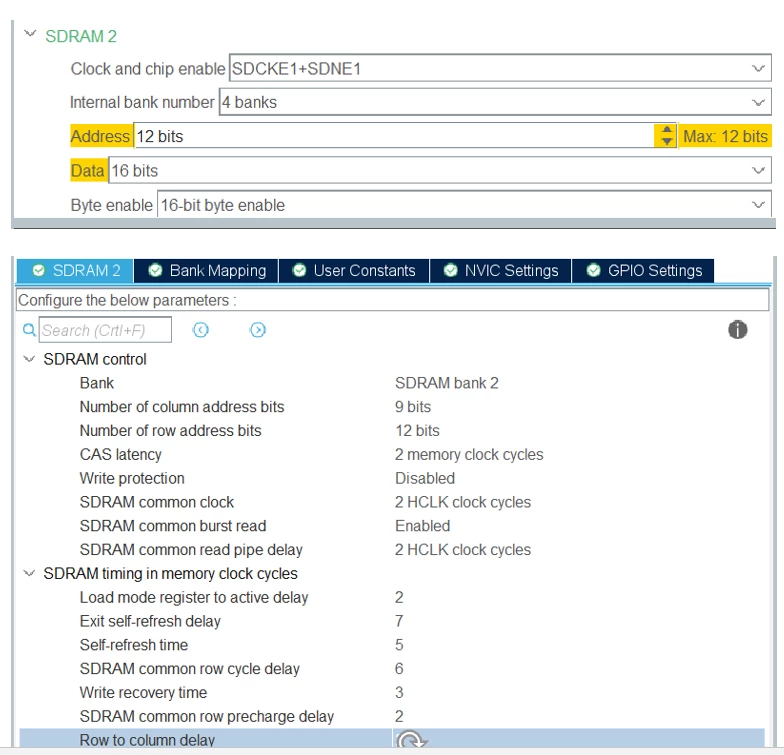
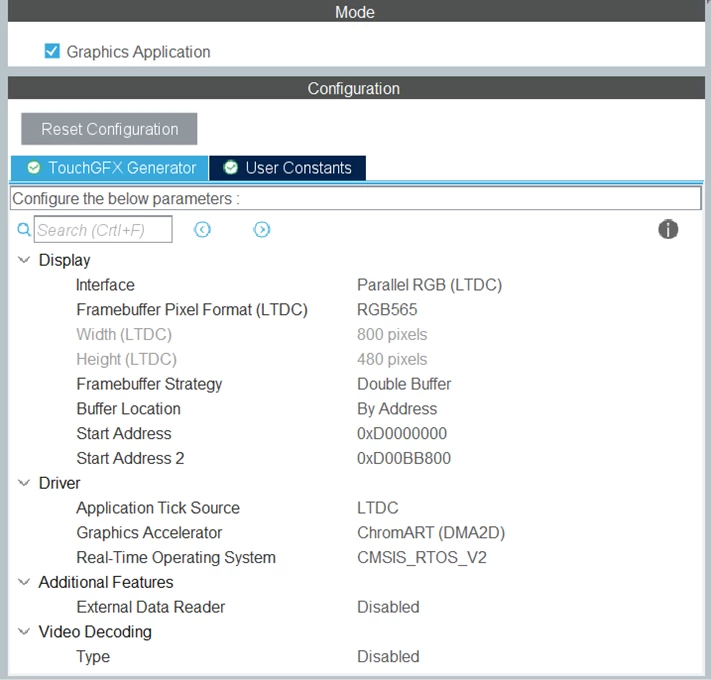
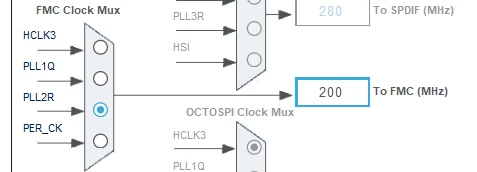
When activeted SDRAM, touch part dont work and screen is frezee, FMC settings are as follows.
/* FMC initialization function */
static void MX_FMC_Init(void)
{

 /* USER CODE BEGIN FMC_Init 0 */

 /* USER CODE END FMC_Init 0 */

 FMC_SDRAM_TimingTypeDef SdramTiming = {0};

 /* USER CODE BEGIN FMC_Init 1 */

 /* USER CODE END FMC_Init 1 */

 /** Perform the SDRAM2 memory initialization sequence
 */
 hsdram2.Instance = FMC_SDRAM_DEVICE;
 /* hsdram2.Init */
 hsdram2.Init.SDBank = FMC_SDRAM_BANK2;
 hsdram2.Init.ColumnBitsNumber = FMC_SDRAM_COLUMN_BITS_NUM_9;
 hsdram2.Init.RowBitsNumber = FMC_SDRAM_ROW_BITS_NUM_12;
 hsdram2.Init.MemoryDataWidth = FMC_SDRAM_MEM_BUS_WIDTH_16;
 hsdram2.Init.InternalBankNumber = FMC_SDRAM_INTERN_BANKS_NUM_4;
 hsdram2.Init.CASLatency = FMC_SDRAM_CAS_LATENCY_2;
 hsdram2.Init.WriteProtection = FMC_SDRAM_WRITE_PROTECTION_DISABLE;
 hsdram2.Init.SDClockPeriod = FMC_SDRAM_CLOCK_PERIOD_2;
 hsdram2.Init.ReadBurst = FMC_SDRAM_RBURST_ENABLE;
 hsdram2.Init.ReadPipeDelay = FMC_SDRAM_RPIPE_DELAY_2;
 /* SdramTiming */
 SdramTiming.LoadToActiveDelay = 2;
 SdramTiming.ExitSelfRefreshDelay = 7;
 SdramTiming.SelfRefreshTime = 5;
 SdramTiming.RowCycleDelay = 6;
 SdramTiming.WriteRecoveryTime = 3;
 SdramTiming.RPDelay = 2;
 SdramTiming.RCDDelay = 2;

 if (HAL_SDRAM_Init(&hsdram2, &SdramTiming) != HAL_OK)
 {
 Error_Handler( );
 }

 /* USER CODE BEGIN FMC_Init 2 */

 FMC_SDRAM_CommandTypeDef Command;

 /* Step 1: Configure a clock configuration enable command */
 Command.CommandMode = FMC_SDRAM_CMD_CLK_ENABLE;
 Command.CommandTarget = FMC_SDRAM_CMD_TARGET_BANK2;
 Command.AutoRefreshNumber = 1;
 Command.ModeRegisterDefinition = 0;
 HAL_SDRAM_SendCommand(&hsdram2, &Command, 0xfff);

 /* Step 2: Insert 100 us minimum delay */
 /* Inserted delay is equal to 1 ms due to systick time base unit (ms) */
 HAL_Delay(1);

 /* Step 3: Configure a PALL (precharge all) command */
 Command.CommandMode = FMC_SDRAM_CMD_PALL;
 HAL_SDRAM_SendCommand(&hsdram2, &Command, 0xfff);

 /* Step 4: Configure an Auto Refresh command */
 Command.CommandMode = FMC_SDRAM_CMD_AUTOREFRESH_MODE;
 Command.AutoRefreshNumber = 2;
 HAL_SDRAM_SendCommand(&hsdram2, &Command, 0xfff);

 /* Step 5: Program the external memory mode register */
 Command.CommandMode = FMC_SDRAM_CMD_LOAD_MODE;
 Command.ModeRegisterDefinition = (uint32_t)0 | 0<<3 | 2<<4 | 0<<7 | 1<<9;
 HAL_SDRAM_SendCommand(&hsdram2, &Command, 0xfff);

 /* Step 6: Set the refresh rate counter */
 /* Set the device refresh rate */
 HAL_SDRAM_ProgramRefreshRate(&hsdram2, 1542);
 /* USER CODE END FMC_Init 2 */
}