

HNall.1
Associate III
August 17, 2020
Question

Running application in "Release mode causes errors"

  • August 17, 2020
  • 20 replies
  • 10788 views

Hi all,

I'm trying to profile my application which running on STM32F469IH6 micro-controller.

I'm able to run the application in debug mode and able to see the timings of the applications.

But In generally running application in release mode will have more optimizations included compared with the debug mode. But If I run the application in Release mode then i'm encountered with below error.0693W000003PSBYQA4.png
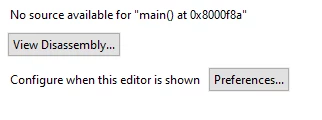
Below is log at the time of running application in release mode:

STMicroelectronics ST-LINK GDB server. Version 5.6.0
Copyright (c) 2020, STMicroelectronics. All rights reserved.
 
Starting server with the following options:
 Persistent Mode : Disabled
 Logging Level : 1
 Listen Port Number : 61234
 Status Refresh Delay : 15s
 Verbose Mode : Disabled
 SWD Debug : Enabled
 InitWhile : Enabled
 
Waiting for debugger connection...
Debugger connected
 -------------------------------------------------------------------
 STM32CubeProgrammer v2.5.0-RC1 
 -------------------------------------------------------------------
 
ST-LINK SN : 066DFF535254887767171939
ST-LINK FW : V2J37M26
Board : 32F469IDISCOVERY
Voltage : 3.27V
SWD freq : 4000 KHz
Connect mode: Under Reset
Reset mode : Hardware reset
Device ID : 0x434
Revision ID : Rev A
Device name : STM32F469xx/F467xx
Flash size : 2 MBytes
Device type : MCU
Device CPU : Cortex-M4


Memory Programming ...
Opening and parsing file: ST-LINK_GDB_server_a09660.srec
 File : ST-LINK_GDB_server_a09660.srec
 Size : 676208 Bytes
 Address : 0x08000000 
 
 
Erasing memory corresponding to segment 0:
Erasing internal memory sectors [0 9]
Download in Progress:
 
 
File download complete
Time elapsed during download operation: 00:00:12.201


Verifying ...


Download verified successfully 
 
 
Debugger connection lost.
Shutting down...
 

Thanks in advance.

This topic has been closed for replies.

20 replies

TDK
August 17, 2020

If your application runs fine in Debug, but not in Release, this typically indicates there is an bug somewhere that doesn't get tripped by Debug mode. This could be due to reading uninitialized data, a race condition, or something else. There is not catch-all solution. You'll need to debug the program and determine where/what is causing the issue.

Just because it works in Debug mode doesn't not indicate there are not bugs.

Your log shows the program was downloaded successfully. No information there.

"If you feel a post has answered your question, please click ""Accept as Solution""."
HNall.1
HNall.1Author
Associate III
August 17, 2020

Hi @TDK​ ,

I don't see any issue in the code.

I feel this could be an configuration issue. Did you see similar issue earlier.

Also, Is there any specific things i need to configure for release mode.

I ran the application in Release mode again in Verbose mode. Please find the attached log.

STMicroelectronics ST-LINK GDB server. Version 5.6.0
Copyright (c) 2020, STMicroelectronics. All rights reserved.
 
Starting server with the following options:
 Persistent Mode : Disabled
 LogFile Name : C:\Users\hp\STM32CubeIDE\workspace_1.4.0\ActivityRecognition1\Release\st-link_gdbserver_log.txt
 Logging Level : 31
 Listen Port Number : 61234
 Status Refresh Delay : 15s
 Verbose Mode : Enabled
 SWD Debug : Enabled
 InitWhile : Enabled
 
Target connection mode: Under reset
Hardware watchpoint supported by the target 
COM frequency = 4000 kHz
ST-LINK Firmware version : V2J37M26
Device ID: 0x434
PC: 0x80012b0
ST-LINK device status: HALT_MODE
ST-LINK detects target voltage = 3.27 V
ST-LINK device status: HALT_MODE
ST-LINK device initialization OK
Waiting for debugger connection...
Waiting for connection on port 61234...
Accepted connection on port 61234...
Debugger connected
Enter STM32_AppReset() function 
NVIC_DFSR_REG = 0x00000008
NVIC_CFGFSR_REG = 0x00000000
 ------ Switching to STM32CubeProgrammer ----- 
 -------------------------------------------------------------------
 STM32CubeProgrammer v2.5.0-RC1 
 -------------------------------------------------------------------


Log output file: C:\Users\hp\AppData\Local\Temp\STM32CubeProgrammer_a07124.log
ST-LINK SN : 066DFF535254887767171939
ST-LINK FW : V2J37M26
Board : 32F469IDISCOVERY
Voltage : 3.27V
SWD freq : 4000 KHz
Connect mode: Under Reset
Reset mode : Hardware reset
Device ID : 0x434
Revision ID : Rev A
Device name : STM32F469xx/F467xx
Flash size : 2 MBytes
Device type : MCU
Device CPU : Cortex-M4


Memory Programming ...
Opening and parsing file: ST-LINK_GDB_server_a07124.srec
 File : ST-LINK_GDB_server_a07124.srec
 Size : 676208 Bytes
 Address : 0x08000000 
 
 
Erasing memory corresponding to segment 0:
Erasing internal memory sectors [0 9]
Download in Progress:
�������������������������������������������������� 0%
����������������������� 47%������������������������ 95%��� 100%
 
File download complete
Time elapsed during download operation: 00:00:12.355


Verifying ...
 
 
Read progress:
�������������������������������������������������� 50%
� 2%� 4%� 6%� 8%� 10%� 12%� 14%� 16%� 18%� 20%� 22%� 24%� 26%� 28%� 30%� 32%� 34%� 36%� 38%� 40%� 42%� 44%� 46%� 48%� 50%� 52%� 54%� 56%� 58%� 60%� 62%� 64%� 66%� 68%� 70%� 72%� 74%� 76%� 78%� 80%� 82%� 84%� 86%� 88%� 90%� 92%� 94%� 96%� 98%� 100%
 
Download verified successfully 
 
 
 ------ Switching context ----- 
Target connection mode: Under reset
Hardware watchpoint supported by the target 
COM frequency = 4000 kHz
ST-LINK Firmware version : V2J37M26
Device ID: 0x434
PC: 0x80012b0
ST-LINK detects target voltage = 3.27 V
ST-LINK device status: HALT_MODE
ST-LINK device initialization OK
handle_vCont_c, continue thread
ST-LINK device status: RUN_MODE
Debugger connection lost.
Shutting down...
 

 Also Please find the entire log from this link.

Thanks,

Hari

hs2
Visitor II
August 17, 2020

If you mean 'no source available for main()' is an error, it's not.

It's just the result of stripping symbol information from the application binary, which is usually done for release builds.

If you need (debug) symbols also for release builds you've to adjust the linker flags accordingly (e.g. remove the -s option for GCC toolchain).

I don't know if there is also a Cube config item for that. I don't use Cube.

HNall.1
HNall.1Author
Associate III
August 20, 2020

Hi @Community member​ ,

I'm not using -s option for compilation but i'm still seeing above issue.

Please find the attached build log for more details.

~Hari

TDK
August 20, 2020

> I don't see any issue in the code.

> Also, Is there any specific things i need to configure for release mode.

You're looking for a magic solution. The only reason something can work in Debug but not in Release is if there's a bug somewhere. Focus on that instead.

Your log looks completely normal and has no error messages. I don't see why you're attaching it.

"If you feel a post has answered your question, please click ""Accept as Solution""."
HNall.1
HNall.1Author
Associate III
August 21, 2020

hi @TDK​ ,

Thanks for your response.

My application size was greater than RAM size. Please find the attached screenshot. This could be the reason it was failing in Release mode. Can you confirm on this?

If this is the reason for failing in release mode, then how it was running in Debug mode? (or) Is this expected?

Radosław
Associate II
August 21, 2020

Hello. Problem that source file can't be found can be related to missing debug information. Check your compiler settings for release.

TDK
August 21, 2020

> My application size was greater than RAM size. Please find the attached screenshot.

Why do you think that? The screenshot shows your application is using 1.13% of the total available RAM. Doesn't seem like it's too big to me. If you overflow a region, the linker will give you an error.

"If you feel a post has answered your question, please click ""Accept as Solution""."
HNall.1
HNall.1Author
Associate III
August 21, 2020

Hi @TDK ,

Correct me if i'm wrong. Here 672.9KB of my code sections resides in FLASH memory .

My assumption is that at the runtime, entire code section will be loaded into RAM. This is usual behaviour when I work with micro-processors(DISK to RAM). I feel the same with Micro-controllers (FLASH to RAM).

In my case,STM32F496IH6 has only 320KB RAM.​ And I feel it's impossible to fit 672.9KB data from FLASH to RAM.

TDK
August 21, 2020
On most (all?) STM32 families, the CPU can run instructions directly from FLASH and this is typically what it does unless you go out of your way to tell it to run from RAM.
The only thing that gets moved from FLASH to RAM on startup are initialized, non-const variables. Uninitialized variables aren't stored in FLASH at all, but space is made for them in RAM during startup.
"If you feel a post has answered your question, please click ""Accept as Solution""."
HNall.1
HNall.1Author
Associate III
August 21, 2020

Hi @TDK​ ,

If CPU directly run instructions from FLASH then ideally there will no issue with code size. I will try to figure out why my application was not running in RELEASE mode and let you know if I find a solution.

In second paragraph, you mentioned uninitialized variables are not stored in FLASH. But it seems not true. Uninitialized variables are resides under .bss section. And this will be created in both FLASH and RAM. I posted one question similar to this. Please take a look at map file from this post.

https://community.st.com/s/feed/0D53W00000FzIanSAF

​In the MAP file you can see .bss section was created in both FLASH and RAM.

TDK
August 21, 2020

Obviously if you tell it to be stored in the read-only section, that is where it will be stored.

You're telling it to store an uninitialized, non-const array in a read-only section, which is nonsensical.

Remove the attribute, use a default linker script, and it will indeed not store uninitialized arrays in FLASH.

"If you feel a post has answered your question, please click ""Accept as Solution""."
HNall.1
HNall.1Author
Associate III
August 21, 2020

​Hi @TDK​ ,

I have not used any attribute and I have default linker script only. Not changed explicitly anything.

Also, Did you get a chance ​to look at map and linker filers in above mentioned link?

If you see the map file, it has .bss sections created in both FLASH and RAM.​

TDK
August 21, 2020

> I have not used any attribute and I have default linker script only. Not changed explicitly anything.

One of us is definitely missing something.

0693W000003Q0yPQAS.png

We're just running in circles now. I think my first couple of replies to this post is about all I can help.

You're trying to use FLASH as RAM. You can't do that.

Good luck.

"If you feel a post has answered your question, please click ""Accept as Solution""."