

SKokk.1
Associate III
May 22, 2020
Question

STM32F746 + 5.0�? TFT + TouchGFX on custom board

  • May 22, 2020
  • 5 replies
  • 4198 views

Hello,

I am building a custom board based on the STM32F746's discovery.

I have already used the STM32CubeIDE 1.1.0 with TouchGFX 4.12.3 om discovery and everything is working fine.

Custom board has the same hardware with discovery but we are using different TFT screen (attached PDF).

The TFT on my board displays:0693W000001pKYnQAM.png
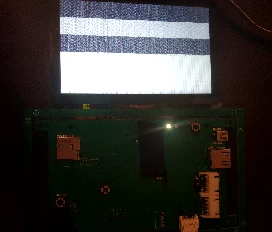
I am not sure about the LTDC parameters based on the new TFT. I have set the below:

void MX_LCD_Init(void) 
{ 
 LTDC_LayerCfgTypeDef pLayerCfg;
 
/* De-Initialize LTDC */
 HAL_LTDC_DeInit(&hltdc);
/* Configure LTDC */
 
 hltdc.Instance = LTDC;
 hltdc.Init.HSPolarity = LTDC_HSPOLARITY_AL;
 hltdc.Init.VSPolarity = LTDC_VSPOLARITY_AL;
 hltdc.Init.DEPolarity = LTDC_DEPOLARITY_AL;
 hltdc.Init.PCPolarity = LTDC_PCPOLARITY_IPC;
 hltdc.Init.HorizontalSync = 49;
 hltdc.Init.VerticalSync = 4;
 hltdc.Init.AccumulatedHBP = 89;
 hltdc.Init.AccumulatedVBP = 33;
 hltdc.Init.AccumulatedActiveW = 889;
 hltdc.Init.AccumulatedActiveH = 513;
 hltdc.Init.TotalWidth = 929;
 hltdc.Init.TotalHeigh = 526;
 hltdc.Init.Backcolor.Blue = 0;
 hltdc.Init.Backcolor.Green = 0;
 hltdc.Init.Backcolor.Red = 0;
 if (HAL_LTDC_Init(&hltdc) != HAL_OK)
 {
 Error_Handler( );
 }
 
 pLayerCfg.WindowX0 = 0;
 pLayerCfg.WindowX1 = 800;
 pLayerCfg.WindowY0 = 0;
 pLayerCfg.WindowY1 = 480;
 pLayerCfg.PixelFormat = LTDC_PIXEL_FORMAT_RGB888;
 pLayerCfg.Alpha = 255;
 pLayerCfg.Alpha0 = 0;
 pLayerCfg.BlendingFactor1 = LTDC_BLENDING_FACTOR1_PAxCA;
 pLayerCfg.BlendingFactor2 = LTDC_BLENDING_FACTOR2_PAxCA;
 pLayerCfg.FBStartAdress = 0xC0000000;
 pLayerCfg.ImageWidth = 480;
 pLayerCfg.ImageHeight = 272;
 pLayerCfg.Backcolor.Blue = 0;
 pLayerCfg.Backcolor.Green = 0;
 pLayerCfg.Backcolor.Red = 0;
 if (HAL_LTDC_ConfigLayer(&hltdc, &pLayerCfg, 0) != HAL_OK)
 {
 Error_Handler( );
 }
 
 HAL_LTDC_SetPitch(&hltdc, 800, 0);
 
}

Could someone help me or advise?

This topic has been closed for replies.

5 replies

Tesla DeLorean
Guru
May 23, 2020
void MX_LCD_Init(void) 
{ 
 LTDC_LayerCfgTypeDef pLayerCfg;
 
/* De-Initialize LTDC */
 HAL_LTDC_DeInit(&hltdc);
/* Configure LTDC */
 
 hltdc.Instance = LTDC;
 hltdc.Init.HSPolarity = LTDC_HSPOLARITY_AL;
 hltdc.Init.VSPolarity = LTDC_VSPOLARITY_AL;
 hltdc.Init.DEPolarity = LTDC_DEPOLARITY_AL;
 hltdc.Init.PCPolarity = LTDC_PCPOLARITY_IPC;
 
 hltdc.Init.HorizontalSync = 47;
 hltdc.Init.AccumulatedHBP = 87;
 hltdc.Init.AccumulatedActiveW = 887;
 hltdc.Init.TotalWidth = 927;
 
 hltdc.Init.VerticalSync = 2;
 hltdc.Init.AccumulatedVBP = 31;
 hltdc.Init.AccumulatedActiveH = 511;
 hltdc.Init.TotalHeigh = 524;
 
 hltdc.Init.Backcolor.Blue = 0;
 hltdc.Init.Backcolor.Green = 0;
 hltdc.Init.Backcolor.Red = 0;
 if (HAL_LTDC_Init(&hltdc) != HAL_OK)
 {
 Error_Handler( );
 }
 
 pLayerCfg.WindowX0 = 0;
 pLayerCfg.WindowX1 = 800;
 pLayerCfg.WindowY0 = 0;
 pLayerCfg.WindowY1 = 480;
 pLayerCfg.PixelFormat = LTDC_PIXEL_FORMAT_RGB888;
 pLayerCfg.Alpha = 255;
 pLayerCfg.Alpha0 = 0;
 pLayerCfg.BlendingFactor1 = LTDC_BLENDING_FACTOR1_PAxCA;
 pLayerCfg.BlendingFactor2 = LTDC_BLENDING_FACTOR2_PAxCA;
 pLayerCfg.FBStartAdress = 0xC0000000;
 pLayerCfg.ImageWidth = 800;
 pLayerCfg.ImageHeight = 480;
 pLayerCfg.Backcolor.Blue = 0;
 pLayerCfg.Backcolor.Green = 0;
 pLayerCfg.Backcolor.Red = 0;
 if (HAL_LTDC_ConfigLayer(&hltdc, &pLayerCfg, 0) != HAL_OK)
 {
 Error_Handler( );
 }
}

Tips, Buy me a coffee, or three.. PayPal Venmo (See Profile) Up vote any posts that you find helpful, it shows what's working..
Karan 123
Senior
May 23, 2020

Hi,

I have not seen your datasheet​

But If your schematic/connections is correct

Did you compare the paramters of both the TFT/LCD ​such as VSYNC, HSYNC, Vertical Porch Horizontal Portch etc.? as in program.

Also you can put scope on DE, VSYNC, HSYNC,Reset pin​ etc of TFT?

​Check your TFT Works with DE/Sync check both Datasheets? For code compatibility.

Hope this helps... ​

--

Karan​

SKokk.1
SKokk.1Author
Associate III
May 23, 2020

Thank you for your answers.

I fixed the parameters but still problem. Then i changed the Pixel format to:

pLayerCfg.PixelFormat = LTDC_PIXEL_FORMAT_RGB565;

And it worked.

0693W000001pKm1QAE.png

On TouchGFX project the Pixel format is "locked" to 16bit. Is there a way to change it to 24bit or i should create new TouchGFX project?

0693W000001pKmQQAU.png

Karan 123
Senior
May 23, 2020

Hi

Just Create new Touchgfx project and ​then try...

--

Karan​

SKokk.1
SKokk.1Author
Associate III
May 23, 2020

Worked with RGB888 setup too, thank you guys.

0693W000001pKybQAE.jpg

Karan 123
Senior
May 23, 2020

Great!!!

SKokk.1
SKokk.1Author
Associate III
May 23, 2020

Something else,

why does simulation and real hardware application is different?

I run simulation on TouchGFX designer and everything is good (using some animated pictures from examples) but when i load on hardware, animations seems not working.

https://www.youtube.com/watch?v=e0laQf_d6l8

Martin KJELDSEN
Principal III
May 27, 2020

Seems like maybe your application is not being ticked - Can you break inside Model::tick() and check ? The tick is what drives the application including the animated images.

SKokk.1
SKokk.1Author
Associate III
May 27, 2020

Martin,

I opened the below thread to continue with this issue on RGB888:

https://community.st.com/s/feed/0D53W000007zOgF