

STM32L552E-EV Demonstration Firmware
Hello,
I trying to test Demostration Firmware(*1) for my STM32L552E-EV evaluation Board, and in the documentation for this Demo is written:
<<
- This demonstration has been tested with STM32L552E-EV (MB1372-C02) evaluation board and can be easily tailored to any other supported device and development board.
- Copy Binary\SD_card content at the root of the microSD card
@note Jumpers setup on MB1372_L552ZEQ-C02:
JP1 : OPENED / JP4 : 1-2 (LEFT) / JP5 : 1-2 (LEFT) / JP6 : CLOSED
JP7 : 1-2 (RIGHT) / JP8 : 1-2 (LEFT) / JP9 : 1-2 (DOWN) / JP10 : CLOSED
JP11 : 1-2 (LEFT) / JP12 : 1-2 POT / JP13 : 2-3 OPAMP / JP14 : OPENED
JP15 : 1-2 (VDD) / JP16 : 5V-STLK / JP17 : 1-2 (RIGHT) / JP18 : OPENED
JP19 : OPENED / JP20 : OPENED / JP21 : OPENED / JP22 : OPENED
JP23 : OPENED / CN12 : OPENED / CN23 : OPENED
>>
The problem is that my Evaluation Board is a different version. My Evaluation Board has this Labels:
- Sticker_Top: STM32L552E-EV1
- Sticker_Bottom: MB1372_L552ZEQ-B01
- PCB Serigraphy 1: STM32L552E-EVAL
- PCB Serigraphy 2: MB1372B
This is my Board (attach an image):
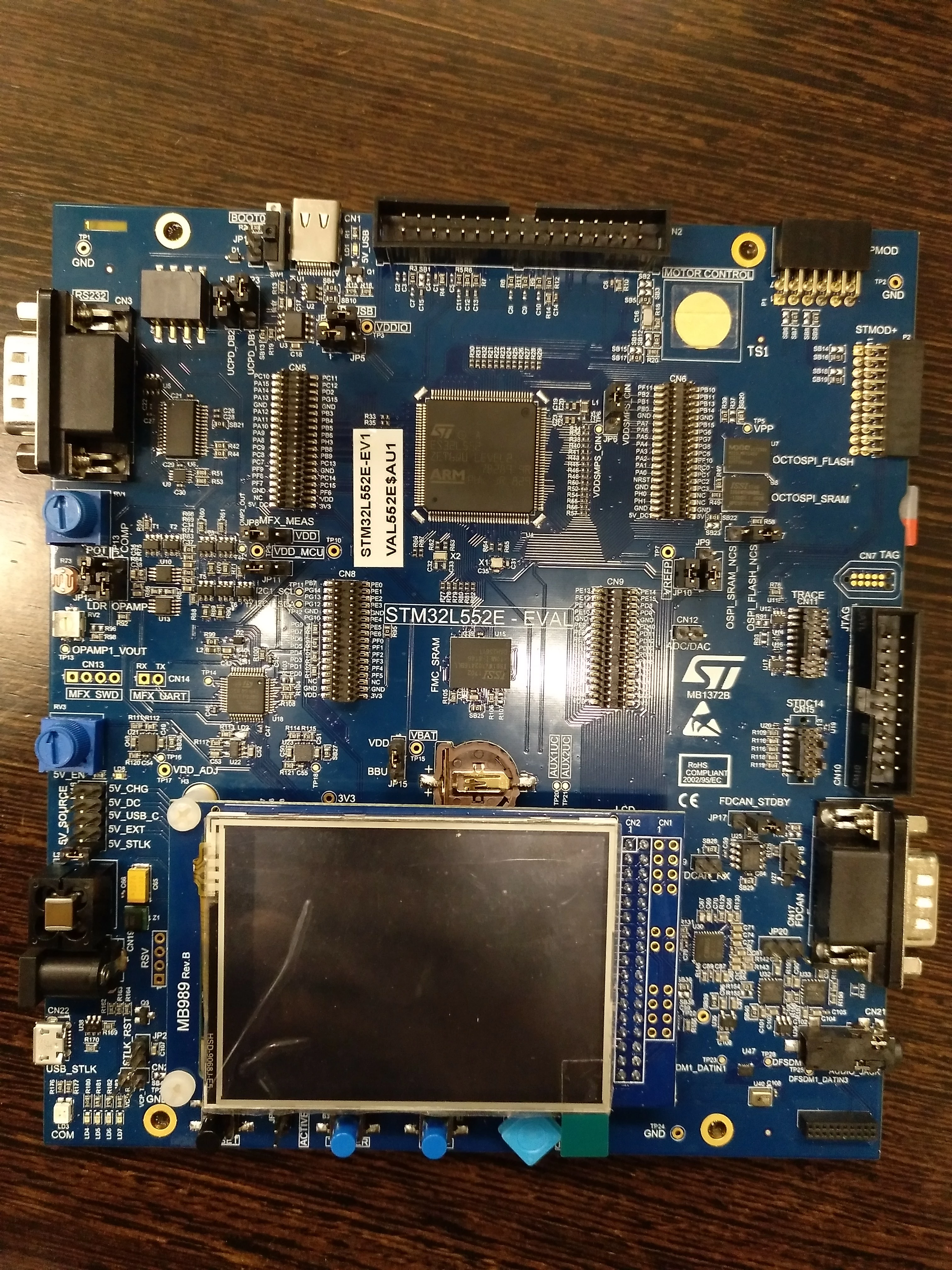
In my Board:
- JP4 have only 2 PINS. How is the corret confuguration OPEN or CLOSE?
- JP6 have 3 PINS. How is the corret configuration 1-2 (UP) or 2-3 (DOWN)?
- JP23 does not exist or I don't find it.
I downloaded Resources from:
- MB1372 Board design project files 1.0 15.91 MB
- MB1372 Manufacturing files 1.0 21.98 MB
- MB1372-L552ZEQ-C02 Board Schematic 1.0 42.43 MB
This Resources are not for my board neither, but if I search for these JPs in these docs JP4 have only 2 PINS too, how it will be "JP4 : 1-2 (LEFT) "
Where can download the resources for my board version?
(*1)
Related POST:
https://community.st.com/s/question/0D50X0000C0wFSiSQM/stm32l552eev-and-stm32cubefwl5v110
Best Regards,
Sergio
