


scottSD
Senior III
November 19, 2019
Question

Is the L8_ARGB8888 image format supported for Shapes widget? If not, will it be in the future?

  • November 19, 2019
  • 6 replies
  • 11297 views

Let me preface this question by saying I appreciate the new L8 (indexed) color support for many of the widgets. This includes the support for L8s in dynamic bitmaps.

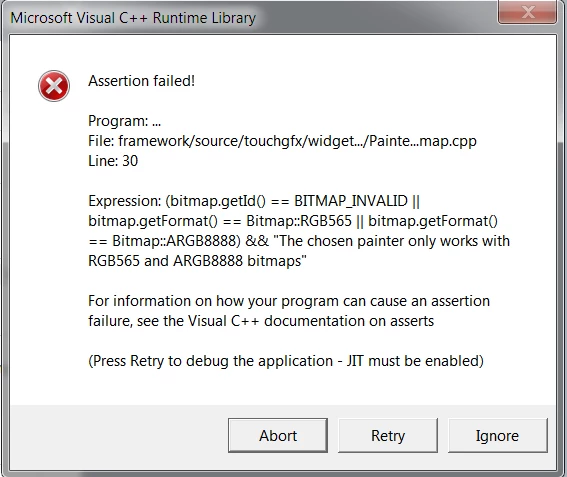
I attempted to use an image formatted to L8_ARGB8888 in a shape widget. The code compiled, but when running on the simulator I received the following assert:
0690X00000AsD78QAF.png

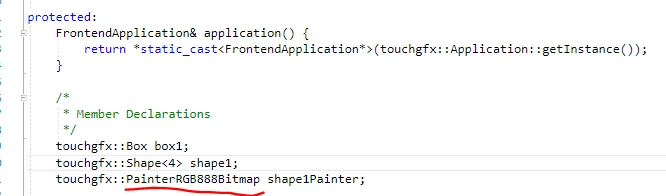
The painter for the shape is not instantiated as an L8_ARGB8888, but a PainterRGB8888Bitmap as seen in the gui_generated Screen1ViewBase.hpp file:
0690X00000AsDCwQAN.png

Does the shape widget support the PainterARGB8888L8Bitmap? If not will it support it in the future?

This topic has been closed for replies.

6 replies

scottSD
scottSDAuthor
Senior III
November 21, 2019

Anybody?

scottSD
scottSDAuthor
Senior III
November 22, 2019

I found that this also happens when trying to paint a line, circle, or circle progress with an L8_ARGB888 (using PainterARGB8888L8Bitmap).

scottSD
scottSDAuthor
Senior III
November 22, 2019

I am not getting responses.

I created a simple project with an image formated to default (not L8_ARGB8888). Placing this in a shape in the TouchGFX Designer, it works fine. Then I added a copy of the shape (named differently) and formatted it to L8_ARGB8888.

I manually added this shape and set it's painter to PainterARGB8888L8Bitmap. The code compiles, but I get an assert in the AbstractPainterARGB8888 (which is the base class of PainterARGB8888L8Bitmap).

A little bit more digging and I did find that this painter asserts this when it's not compatible with the framebuffer:

0690X00000AsNGZQA3.png

But, according to the L8 article (https://touchgfx.zendesk.com/hc/en-us/articles/360009793299-Using-the-L8-Image-Format)

L8_ARGB8888 should be supported in BOTH Framebuffer formats:

0690X00000AsNIaQAN.png

Am I missing something?

scottSD
scottSDAuthor
Senior III
November 25, 2019

Still no input from anybody. Some help would be appreciated.

I created an image without transparent pixels and added it as the image for a Shape widget. When I set the Image Format to RGB565, the code runs fine.

But if I set the Image Format to L8_RGB565 (no transparent pixels this time), I get the same assert message.

scottSD
scottSDAuthor
Senior III
December 9, 2019

Bringing to the top

Still waiting for an answer on whether or not the Shapes widget supports L8......

Martin KJELDSEN
Principal III
December 10, 2019

They do in the sense that we have the following painters:

PainterRGB565L8Bitmap
PainterRGB888L8Bitmap

scottSD
scottSDAuthor
Senior III
December 10, 2019

Martin, I noticed you did not include L8 with alpha (L8_ARGB8888). Will this be supported for the Shape widget in the future?

Is there an example available of PainterRGB565L8Bitmap or PainterRGB888L8Bitmap being used with the Shape widget?

I formatted an image to L8RGB565 using the TouchGFX Designer. Then I used this image in a Shape widget (within the Designer). However, in the gui_generated Screen1ViewBase.hpp file, it is creating an instance of PainterRGB565Bitmap (not PainterRGB565L8Bitmap setup in the Designer):

touchgfx::Shape<4> shape1;
 touchgfx::PainterRGB565Bitmap shape1Painter;

I do not understand why it is creating a PainterRGB565Bitmap when the image is formatted to L8RGB565. Can you explain this?

scottSD
scottSDAuthor
Senior III
March 25, 2020

@Martin KJELDSEN​ 

I am just checking if the fix for this will be included in the next TouchGFX Release?

I ran into it again and then I remembered it is a bug in the TouchGFX Designer.

At least there is a work-around. =)

And...any idea when the next release might be?

FBena.1
Associate II
March 3, 2022

.

Osman SOYKURT
ST Technical Moderator
March 4, 2022

Hello FBena.1,

Sorry but I don't really understand your answer. What is LCD8bpp_LUt8.h ? Where do you find it ?

/Osman

ST Software Developer | TouchGFX
FBena.1
Associate II
March 4, 2022

Sorry, i don't know why this post is here honestly

I don't know if it is possible to delete it