Your range was defined using the actual, rendered glyphs - Try defining the unicode ranges instead . e.g. 0x0-0xe000. I'm unsure if the designer is able to take in ranges like that for anything bug ASCII - And I'm not too familiar with proper chinese unicode ranges.
But let's investigate:
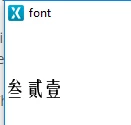
�?? = (U+53C1)
贰 = (U+8CB3)
壹 = (U+58F9)
If i define a range of 0x0-0xe000 my Font_FZYTK_TTF_20_4bpp.cpp is 10MB and it has the following:
// Unicode: [0x58F9, ]
 0x00, 0x00, 0x00, 0xFA, 0x01, 0x00, 0x00, 0x00, 0x00, 0x00, 0xFA, 0x01, 0x00, 0x00, 0xC1, 0xCC, 0xCC, 0xFE, 0xCC, 0xCC, 0x6C, 0x00, 0x00, 0x00, 0xFA, 0x01, 0x00, 0x00, 0x00, 0x11, 0x11, 0xFA, 0x11, 0x11, 0x00, 0x20, 0xDD, 0xDD, 0xDD, 0xDD, 0xDD, 0x03, 0x70, 0x03, 0x00, 0x00, 0x00, 0x00, 0x66, 0xF2, 0xCE, 0xCC, 0xCC, 0xCC, 0xCC, 0xDF, 0xF2, 0x07, 0x00, 0x00, 0x00, 0x00, 0xDE, 0xF1, 0xC7, 0xCC, 0xCC, 0xCC, 0x8C, 0x47, 0x00, 0x40, 0x01, 0x00, 0x00, 0x56, 0x00, 0x00, 0xF1, 0x7B, 0x77, 0x77, 0xDF, 0x00, 0x00, 0xF1, 0x4A, 0x44, 0x44, 0xDE, 0x00, 0x00, 0xF1, 0x07, 0x00, 0x00, 0xDE, 0x00, 0x00, 0xF1, 0xAD, 0xAA, 0xAA, 0xDF, 0x00, 0x00, 0xE1, 0x18, 0x11, 0x21, 0x9E, 0x00, 0x00, 0x00, 0x4B, 0x00, 0x90, 0x04, 0x00, 0x00, 0x00, 0xC6, 0x00, 0xA3, 0x00, 0x00, 0xC3, 0xCC, 0xEC, 0xCC, 0xDE, 0xCC, 0xCC,
The other two unicodes are present as well.
You've made a slight mistake in your code. The designer already set the buffer for you, so you do not need to do it again. Also, when you simply paste the rendered characters into code i'm not sure this will always go well.
Try using unicodes instead - This makes your application work for me =)
void Screen1View::setupScreen()
{
 Screen1ViewBase::setupScreen();

 Unicode::UnicodeChar tmp[5] = { 0x53C1, 0x8CB3, 0x58F9, 0x0};
 Unicode::strncpy(textArea1Buffer, tmp, TEXTAREA1_SIZE);
 textArea1.resizeToCurrentText();
}
(I added a call to resize to the current text, but you don't need that).
/Martin