
MHetm
Associate
July 25, 2019
Solved

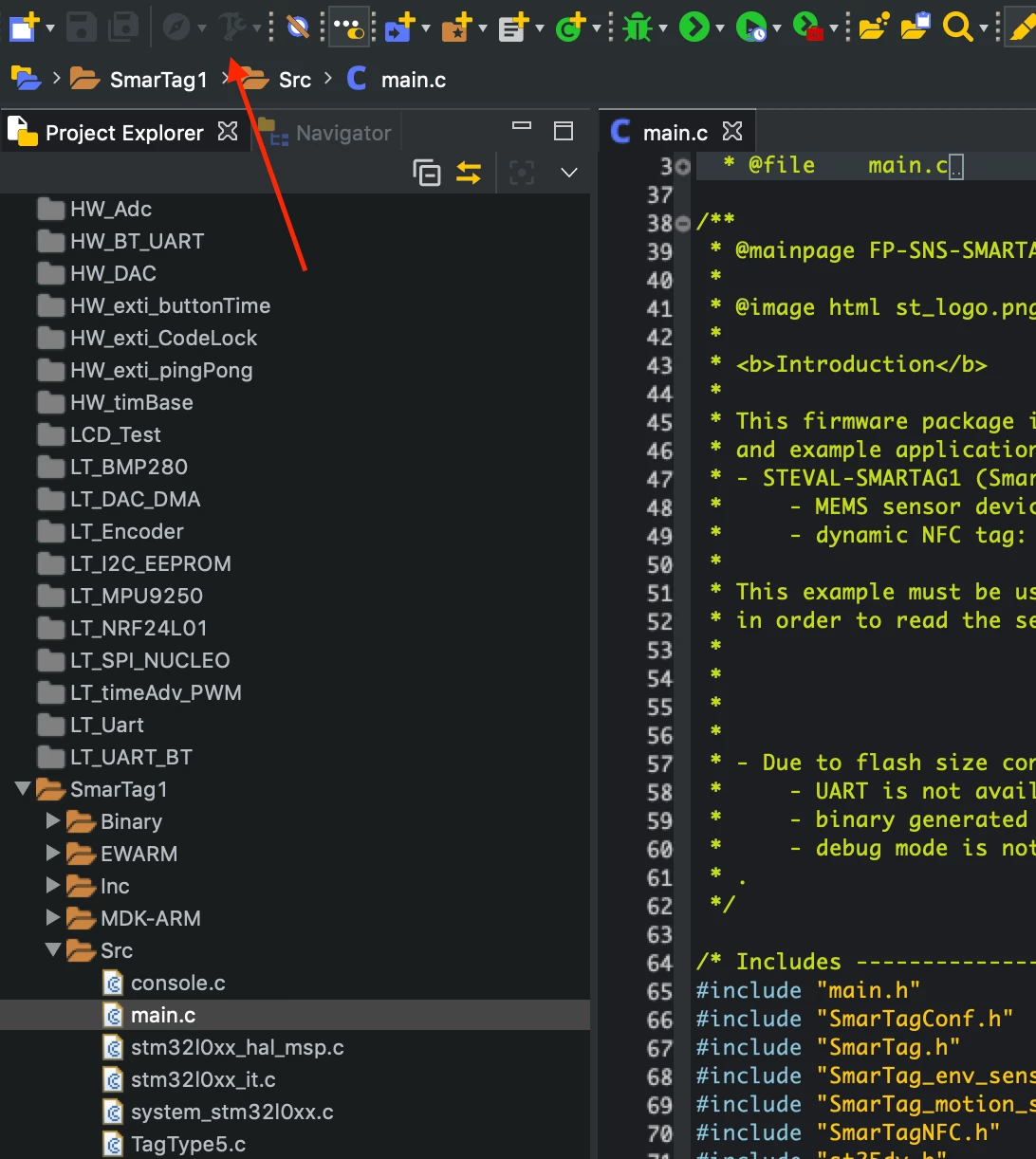
Hello! I'm using the Workbench Systems on a Mac. I downloaded FP-SNS-SMARTAG1, imported a project for SMARTAG1 to Workbench, but I do not have the Build button active

  • July 25, 2019
  • 1 reply
  • 1316 views

0690X000009Z5cMQAS.png

This topic has been closed for replies.
Best answer by Salvatore Curti

Hi,

I verified that the project with the latest version of the SW4STM32 for MAC is ok (the build button is active and the project build without errors).

One note:

  • the project for SW4STM32 there is for only nucleo project.
  • binary generated by SW4STM32 for STEVAL-SMARTAG1 is more than the flash dimension, so due to flash size constraints the SW4STM32 project is removed for STEVAL-SMARTAG1
    • the build button for STEVAL-SMARTAG1 is not active because the project there is not in the package.

It is a known issue, as you can read in the release note:

ISSUE

  • Due to flash size constraints on STEVAL-SMARTAG1:
    • UART is not available
    • Binary generated by System Workbench for STM32 is not available (the IDE project is removed)
    • Debug mode is not available.

Regards,

Salvatore Curti.

1 reply

Salvatore Curti
Salvatore CurtiBest answer
ST Employee
September 2, 2019

Hi,

I verified that the project with the latest version of the SW4STM32 for MAC is ok (the build button is active and the project build without errors).

One note:

  • the project for SW4STM32 there is for only nucleo project.
  • binary generated by SW4STM32 for STEVAL-SMARTAG1 is more than the flash dimension, so due to flash size constraints the SW4STM32 project is removed for STEVAL-SMARTAG1
    • the build button for STEVAL-SMARTAG1 is not active because the project there is not in the package.

It is a known issue, as you can read in the release note:

ISSUE

  • Due to flash size constraints on STEVAL-SMARTAG1:
    • UART is not available
    • Binary generated by System Workbench for STM32 is not available (the IDE project is removed)
    • Debug mode is not available.

Regards,

Salvatore Curti.
