

idrissmc
Associate III
July 14, 2019
Question

use an exsiting project

  • July 14, 2019
  • 1 reply
  • 914 views

hi ST Community,

I have a problem with my project:

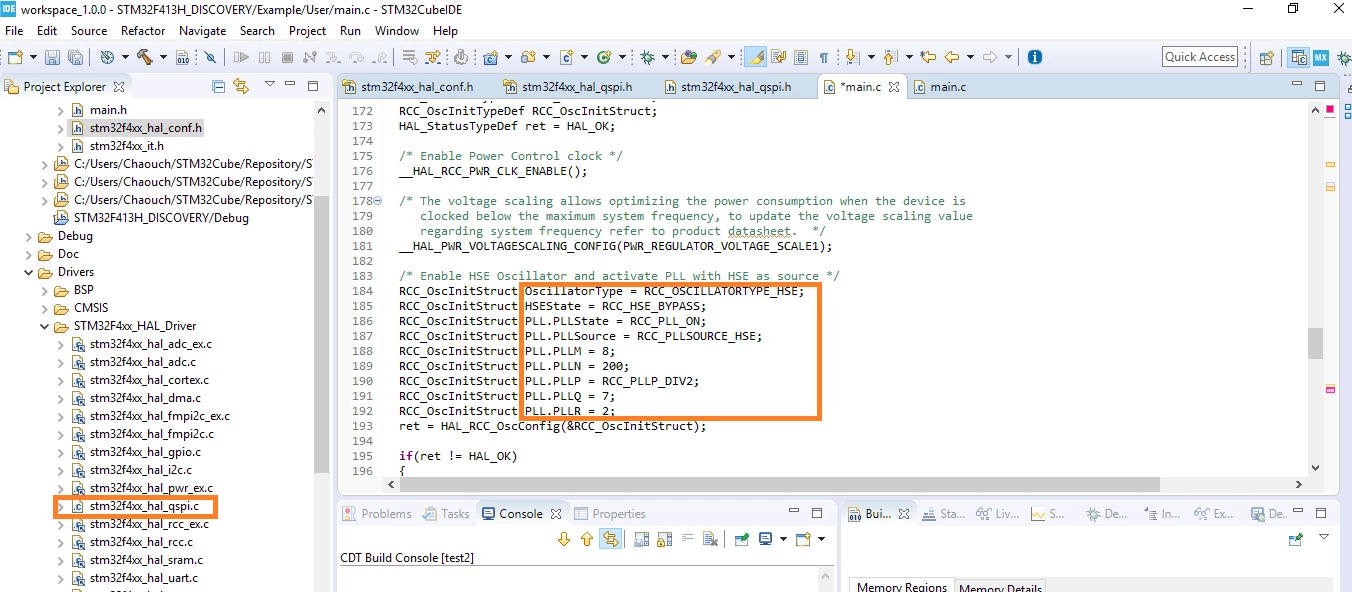
so I want to use an exsiting project in the repository (STM32Cube), I enabled the QSPI in stm32f4xx_hal_conf.h then I create a new file called stm32f4xx_hal_qspi.c and I copied the contents of the same file generated by CubeMX in this file which I saved it in the folder where we find all the .c files. I can't understand why the Instance and the Handle TypeDef are't in BLUE!

also the QSPI.c file I created by myself as explained above.

here a picture.

thank you0690X000009YiR5QAK.png
This topic has been closed for replies.

1 reply

Tesla DeLorean
Guru
July 14, 2019

Not sure what the picture illustrates, your post doesn't discuss the RCC and not sure what is supposed to be blue.

Tips, Buy me a coffee, or three.. PayPal Venmo (See Profile) Up vote any posts that you find helpful, it shows what's working..
idrissmc
idrissmcAuthor
Associate III
July 14, 2019

I just screen the RCC code as an example so for ADC Code isn’t blue too! I mean hadc.Instance, hadc.Init.ClockPrescaler ... (Instance and ClockPrescaler are supposed to be Blue) then same for RCC (PLL.PLLState...), this is the first point.

the second point I want to understand how to add header file and source file to a project to add Qspi for example ( because the project doesn’t contain these files (.c and .h))
