

Zui
Senior
June 11, 2019
Question

Assertion failed when using simulator ONLY from mvs

  • June 11, 2019
  • 2 replies
  • 1089 views

I'm working on a project on the STM32F746G-DISCO board, a colleague modified it to be used in kyle and succesfully be loaded on bord, and now when i launch the simulator via touchGFX designer, everything seems to works fine, but when i launch it from visaul studio i have this when i open one of my screen(yes, just one, the others works fine)0690X000008iShlQAE.png
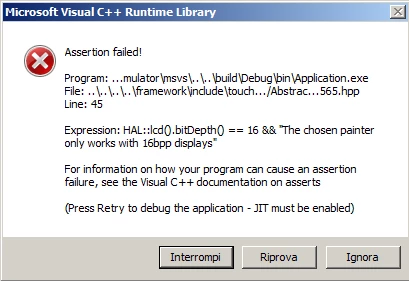
should i modify something from cubeMx?

Thanks

Stefano

This topic has been closed for replies.

2 replies

Martin KJELDSEN
Principal III
June 11, 2019

Hi @Zui​,

This is probably because your project uses a 16bit painter for a Canvas widget, but.. the bitdepth of your application is actually 24 - And does not match. Please check the following file in the root of your application for the <useBPP> :

config/msvs/Application.props

/Martin

Martin KJELDSEN
Principal III
June 11, 2019

Here's an example from a default configuration made with CubeIDE - So, basically you can could be linking with various combinations of objects that match a certain bitdepth but some configurations do not work, hence the asserts. e.g. If you were to use an RGB888 painter with LCD16, that would not work either.

<?xml version="1.0" encoding="utf-8"?>
<Project xmlns="http://schemas.microsoft.com/developer/msbuild/2003" ToolsVersion="4.0">
 <ImportGroup Label="PropertySheets"/>
 <PropertyGroup Label="UserMacros">
 <UseBPP>24</UseBPP>
....
</Project>