ikassma
Associate III
Apr 12, 2019 5:32 AM UTC
Question

how to scroll container scroll bar limit set?

I am creating my menu using ListLayout Example of TouchGFX example code.

I want to set the Limit of the Scrollbar. But when I reviewed the current example and Class, I could not find that part.

How can I set Limit ?????

​

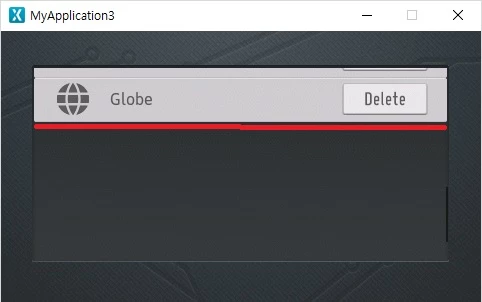
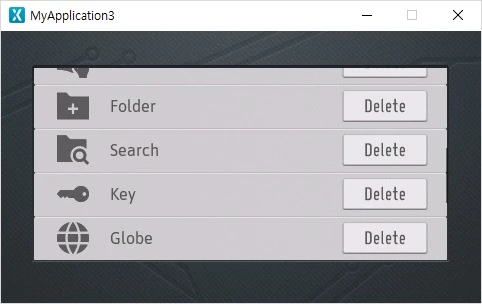
The end of the current list is similar to the one below, but I want to make the end of the list like the second one.

​

1st.0690X000008AQxAQAW.jpg

2nd.

0690X000008AQxOQAW.jpg

This topic has been closed for replies.

10 replies

apll
Associate II
May 3, 2019 3:50 PM UTC

@ikassma​ do you resolve this problem?

ikassma
ikassmaAuthor
Associate III
May 5, 2019 1:08 AM UTC

no,i don't

ihsanoglu
Senior
May 6, 2019 1:15 PM UTC

same problem here :)

ihsanoglu
Senior
May 6, 2019 1:16 PM UTC

Its like the scrolling limit value is somehow set to the upper side of the container instead of the lower side

Martin KJELDSEN
Principal III
May 7, 2019 11:00 AM UTC

The height of the "list" member in the ListView example controls this behavior. Try, in your concrete view constructor, adding the following line:

list.setPosition(0, 0, 250, 50 /*Previously 250*/);

ihsanoglu
Senior
May 7, 2019 11:49 AM UTC

The list member of the object is in protected scope ... and cant be accessed form the view construcor ...

ihsanoglu
Senior
Jul 24, 2019 6:38 AM UTC

Here is the answer for the question.

Simply use

setWindowSize()

From ScrollList Class.

If you have a list instance called myScrollList. And you want it to always display 5 items. You do this:

myScrollList.setWindowSize(5);

The default value is 1. So it will keep scrolling until there is 1 item displayed (Like the screenshot you shared). Set it to 5 and it won't scroll if less than 5 items are going to be visible.

RMoha.2
Associate III
Jul 14, 2020 3:48 PM UTC

setWindowSize() is a member in the ScrollList Class, not in the ListLayoutthough.

Is there a way to have the same effect of setWindowSize() in ListLayout?