

xxx
Associate
April 11, 2019
Solved

Enable touch drivers TrueSTUDIO 9.3, CubeMX 5.1, TouchGFX 4.1, on a STM32746G Discovery Board

  • April 11, 2019
  • 3 replies
  • 1266 views

I started with the tips that user @BBenn​ commented in this forum post. Eventually I was able to get a project that compiled and loaded on the target device.

The minimal gui that I generated in TouchGFX shows up on the display but the START button does not react to touches.

UPDATE: Thanks to the advice of users @eng23​and @BBenn​ I was able to get the touch driver configured. Thanks again for your help.
This topic has been closed for replies.
Best answer by eng23

Hi,

No, in fact you need to follow the instructions after this line:

"In the project add a sub-group under Drivers called BSP and add the three"

And until the QSPI part... I said EWARM because the article is organised in this way..

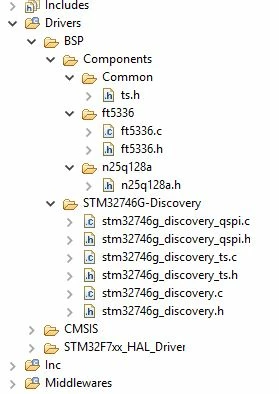
For example, your files about Touch need to be like this:

0690X000008ASUxQAO.jpg

And after you need to add the code in STM32F7TouchController.cpp like the article. Finally I think your touch will be working!

Regards.

3 replies

BBenn
Associate II
April 11, 2019

Hmmm... On the same board, touch worked just fine for my project. Did the as-shipped example firmware respond to touch? (i.e. does your hardware work?) If so, there's got to be an error in your touch configuration...

xxx
xxxAuthor
Associate
April 11, 2019

I have confirmed the hardware is functional using TouchGFX stand-alone.

Thanks again for your help.

eng23
Senior
April 11, 2019

Hello,

I followed this article to enable touch driver:

https://touchgfx.zendesk.com/hc/en-us/articles/360019884752-Configuring-STM32F746G-DISCO

In the end in section "Modifying the EWARM Project" (even if you aren't in IAR).

You can check this other tutorial to see the files about BSP and how to import the files properly.

https://community.st.com/s/article/FAQ-Enable-touch-screen-on-the-STM32F746G-Discovery

Regards.

Anderson

xxx
xxxAuthor
Associate
April 11, 2019

Are you saying that you modified your linker script according to the values that are listed under "Add the following changes to EWARM\stm32f746xx_flash.icf:"? If so, can you explain how you did that?

I also applied most what I read in the FAQ article that you linked. I stopped once I got to where the user is directed to add code that calls functions that are generated by STemwin. Is this incorrect?

Thank you for your help.

eng23
eng23Best answer
Senior
April 12, 2019

Hi,

No, in fact you need to follow the instructions after this line:

"In the project add a sub-group under Drivers called BSP and add the three"

And until the QSPI part... I said EWARM because the article is organised in this way..

For example, your files about Touch need to be like this:

0690X000008ASUxQAO.jpg

And after you need to add the code in STM32F7TouchController.cpp like the article. Finally I think your touch will be working!

Regards.
