

YAtia
Associate
February 19, 2019
Solved

STM32F407G-DISC1 goes to unspecified

  • February 19, 2019
  • 25 replies
  • 4086 views

Hello, I have an STM32F407G-DISC1 and it has not been fun. when I try to plug it into my PC it always goes to Unspecified in Device and printers. i have tried this on 2 pcs ant the same thing happens. Thank you if you read this!

This topic has been closed for replies.
Best answer by Mon2

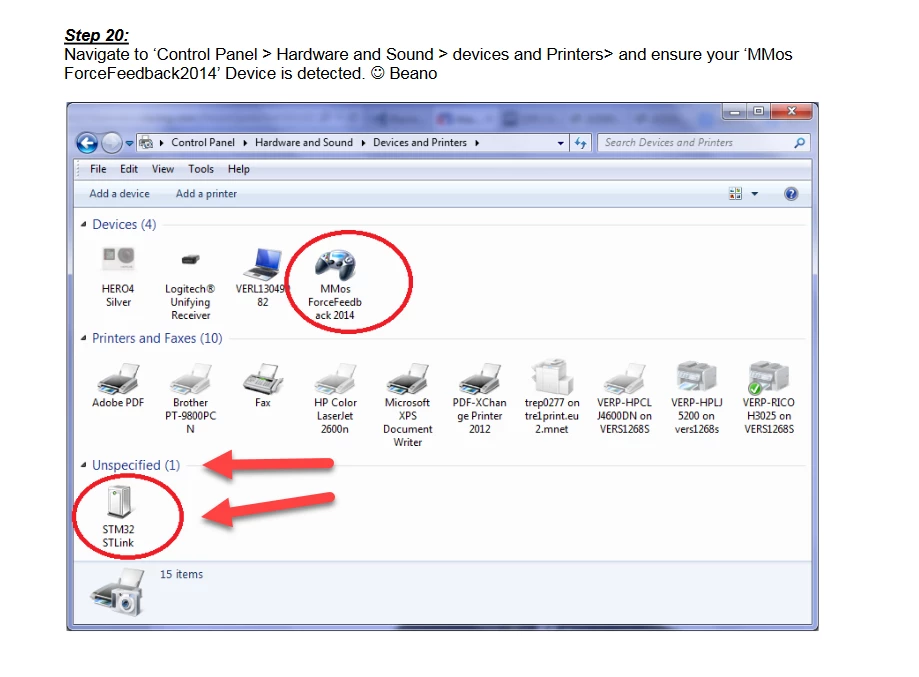
Step 20 of your posted PDF document shows the STLink in same location :)

0690X000006DiAtQAK.png

25 replies

Piranha
Principal III
February 19, 2019

Install the driver:

https://www.st.com/en/development-tools/stsw-link009.html

After that also it is suggested to update ST-Link firmware:

https://www.st.com/en/development-tools/stsw-link007.html

YAtia
YAtiaAuthor
Associate
February 19, 2019

This did not work thank you for contributing though!

Mon2
Senior III
February 19, 2019

What is the history of the USB cable? Was it supplied with the kit or sourced elsewhere?

Consider to source a quality USB cable that is as short as practical for your development but must be fully loaded. There are many USB cables that feature only Vbus & Ground (ie. missing the signal D+ / D-) that may raise the same fault.

Please post your update after testing.

YAtia
YAtiaAuthor
Associate
February 19, 2019

I just bought a mini usb cable on ebay i dont know if it is missing anything do you have a link i can buy one?

waclawek.jan
Super User
February 19, 2019

Which end of the DISCO board are you trying to connect to PC?

JW

YAtia
YAtiaAuthor
Associate
February 19, 2019

I am using the mini usb port

Mon2
Senior III
February 19, 2019

Very good call @Community member​, the MINI USB connector (larger one of the 2 on this kit) MUST be used to develop with the kit. Then you should see the enumeration of the ST-Link front end tool.

0690X000006Di7GQAS.png

YAtia
YAtiaAuthor
Associate
February 19, 2019

I am using the mini usb port thank you for trying to help!

Mon2
Senior III
February 19, 2019

If you have a continuity meter handy, you can probe each pin of the cable. That is, insert the cable into the mini USB connector of the kit but do not mate with the PC. Then check the continuity of the free USB Type A connector to the kit. It is possible that you have only a "charging cable" - openly we wasted some time on this ourselves in the lab. Vendor must have saved pennies for this garbage cable.

Are you in the US or Canada?

If yes, we use Arrow all the time due to the FREE shipping on any purchase and next day delivery. Better than Amazon :)

Here are some that would work fine but do review the length of each:

https://www.arrow.com/en/products/88732-8510/molex

* USB 1.1 spec but is fully loaded with all 4 wires

* USB 2.0 is a better choice so you can use the same cable anywhere

  • 0.8 mm

https://www.arrow.com/en/products/ak672m-1/assmann-wsw-components-inc

  • 1 m length & USB 2.0 compliant

If in a pinch, you may be able to source one locally at the Dollar Store but could not guarantee the pinout. Walmart is another choice but will be more $$ than Arrow.

Before you proceed, do check the properties of the USB device inside of your Device Manager and share the details.

Control Panel -> Device Manager -> Select the Yellow Marked function -> Details -> Hardware IDs

What does that show? A proper USB widget must emit valid IDs and are listed here.

Hope this helps.

YAtia
YAtiaAuthor
Associate
February 19, 2019

https://gyazo.com/4bf12174163d91976c9f8ebc52ccbd93 that is what i see in device manager but in device and printers i see this

https://gyazo.com/78fdf47fef294a9bd74c95961cee855e i need it to say something else so i can complete my project and im in the usa

Mon2
Senior III
February 19, 2019

Hang on a sec - the screen looks good. If you remove the cable, does the ST Link icon get removed?

Is it possible that you may have some older device drivers on this box for this kit?

Consider to right mouse click on this function and select to remove AND delete the driver package. This procedure will then remove the driver from your box.

Unplug the cable and seat it back again to your USB port on your PC. Does the kit get installed with a driver? If yes, repeat the above procedure. You are basically removing any and all compatible drivers from your PC. We have had to do this on some of our older PC boxes. Once this was done, proceed to download the latest driver package noted above by @Community member​.

waclawek.jan
Super User
February 19, 2019

That was @Piranha​  not me :)

Mon2
Senior III
February 19, 2019

Hmm. Which OS are you on? Is that Windows 10? Somewhere around here believe to have the same kit but on Windows 7 (64 bit).

What does your toolchain report? It cannot locate the kit?

YAtia
YAtiaAuthor
Associate
February 19, 2019

I am on windows 10 and what is a toolchain?

Mon2
Senior III
February 19, 2019

Toolchain = buzzword for the software tools that will make use of your kit.

What is your compiler? Does your compiler complain about this kit? Perhaps it will work regardless of where it is listed under Device Manager.

If you have not done so already, install Cube MX (latest version); also ST-Link utilities and the CubeF4 package:

https://www.st.com/en/development-tools/stsw-link004.html

  • after installing and running this tool - is this program able to locate your kit?

https://www.st.com/content/st_com/en/products/embedded-software/mcus-embedded-software/stm32-embedded-software/stm32-standard-peripheral-library-expansion/stsw-stm32068.html

https://www.st.com/content/st_com/en/products/embedded-software/mcus-embedded-software/stm32-embedded-software/stm32cube-mcu-packages/stm32cubef4.html

YAtia
YAtiaAuthor
Associate
February 19, 2019

I use stlink already but not cube f4. I am making a steering wheel with this board it will be controled using a software called "MMos Force feedback 2014".

Mon2
Senior III
February 19, 2019

Does the STLINK program detect the kit? There is a CONNECT option in one of the pull-down menus. Does that work to locate the kit?

Target -> Connect

What is the reported message?

YAtia
YAtiaAuthor
Associate
February 19, 2019

Yes it connects

Mon2
Senior III
February 19, 2019

Ok :) Then what is the issue?

If this connects, you are good to go and can use the kit.

YAtia
YAtiaAuthor
Associate
February 19, 2019

In device and printers it should not be in unspecified it should be in devices correct?

YAtia
YAtiaAuthor
Associate
February 19, 2019