

jwhit.10
Associate
February 3, 2019
Solved

Always get STUSB4500 Not Detected message when using NVM GUI

  • February 3, 2019
  • 8 replies
  • 3941 views

I have checked and re-checked this. Also used another USB to I2C converter and can read the registers just fine. Put an I2C analyzer on the setup and I see no activity when the GUI program starts.

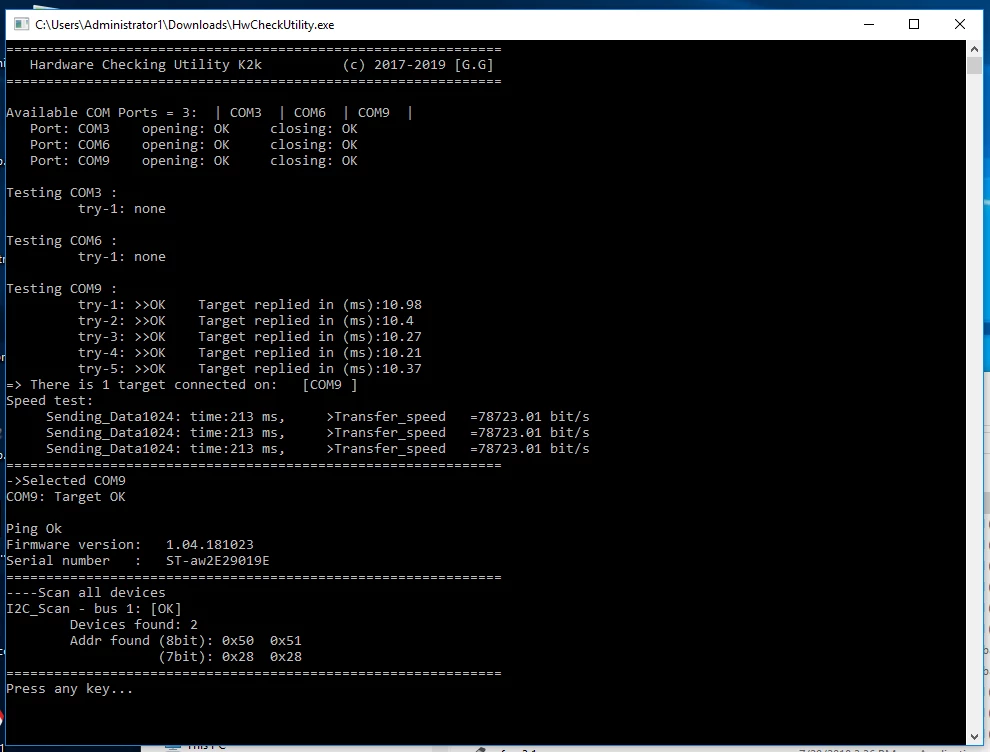
Today on Github I found a HwCheckUtility.exe file. It launches, finds the com port and then indicates it found the I2C device at 0x28 address. I also see the scan on the logic analyzer.

I am now at a loss as to what do next.

GUI version is 1.06S. Thanks
0690X000006DMH6QAO.png

This topic has been closed for replies.
Best answer by Gregory Go.

Here is the latest one

8 replies

Gregory Go.
Senior III
February 7, 2019

Hello,

There is a known issue with the GUI on some computer configuration with several COM ports, where the port on which is connected the Nucleo board is not detected automatically.

Please use the updated version attached. It should resolve the port detection.

Check also that you have VC++ 2015 runtime properly installed.

Prerequisites for STUSBxx GUI:

• 1) On Windows 7, install: STM32 Virtual COM Port Driver (STSW-STM32102)

  http://www.st.com/en/development-tools/stsw-stm32102.html

On Windows 10, no need to install additional drivers, because the USB CDC driver is already installed by default.

• 2) Install: Microsoft Visual C++ 2015 Redistributable Update 3

  https://www.microsoft.com/en-us/download/details.aspx?id=53587

jwhit.10
jwhit.10Author
Associate
February 7, 2019

Gregory

Thank you so much. Once I test it, I will report back.

Gregory Go.
Gregory Go.Best answer
Senior III
February 9, 2019

Here is the latest one

jwhit.10
jwhit.10Author
Associate
February 14, 2019

Gregory

Thank you for the new GUI. I used the latest one and it is now talking to the development board. So it looks like my problem is solved.

NOTE: On my Lenovo laptop (WIN 10), I had to install the 32 bit Microsoft Visual C++ 2015 Redistributable Update 3. Even though this is a 64 bit laptop, it wanted the 32 bit dll. No problem, it works which is all I want.

MRex
Associate III
March 13, 2019

How did you know that you needed 32 bit Microsoft Visual C++ 2015 installed? The documentation talks about needing 2012 and including some of the dll's, but this is ST's documentation problem (and now mine) if you actually needed 2015 for it to work.

I already had C++ 2012 and 2017 for x86 and x64, so now I'm hoping 2015 is the difference. Had to uninstall 2017 to install 2015 and then reinstalled the 2017's.

Before uninstalling 2017 and installing 2015, the application could NEVER see the Nucleo. So I think JUST 2012 runtimes may not be enough. Annoying because I lost half a day to this problem before finding this post.

Now my Nucleo can be seen, but still not successful in talking to my STUSB4500. But that's likely an I2C wiring issue since you've confirmed 1.07 GUI version worked for you in the end.

Thanks
