sliu.5
Associate III
November 16, 2018
Solved

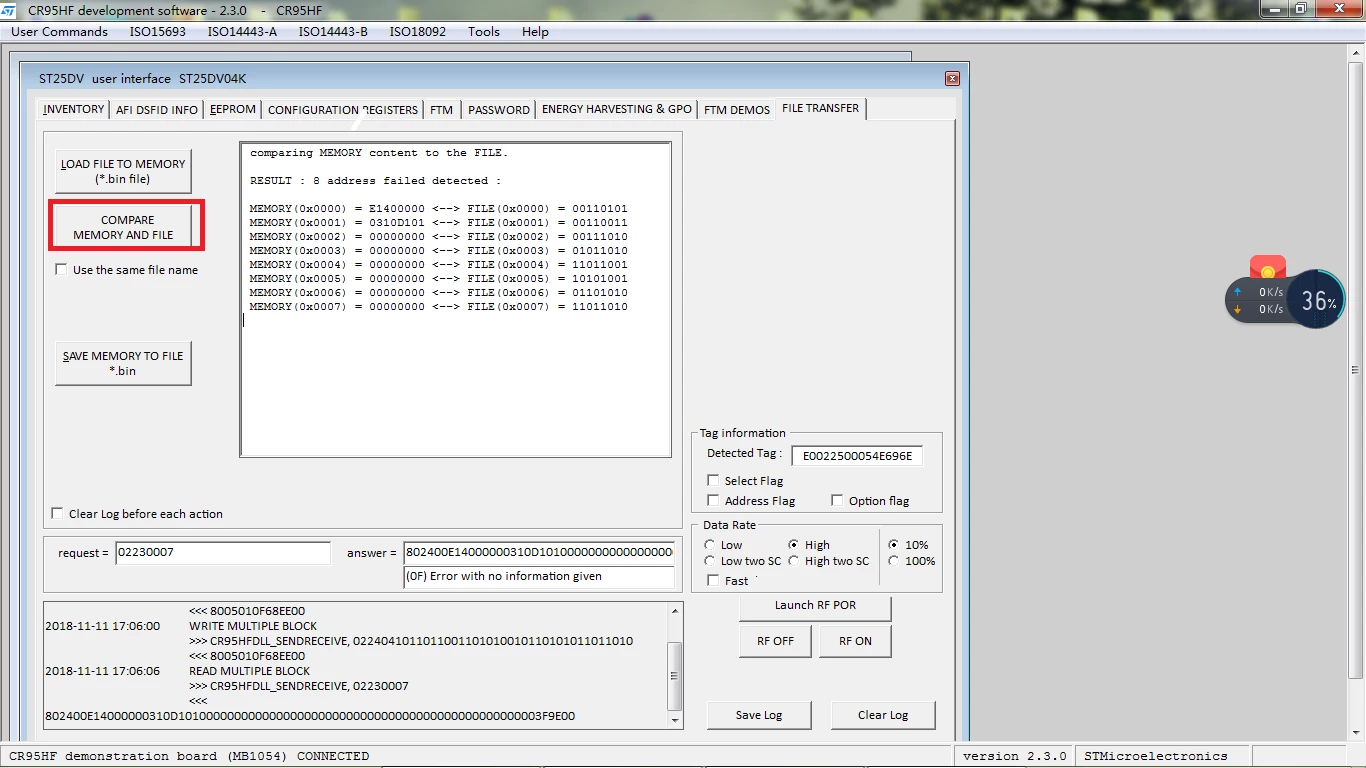
mode of FILE TRANSFER load file ( a bin FILE ) to memory ,why different with EEPROM. The picture FOLLOW.

  • November 16, 2018
  • 10 replies
  • 4047 views

@0690X000006CO8lQAG.png

This topic has been closed for replies.
Best answer by NFC/RFID Customer support

​Hello,

after deeper investigations, the issue could be from write to memory process included in the PC Software. Please find attached a new version of the PC software that can solve your issue. (Install attached file to get revision 2.3.1). This new version will be vailable on internet web site in few days.

If the issue is not corrected with the update, please check your binary file editor : it MUST display hexadecimal data, not binary data.

Best regards

NFC/RFID Customer support

10 replies

NFC/RFID Customer support
ST Employee
November 16, 2018

Hello,

It is very difficult to answer to your question regarding the little given informations.

Anyway, seeing the picture and 00110101 data in file, I suppose that the format of the binary file is not the good one. Binary file must contains BYTE informations and not BIT informations. I suggest to use a specific software to edit and create your comparison file (exemple Hex Editor).

I take this post to tell you a new software that can be used to manage CR95HF & ST25DV : ST25PC-NFC PC software

www.st.com/st25pc-nfc/

Best regards

NFC/RFID Customer support

John_zhang
Associate II
November 18, 2018

0690X000006COUIQA4.bmpHi,

www.st.com/st25pc-nfc/ is not available, 404 Error Page

BR

John

NFC/RFID Customer support
ST Employee
November 19, 2018

Hi, this link should be good​

www.st.com/st25pc-nfc or www.st.com/st25pcnfc

Best regards

NFC/RFID Customer support

NFC/RFID Customer support
ST Employee
November 20, 2018

​Hello,

after deeper investigations, the issue could be from write to memory process included in the PC Software. Please find attached a new version of the PC software that can solve your issue. (Install attached file to get revision 2.3.1). This new version will be vailable on internet web site in few days.

If the issue is not corrected with the update, please check your binary file editor : it MUST display hexadecimal data, not binary data.

Best regards

NFC/RFID Customer support

sliu.5
sliu.5Author
Associate III
November 21, 2018

thanks I success:face_with_tears_of_joy:

NFC/RFID Customer support
ST Employee
November 21, 2018

​Sure, ST25DV04K is 100% compatible with ST25DV64K.

ST25DV64K will support additional commands such as Extended Read commands and Extended Write commands to be able to access memory address > 0xFF (2 bytes address size).

sliu.5
sliu.5Author
Associate III
November 21, 2018

OK thank you very much:smiling_face_with_heart_eyes: .

sliu.5
sliu.5Author
Associate III
November 28, 2018

I want sak more a question,when I write file(the bin file ),the reader wrote a block (four byte)to tag every time ,how to designer reader for writing more block to tag every time.for example two block or more.