ttatakis
Associate III
September 25, 2017
Question

STM32Cube does not run

  • September 25, 2017
  • 1 reply
  • 768 views
Posted on September 25, 2017 at 22:10

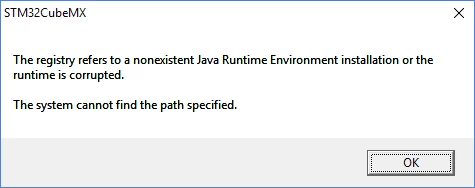
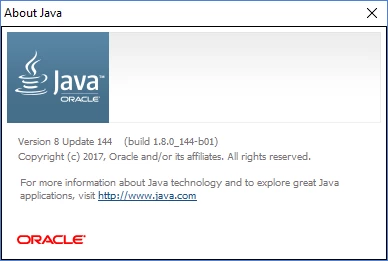
I just installed STM32CubeMX on my Windows 10 machine.  When I try and launch it, I get the following error.  How can I fix this?  I have Java installed- for many environments and the Java About returns the message below

0690X00000608NIQAY.png0690X00000608NlQAI.png
    This topic has been closed for replies.

    1 reply

    Tesla DeLorean
    Guru
    September 25, 2017
    Posted on September 25, 2017 at 22:19

    >> How can I fix this?

    Go into the registry and find the node that points to a deleted/replaced version of Java. Then delete that node.

    http://www.google.com/search?q=java+registry+cleanup

     
    Tips, Buy me a coffee, or three.. PayPal Venmo (See Profile) Up vote any posts that you find helpful, it shows what's working..
    ttatakis
    ttatakisAuthor
    Associate III
    September 25, 2017
    Posted on September 25, 2017 at 23:11

    I tried that but I still get the same message. Any chance you could tell

    me which registry entry it is looking at?

    On Mon, Sep 25, 2017 at 4:20 PM, Clive One <st-microelectronics@jiveon.com>

    Tesla DeLorean
    Guru
    September 26, 2017
    Posted on September 26, 2017 at 00:10

    I'm sure it is enumerating through them, so machine specific.

    I've seen JRE updates do a clean-up. Might want to double check for 'Installed Programs', making sure there aren't assorted versions.

    https://www.java.com/en/download/faq/remove_olderversions.xml


    ST might be able to provide specifics of what they enumerate, or be able to provide additional diagnostic output, I am not ST.

    Check also if anything is listed in the PATH environment variable. Open a DOS Box, type PATH

    Tips, Buy me a coffee, or three.. PayPal Venmo (See Profile) Up vote any posts that you find helpful, it shows what's working..