SoHaeng.Lee
Associate III
December 15, 2016
Question

How to use CubeMX to configure LCD on 469i-Disco Board?

  • December 15, 2016
  • 2 replies
  • 862 views
Posted on December 15, 2016 at 10:37

Hi,

I'm using BSP Library for STM32469i-Discovery.

Create a new project using CubeMX, added some code and compile it.

the result is here.
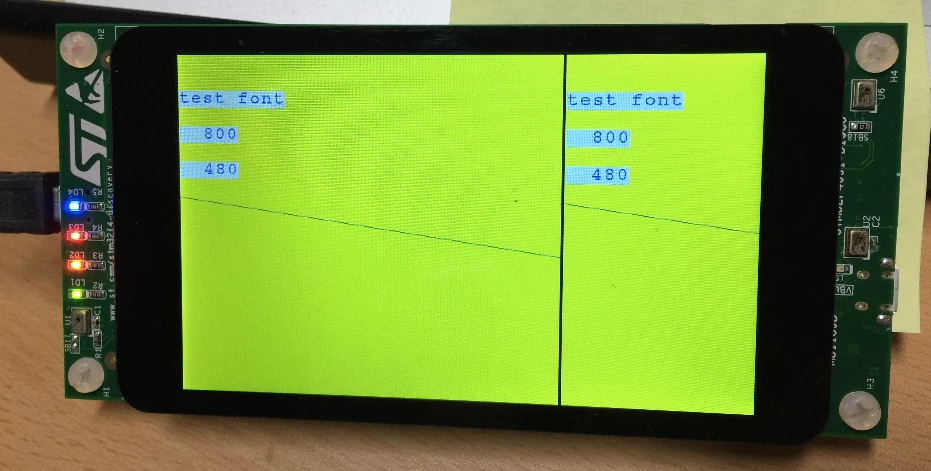
0690X00000605qBQAQ.png

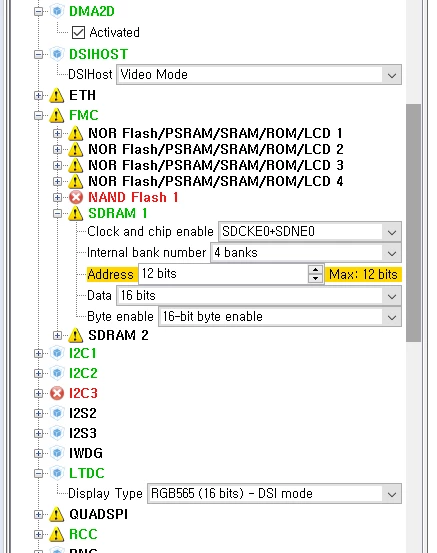
my CubeMX project configure is here.
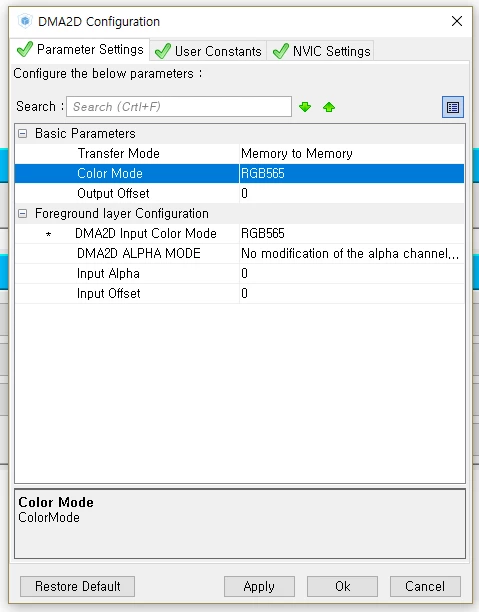
0690X00000605sCQAQ.png0690X00000605sDQAQ.png

No change is made to any configure LCD.

here is my main code....


/* USER CODE BEGIN 2 */

  BSP_LCD_Init();

  BSP_LCD_LayerDefaultInit(LTDC_DEFAULT_ACTIVE_LAYER, LCD_FB_START_ADDRESS);

  BSP_LCD_SelectLayer(LTDC_DEFAULT_ACTIVE_LAYER);

  BSP_LCD_DisplayOn();

  BSP_LCD_Clear(LCD_COLOR_RED);

  HAL_Delay(1000);

  BSP_LCD_SetTextColor(LCD_COLOR_YELLOW);

  BSP_LCD_FillRect(0,0,800,480);

  BSP_LCD_SetTextColor(LCD_COLOR_LIGHTBLUE);

  BSP_LCD_DisplayStringAt(0,50, (

uint8_t

*)

''test font''

,

LEFT_MODE

);


sprintf

(str,

''%5lu''

,BSP_LCD_GetXSize());

  BSP_LCD_DisplayStringAt(0,100, (

uint8_t

*)str,

LEFT_MODE

);


sprintf

(str,

''%5lu''

,BSP_LCD_GetYSize());

  BSP_LCD_DisplayStringAt(0,150, (

uint8_t

*)str,

LEFT_MODE

);

  BSP_LCD_SetTextColor(LCD_COLOR_DARKCYAN);

  BSP_LCD_DrawLine(0,200,800,310);


/* USER CODE END 2 */

Please, help.

#469i #lcd #stm32469i
This topic has been closed for replies.

2 replies

ST Technical Moderator
December 20, 2016
Posted on December 20, 2016 at 13:52

Dear

SoHaeng.Lee

,

You can refer to the LCD examples under STM32CubeF4 package to see their structure and configuration:

STM32Cube_FW_F4_V1.0\Projects\STM32469I-Discovery\Applications\Display

Theworking example can help you about LCD configuration and programming the display.

Look at these manuals :

http://www.st.com/content/ccc/resource/technical/document/user_manual/46/68/46/e0/ee/2a/4c/11/DM00112pdf/files/DM00112pdf/jcr:content/translations/en.DM00112pdf

, in '5.1 LCD configuration'section and

http://www.st.com/content/ccc/resource/technical/document/user_manual/b7/34/4d/b8/bc/ae/47/1f/DM002188pdf/files/DM002188pdf/jcr:content/translations/en.DM002188pdf

.

Hoe this helps you.

Best Regards

-Imen-

In order to give better visibility on the answered topics, please click on 'Best answer' on the reply which solved your issue or answered your question. Thanks
SoHaeng.Lee
Associate III
December 21, 2016
Posted on December 21, 2016 at 06:00

ok, thanks.

but, i need CubeMX Project file.

I was try to find *.ioc files but, i couldn't find *.ioc files.

Jeanne Joly
Associate
May 4, 2017
Posted on May 04, 2017 at 15:29

Hello

SoHaeng.Lee

,

You are right, there is no ioc in the Repository/STM32Cube_FW_..... However, those examples aimed at being integrated manually in your ioc project.

If you need some help, don't hesitate to have a look to the following posts that will give you some tips and tricks to integrate the BSP on top of your CubeMX code generated :

i hope it will help you.

BR. Eric