jbl_raw
Associate III
May 29, 2013
Question

stm32f4 discovery st-link usb problem

  • May 29, 2013
  • 4 replies
  • 1005 views
Posted on May 30, 2013 at 00:14

i have problem with st link swd in discovery board.

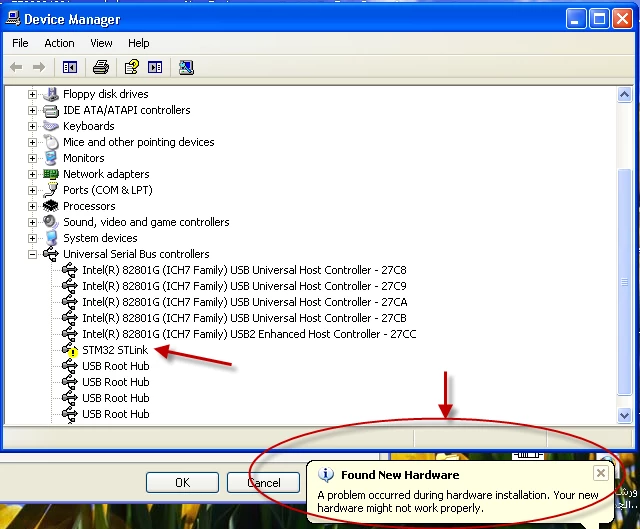
the usb device have problem in this picture. i think it need usb driver for discovery baord.

0690X00000605PpQAI.png

    This topic has been closed for replies.

    4 replies

    Tesla DeLorean
    Guru
    May 29, 2013
    Posted on May 30, 2013 at 01:22

    i think it need usb driver for discovery baord.

    Ok, so could you not locate one via a simple Google or Bing search?

    Or in a tool chain directory like \Keil\ARM\STLink which has drivers and firmware updates.
    Tips, Buy me a coffee, or three.. PayPal Venmo (See Profile) Up vote any posts that you find helpful, it shows what's working..
    jbl_raw
    jbl_rawAuthor
    Associate III
    May 31, 2013
    Posted on May 31, 2013 at 19:20

    thank you. problem is solved.

    it was need to search to found new hardware after st link driver setup

    mmensch
    Associate III
    July 30, 2013
    Posted on July 30, 2013 at 10:35

    Thanks Ahmed, that helped me too.

    To give some more info to people with that problem:

    You need to plug in the ST-Link (in my case it is an STM32F0 Discovery board), then go to Device Manager (the picture above) - Action - Search for new hardware (or so, I translated this from my windows version). The rest runs automatically.

    Maybe the problem results from first plugging in the ST Link (which leads to a failed driver install by windows) and the installing the driver with the file st-link_v2_usbdriver.exe, so maybe there is no problem when you first install the driver.

    Thanks again

    Martin

    069349773
    Associate
    July 30, 2013
    Posted on July 30, 2013 at 11:18

    I first installed the driver, rebooted PC, and only then put the usb cable, and it works )))