William chang
Associate III
February 11, 2018
Solved

Keil IDE: This target device does not support conditional breakpoints

  • February 11, 2018
  • 5 replies
  • 4992 views
Posted on February 11, 2018 at 01:36

0690X00000609RqQAI.png

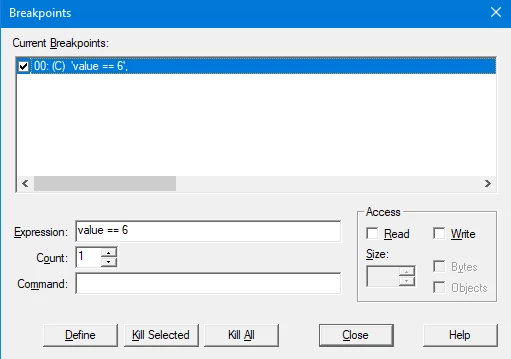
here is my conditional breakpoints settings

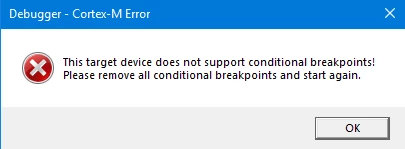
0690X00000609d2QAA.png

I took exercise as <apnt_230.pdf> did at page 11, 15) watchpoints: Conditional Breakpoints.

The application can use conditional breakpoints. Why I can't? I got a dialogue saying that My 

target device dose not support conditional breakpoints!

Actually, I am using the STMF407 Discovery board as the 

<apnt_230.pdf> using.

So, why? 

Turvey.Clive.002

http://userbadge


#conditional-breakpoints
    This topic has been closed for replies.
    Best answer by William chang
    Posted on February 11, 2018 at 10:21

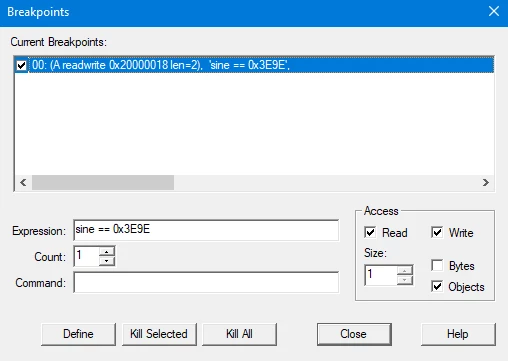
    0690X00000609fgQAA.png

    Finally, I found I forget to check the box of Read and Write.

    Turvey.Clive.002

    ‌ Don't tell Bob boys, I make a stupid mistake. ^ ^

    His notes is very helpful to get the uVision debugger working, and act like a professional.

    5 replies

    Tesla DeLorean
    Guru
    February 11, 2018
    Posted on February 11, 2018 at 03:37

    Not really functionality I use. You might want to check the state of the SB12 solder bridge, and the specific version of the board and ST-LINK firmware. Bob Boys the author of the app note is an occasional visitor here, I will share the post.

    Tips, Buy me a coffee, or three.. PayPal Venmo (See Profile) Up vote any posts that you find helpful, it shows what's working..
    William chang
    Associate III
    February 11, 2018
    Posted on February 11, 2018 at 04:06

    SB12 is connected as default.

    My ST-LINK firmware updated recently. Version: V2.J29.S0

    Here is my KEIL IDE details:

    0690X00000609fbQAA.png
    William chang
    William changAuthorBest answer
    Associate III
    February 11, 2018
    Posted on February 11, 2018 at 10:21

    0690X00000609fgQAA.png

    Finally, I found I forget to check the box of Read and Write.

    Turvey.Clive.002

    ‌ Don't tell Bob boys, I make a stupid mistake. ^ ^

    His notes is very helpful to get the uVision debugger working, and act like a professional.

    Bob Boys
    Visitor II
    February 13, 2018
    Posted on February 13, 2018 at 18:35

    Hello

    I noticed this and by the time I got to answer - you had already found the problem.

    You are not the first to forget this - I think there are three others over the years.

    So I updated the appnote a bit.  It is now on the Keil website.

    Bob

    Bob Boys
    Visitor II
    February 20, 2018
    Posted on February 20, 2018 at 20:35

    Hello

    I updated Appnote 230 and it is now on www.keil.com:: 

    http://www.keil.com/appnotes/docs/apnt_230.asp

    You can adapt this document to many other ST boards.

    There have been many improvements and additions to uVision since the last version of this document.

    Event Recorder, ULINKplus Power Measurement, FreeRTOS support, ETM trace features and so on....

    Thanks

    Bob

    San Jose, California