MDW
Associate II
May 18, 2017
Solved

Disabling flash sectors protection through dfu

  • May 18, 2017
  • 1 reply
  • 739 views
Posted on May 18, 2017 at 11:33

Hi,

Is there a way to disable the ''Flash sectors protection'' through USB (DfuSeDemo/dfu-util/...)?

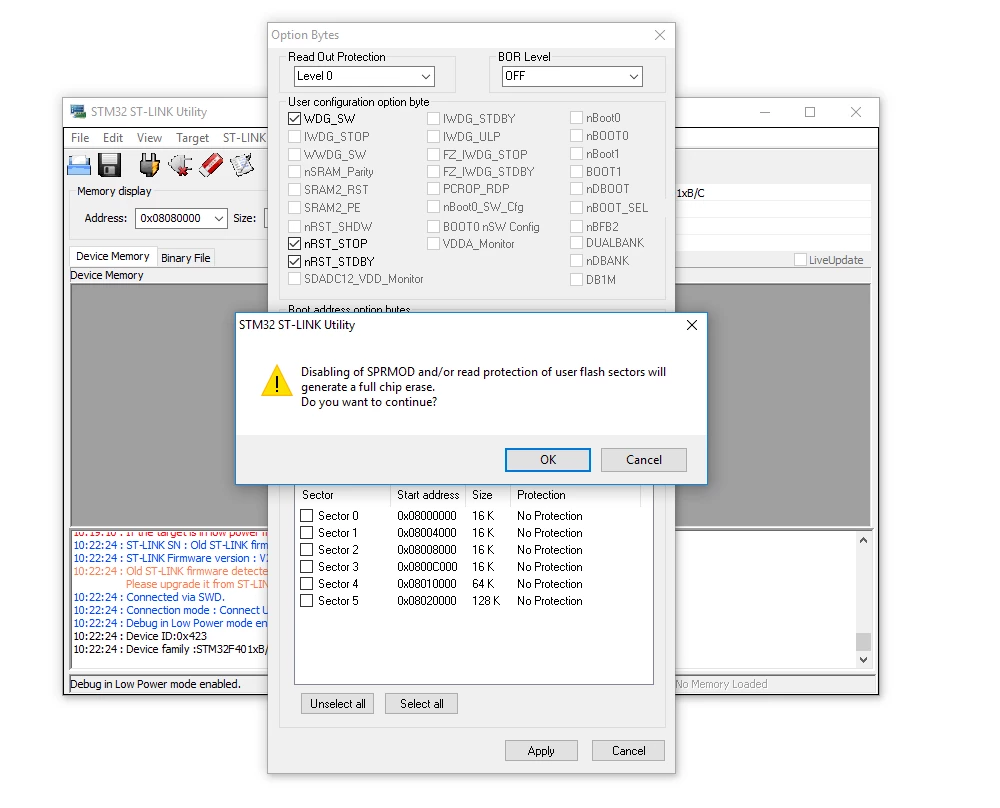
It can be done using the STM32 ST-LINK Utility,

by going to Target > Option Bytes, and unselecting all the sectors under ''Flash sectors protection''

and pressing Apply.

0690X00000606MpQAI.png

Note that the sectors were Read/Write Protected.

As described in the last post on this topic: 

https://community.st.com/message/60940


I would have to put the chip protection level to 1 and switch it back to 0 while changing the PCROP bit.

How would i go about doing this through the dfu-protocol or is this not possible.

Regards,

Michiel
    This topic has been closed for replies.
    Best answer by MDW
    Posted on June 09, 2017 at 11:57

    I have received an answer from ST

    '

    (...) this is not possible with system DFU bootloader.

    As you can find in reference manual for F401 (RM0368 rev4) page 58:

    'The deactivation of the SPRMOD and/or the unprotection of PCROPed user sectors can only occur when, at the same time, the RDP level changes from 1 to 0'

    And system bootloader is not accessible when RDP>0, so it's not possible to perform this action.

    '

    1 reply

    MDW
    MDWAuthorBest answer
    Associate II
    June 9, 2017
    Posted on June 09, 2017 at 11:57

    I have received an answer from ST

    '

    (...) this is not possible with system DFU bootloader.

    As you can find in reference manual for F401 (RM0368 rev4) page 58:

    'The deactivation of the SPRMOD and/or the unprotection of PCROPed user sectors can only occur when, at the same time, the RDP level changes from 1 to 0'

    And system bootloader is not accessible when RDP>0, so it's not possible to perform this action.

    '