

Wojciech Sura
Associate II
June 24, 2018
Question

How to configure CubeMX to enable LCD in STM32F469i-disco

  • June 24, 2018
  • 15 replies
  • 7712 views
Posted on June 24, 2018 at 22:57

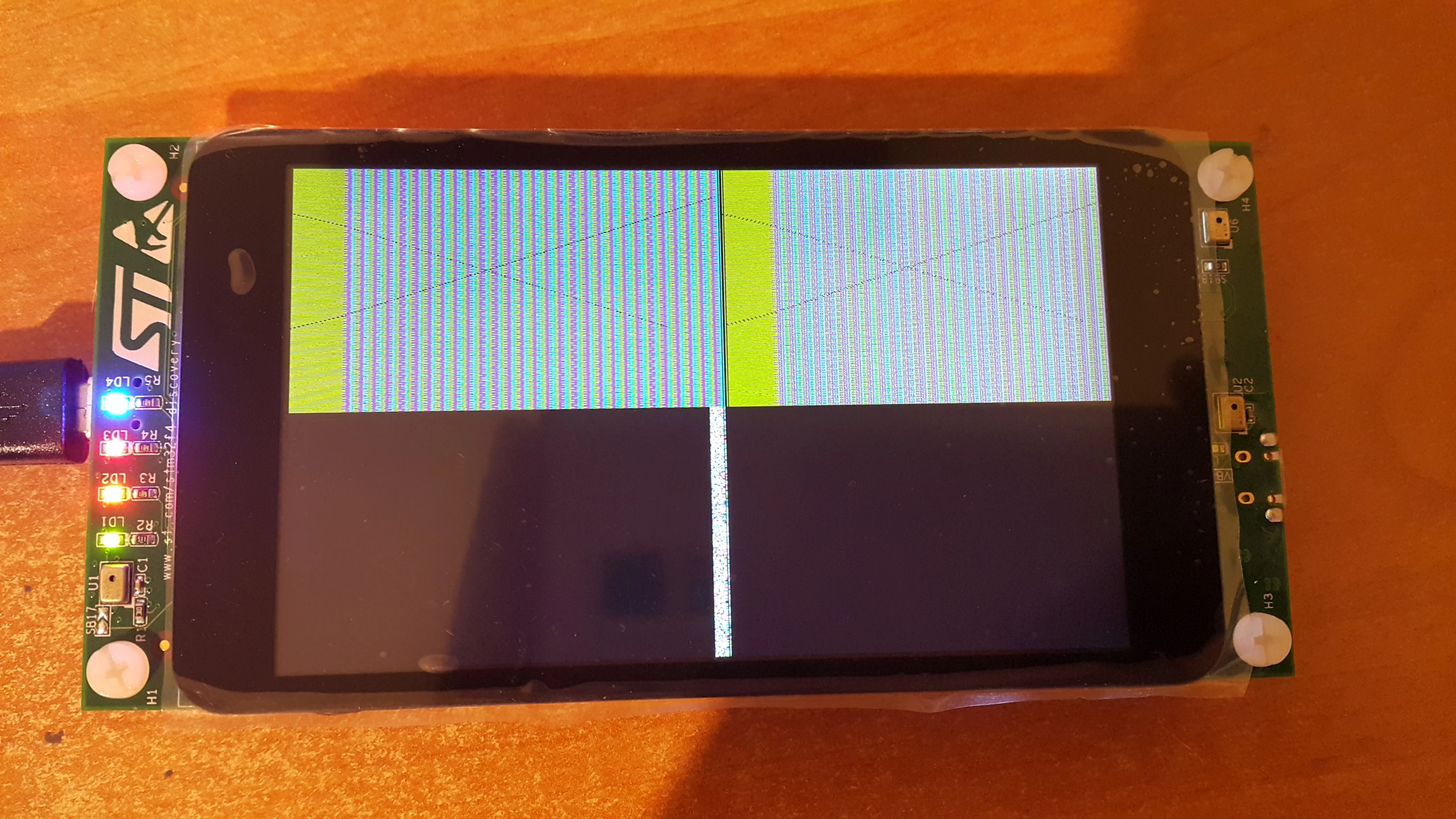
I'm hopelessly trying to configure CubeMX to enableLCD TFT on STM32F469i-disco board (bought recently if that matters). The best effect so far is the following:

_legacyfs_online_stmicro_images_0690X0000060N6OQAU.png

What I did:

1. Used CubeMX to generate configuration with all peripherials configured

2. Switched off all I did not need (for instance the RTOS, USART etc.)

3. Selectively copied BSP drivers from the CubeF4 examples. I added all dependencies (components, fonts), such that project builds correctly

4. I try to draw cross through the whole screen, important part of the main.c follows (I stripped comments to improve clarity):

int main(void) { HAL_Init(); SystemClock_Config(); MX_GPIO_Init(); MX_CRC_Init(); MX_DMA2D_Init(); MX_DSIHOST_DSI_Init(); MX_FMC_Init(); MX_I2C1_Init(); MX_I2C2_Init(); MX_LTDC_Init(); MX_QUADSPI_Init(); MX_SAI1_Init(); MX_SDIO_SD_Init(); MX_TIM1_Init(); MX_FATFS_Init(); BSP_SDRAM_Init(); BSP_LCD_InitEx(LCD_ORIENTATION_LANDSCAPE); BSP_LCD_DisplayOn(); BSP_TS_Init(800,480); BSP_LCD_LayerDefaultInit(0, 0xC0000000); BSP_LCD_SelectLayer(0); BSP_LCD_DisplayOn(); BSP_LCD_Clear(LCD_COLOR_DARKCYAN); BSP_LCD_SetTextColor(0x00000000); BSP_LCD_DrawLine(0, 0, 799, 399); BSP_LCD_DrawLine(0, 399, 799, 0); while (1) { } }

This is the best effect I could achieve, at least the lines are visible, but obviously this is not what I'm counting on.

I attached the CubeMX configuration file to this post. I'm kinda new in microcontroller programming (a background with Arduino only), so I have no clue, what might I misconfigured. As the source is really simple, I guess, there's something in CubeMX, that I have misconfigured or not configured, but I'm running out of ideas. I looked at the CubeF4 demos, but they lack CubeMX configuration files. Also, I failed to deduce from the sources, how to configure the LTDC in CubeMX.

I can attach the whole project if needed (though there is nothing more than HAL and BSP copied from F4).

What am I missing? How can I fix the configuration? Is there a place in the Internet that shows how to configure CubeMX for LCD?

#stm32f469-discovery #stm32f469-dsi #lcd

This topic has been closed for replies.

15 replies

ST Technical Moderator
June 25, 2018

Posted on June 25, 2018 at 12:51

 Hello wojciechsura,

It may be is due to the LCD configuration.

I recommend you to follow AN4861 (https://www.st.com/content/ccc/resource/technical/document/application_note/group0/25/ca/f9/b4/ae/fc/4e/1e/DM00287603/files/DM00287603.pdf/jcr:content/translations/en.DM00287603.pdf), it may help you on the LCD configuration.

https://community.st.com/0D50X00009bMM6QSAW

With Regards,

Imen

PS: Manually edited by Amel NASRI on 27/09/2019 to fix link to AN4861 

In order to give better visibility on the answered topics, please click on 'Best answer' on the reply which solved your issue or answered your question. Thanks
Wojciech Sura
Associate II
June 25, 2018
Posted on June 25, 2018 at 21:50

Hi Imen, thanks for the answer.

Since STMF469I-Disco is a very specific piece of hardware, could you give us a hint about the settings? I already saw the document you linked, but it mostly defines boundaries, but does not specify, what values should we enter for certain parameters and there are a lot of them - especially for beginners (clock, pixel format, synchronization to name a few). Also it seems, that there might be some kind of generic problem, as Arthur Jordan seemed to have problem either identical or very similar to mine (I can no longer see his post though).

Maybe you could provide us with pre-configured CubeMX file to work with BSP? I managed to include BSPs into my project without bigger problems, it's mostly about setting proper include directories.

Best regards -- Wojciech 'Spook' Sura.

Arthur Jordan
Visitor II
June 27, 2018
Posted on June 27, 2018 at 06:37

PS: From Imen's suggestion I just stumbled upon the AN4860 (

https://www.st.com/content/ccc/resource/technical/document/application_note/group0/1d/b8/33/4f/dc/0a/45/52/DM00287601/files/DM00287601.pdf/jcr:content/translations/en.DM00287601.pdf

 )

which, besides explaining the DSI part, describes how to set up the DSI host in CubeMX. Unfortunately I cannot dig deeper into the subject this week due to time constraints but I sure will. Hope this helps someone.

Arthur Jordan
Visitor II
June 25, 2018
Posted on June 25, 2018 at 16:59

Hello,

I'm having the same issues with the STM32F469I-DISCO and CubeMX-generated code. After setting up all BSP files and getting the project to compile without problemsI got a very similar output on the LCD.The text is a little blurry but readable. I'm also outputting the ADC value on the screen here.

I'm also new to STM32 and lack ideas how to solve this issue. Mybe a clock source is configured incorrectly? This is still a section I left untouched after it was generated by CubeMX, although after verifying it roughly, it should be fine...

Actually the solution to this problem should not be too difficult since all settings for the interfaces and the LCD controller are in the BSP files. Making changes to the LTDC inside Cube doesn't affect anything. Wondering where exactly cube interferes here....Any suggestions would be highly appreciated.

Greetings,

AJ

0690X0000060PHDQA2.jpg

________________

Attachments :

TestF469I.zip : https://st--c.eu10.content.force.com/sfc/dist/version/download/?oid=00Db0000000YtG6&ids=0680X000006HxTR&d=%2Fa%2F0X0000000ayW%2FHYClwOnvPPRWPcxhlBk5Q3lVL3_yGqLVSgkuZ_EE8b4&asPdf=false
Wojciech Sura
Associate II
June 29, 2018
Posted on June 29, 2018 at 15:35

If you try to draw something colorful, you'll notice the same effect as in my case. Try to fill screen with solid color like 0xff0000ff - you will notice, that it cycles through RGB - like the value you chose had invalid size (and someone took like 24 from 32 bits. In this case the flickering also can be easily seen.

It looks like some kind of timing problem for me, though I have no idea on where to seek. I spent some time blindly changing parameters of layers, LTDC, DMA2D, but usually with no effect. Is there anyone at all, who succeeded in configuring the STM32F469I with BSP and LCD? This is really weird, that we independently got stuck in exactly the same situation.

Arthur Jordan
Visitor II
June 29, 2018
Posted on June 29, 2018 at 17:57

Tried it out. I agree. Looks quite sad

Spent another morning trying to get the thing running, without success. I implemented all the settings for the LTDC and DSIHOST in CUBEMX as well as the clocks as proposed in AN4860 but it didn&39t change much. The displayed text is not readable at all now. The split screen is still there. Just for kicks i set  RCC_OscInitStruct.PLL.PLLM = 4 in SystemClock_Config() to 8 and this made the &39split screen&39 go full screen but with not much more.

There&39s this forum topic with somebody sharing a Cubemx project with a partially working LCD with BSP libraries:

https://community.st.com/0D50X00009XkXVRSA3


Unfortunately je Cubemx project file doesn&39t work for me and the Display is offset in the X-direction and flickers a little. 

Besides my attempts with setting up a Cubemx project with a  working LCD I also tried initializing the necessary peripherals within the examples which is also quite difficult...what a newbie dilemma.

Jerry Hancock
Associate III
October 29, 2018

hello, I have a number of programs running with the LCD with touchscreen using HAL on the 469i-disco. I would have to strip my confidential code, but if you send me a note, I'll send you a working project.

Jerry

Tesla DeLorean
Guru
October 29, 2018

This is a rather old post, not sure who you're replying too, the desire seemed to be for CubeMX to generate workable project code, or .IOC file. The HAL trees are full of workable projects that could be used as a shell from which to build a LCD + TOUCH combo.

The bigger issue is one where straight HAL examples vs CubeMX generated stuff don't merge well.

Tips, Buy me a coffee, or three.. PayPal Venmo (See Profile) Up vote any posts that you find helpful, it shows what's working..
Ciuffoly
Senior
October 1, 2023

Could you share a simple code to switch-on the lcd on a STM32F469-DISCO ?

JLABO.1
Associate
February 13, 2021

Sorry to dig up this old thread but I ran into the same issue, and wasted a couple hours scratching my head before figuring out it was a LTDC clock issue.

Anyway to fix this, set PLLSAI N multiplier to 192, /R to 7 and the subsequent divider to 2. It gives you a 27.428571MHz LCD-TFT clock and then your LCD works like a charm.

BUT be aware that it will ruin your 48MHz clock and SAI-A clocks. If you need the 48MHz clocks (USB, SDIO) simply change PLL48CLK Mux to PLLQ, set the PLL N multiplier to 144, and /Q to 6.

It would have been nice if ST added more granularity to the PLLSAI dividers so we don't loose nearly 40MHz core clock to keep the 48MHz clock running.

Hope this will help someone in the future.