

Question
X-NUCLEO-IHM03A1: link between the TVAL values of the Powerstep01 registers and the voltage across the shunt resistors ?
Hello everybody, I have a question I can't solve. I use the X-NUCLEO-IHM03A1. My question is : wath is the link between the TVAL values in the register of the Powerstep01 (see figure) and the voltage accross the shunt resistor of the board (100 m ohms). 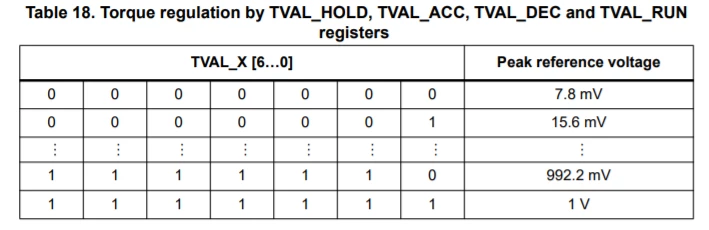 As you can see, the value register set the peak reference voltage for the currrent mode regulation. But, if i take for example 117 mV as peak reference voltage for the holding torque, and if i measure the voltage accross the shunt resistor, it is way below this value (it is 3,6 mV) so i don't understand the link between these two value ...
Thank a lot for your Help !
