

JWhit.3
Associate II
July 30, 2020
Solved

Unable to update Nucleo board firmware and to connect the SpinFamily evaluation tool to the Nucleo board

  • July 30, 2020
  • 1 reply
  • 912 views

I have downloaded and installed the SPINFamily setup msi file. The User Manual UM2022 page A.3 describes programming the nucleo board with the firmware file guifw-STM32XXXXX-nucleo.bin

I have not been able to locate this file for the F401RE Nucleo board on my system and on the internet. Please could you send me a link so that i can download the file.

This topic has been closed for replies.
Best answer by Peter BENSCH

As UM2022 says, the file guifw-STM32XXXXX-nucleo.bin should be already located in your installation path of SPINFamily, where you find it in folder Firmware.

Of course this filename is just a placeholder for the real name, i.e. for your NUCLEO-F401RE the filename is: Guifw-STM32F4xx-Nucleo.bin

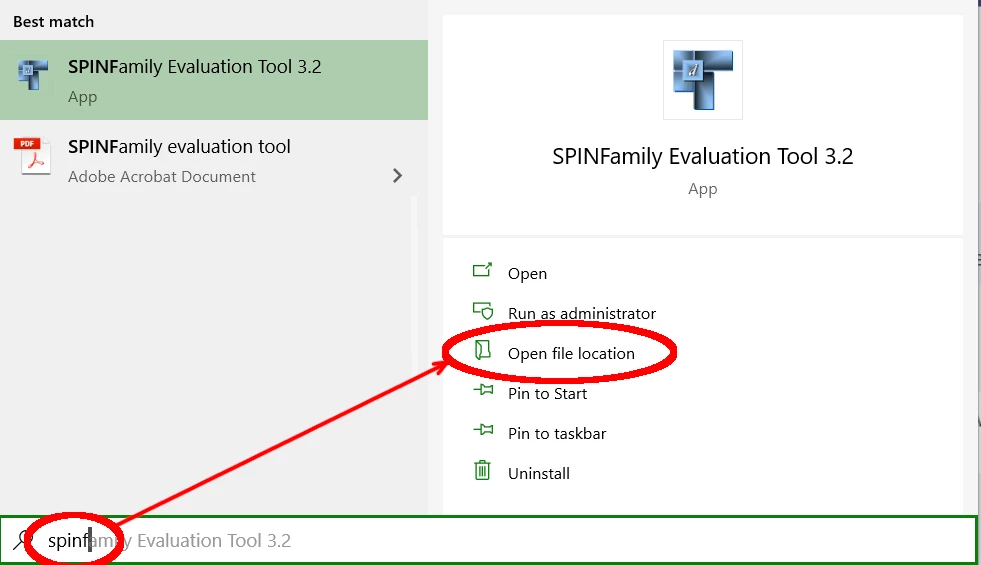
You may have been confused by UM2022, which still uses older Windows references, e.g. for the StartMenu. According the steps suggested by UM2022 and assuming that you are already using Windows 10, you will find this location by Start > SPINFamily > Open File Location, where you will find the Shortcut to Firmware:

0693W000003Bnb0QAC.png

Does it help?

Good luck!

/Peter

1 reply

Peter BENSCH
Peter BENSCHBest answer
Technical Moderator
July 31, 2020

As UM2022 says, the file guifw-STM32XXXXX-nucleo.bin should be already located in your installation path of SPINFamily, where you find it in folder Firmware.

Of course this filename is just a placeholder for the real name, i.e. for your NUCLEO-F401RE the filename is: Guifw-STM32F4xx-Nucleo.bin

You may have been confused by UM2022, which still uses older Windows references, e.g. for the StartMenu. According the steps suggested by UM2022 and assuming that you are already using Windows 10, you will find this location by Start > SPINFamily > Open File Location, where you will find the Shortcut to Firmware:

0693W000003Bnb0QAC.png

Does it help?

Good luck!

/Peter

In order to give better visibility on the answered topics, please click on Accept as Solution on the reply which solved your issue or answered your question.
JWhit.3
JWhit.3Author
Associate II
July 31, 2020

Hi Peter,

thank you for your answer. I reinstalled the tool and found the Firmware folder as you suggested, and downloaded this to the Nucleo board. All working now, although I am not sure what I missed when I first tried. But its working now :)