

Associate
August 11, 2026
Solved

STUSB4500 No Power

  • August 11, 2026
  • 3 replies
  • 66 views

Hello All,


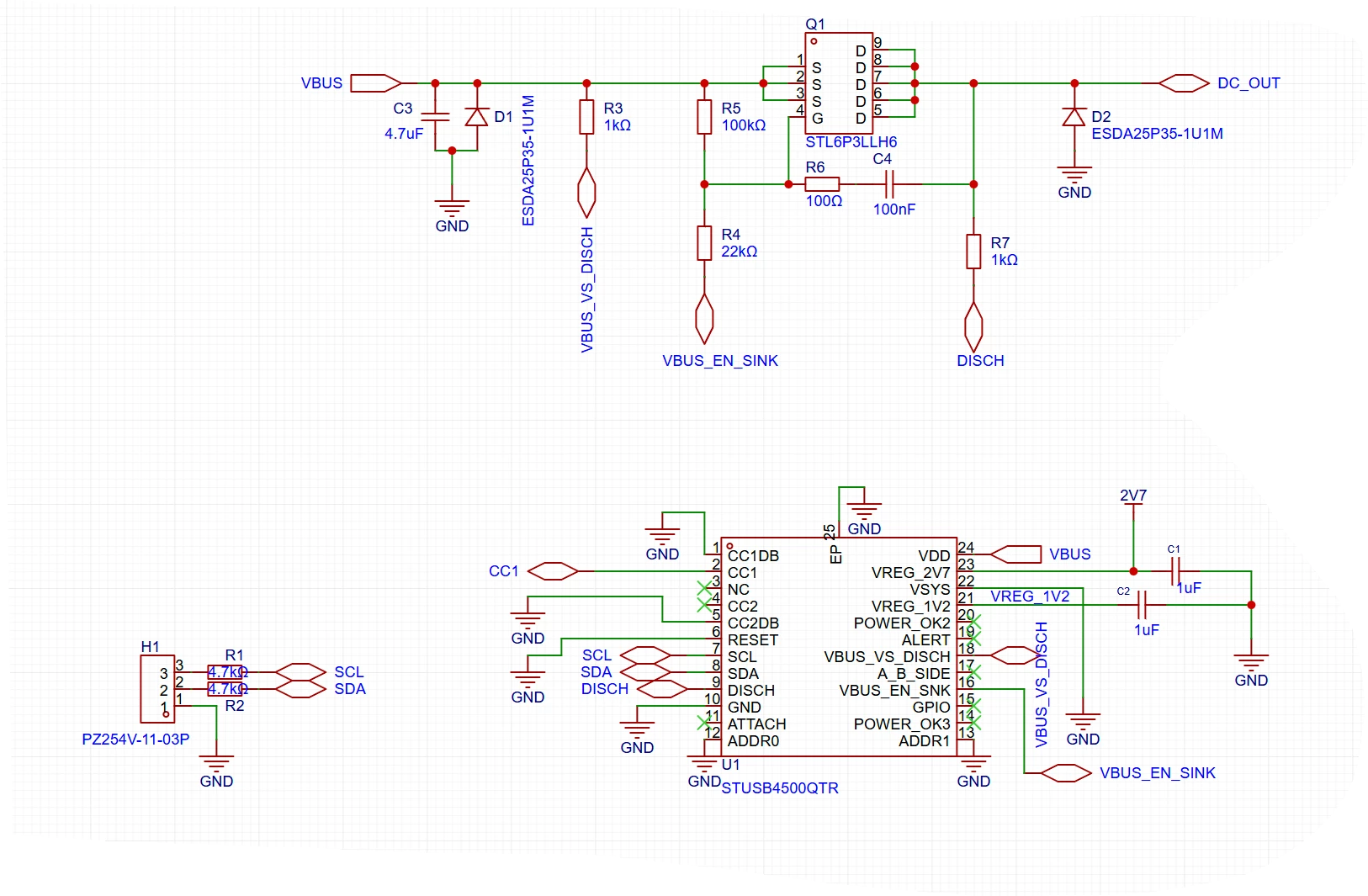
I’m working with a STUSB4500 chip and have hit an issue right from the get go. For reasons I can’t see, the chip is not being powered when connected to a USB-C source. Probing VDD shows continuity to VBUS, and probing GND shows good continuity to the power source GND. I’ve attached my schematic below. Any ideas where I messed up?



Best answer by Didier HERROUIN

Dear mobrien,

All the USB-C chargers are supposed to be “cold socket”, meaning that they should not deliver any voltage when no Sink is connected.

Nevertheless, your suggestion is correct : as you device (Sink) is directly supplied by VBUS, you must enable the dead battery mode by connecting CC1DB to CC1 and CC2DB to CC2.

Regards.

3 replies

mobrienAuthor
Associate
August 11, 2026

I might have found what I did. The USB-C Source is a “cold socket” during the initial connection. If I’m not mistaken this means I need to use dead battery mode and connect the CC1DB pin to CC1?

Didier HERROUIN
Didier HERROUINBest answer
ST Technical Moderator
August 21, 2026

Dear mobrien,

All the USB-C chargers are supposed to be “cold socket”, meaning that they should not deliver any voltage when no Sink is connected.

Nevertheless, your suggestion is correct : as you device (Sink) is directly supplied by VBUS, you must enable the dead battery mode by connecting CC1DB to CC1 and CC2DB to CC2.

Regards.

In order to give better visibility on the answered topics, please click on 'Best answer' on the reply which solved your issue or answered your question.
mobrienAuthor
Associate
August 21, 2026

Didier,


Thank you for the confirmation.