nobody102
Associate II
Mar 9, 2019 10:40 PM UTC
Question

Run vs Debug configurations issue

Running Version: 9.3.0 Build id: 20190212-0734

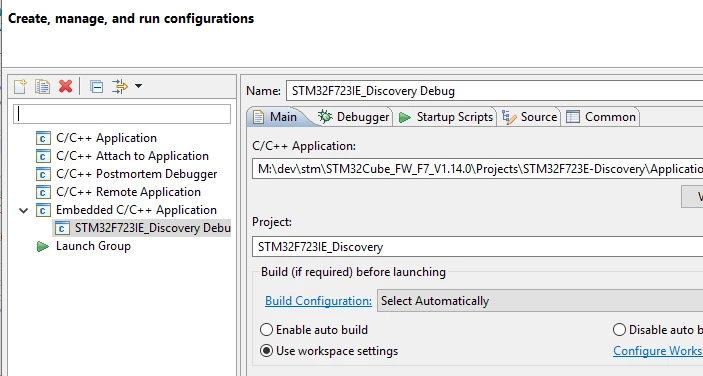
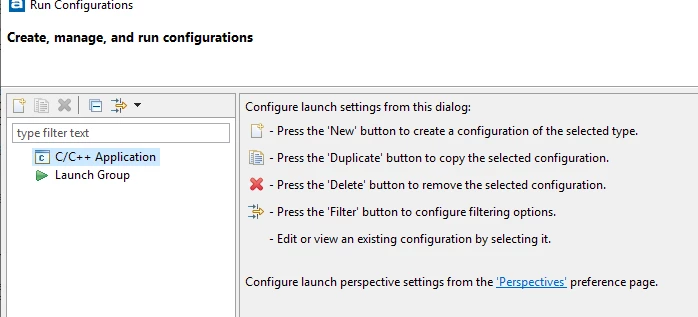
After I compile a sample project from the STM HAL driver examples, when I select a debug configuration, the proper options are available, as shown in the attachment, debug.png. However when I try to setup a Run configuration, the only options is "C/C++ Application" and "Embedded C/C++ Application" is not available.0690X0000087i06QAA.png0690X0000087i01QAA.png
This topic has been closed for replies.

5 replies

nobody102
nobody102Author
Associate II
Apr 8, 2019 1:41 AM UTC

Hello, anyone there?

Tesla DeLorean
Guru
Apr 8, 2019 3:54 AM UTC

Not a huge amount of participation by Atollic staff or users.

Tips, Buy me a coffee, or three.. PayPal Venmo (See Profile) Up vote any posts that you find helpful, it shows what's working..
alister
Senior III
Apr 8, 2019 7:10 AM UTC

The first attachment shows a Run Configuration with none defined. It looks normal. It's same as mine.

The second attachment shows a Debug Configuration with one configuration defined.

I've used Eclipse for embedded development for a long while without needing a Run Configuration. (TrueSTUDIO is based on Eclipse.) Anyway, if you need one you can create it by right-clicking "C/C++ Application", clicking New and entering appropriate parameters. Don't worry that it's not called "Embedded C/C++ Application".

If you're a beginner (sorry if you're not) use the Debug Configuration that's already defined to load the example and try it out.

nobody102
nobody102Author
Associate II
Apr 8, 2019 4:23 PM UTC

Ah ok thanks. will try that.

nobody102
nobody102Author
Associate II
Apr 8, 2019 4:42 PM UTC

thanks