Associate
July 24, 2026
Question

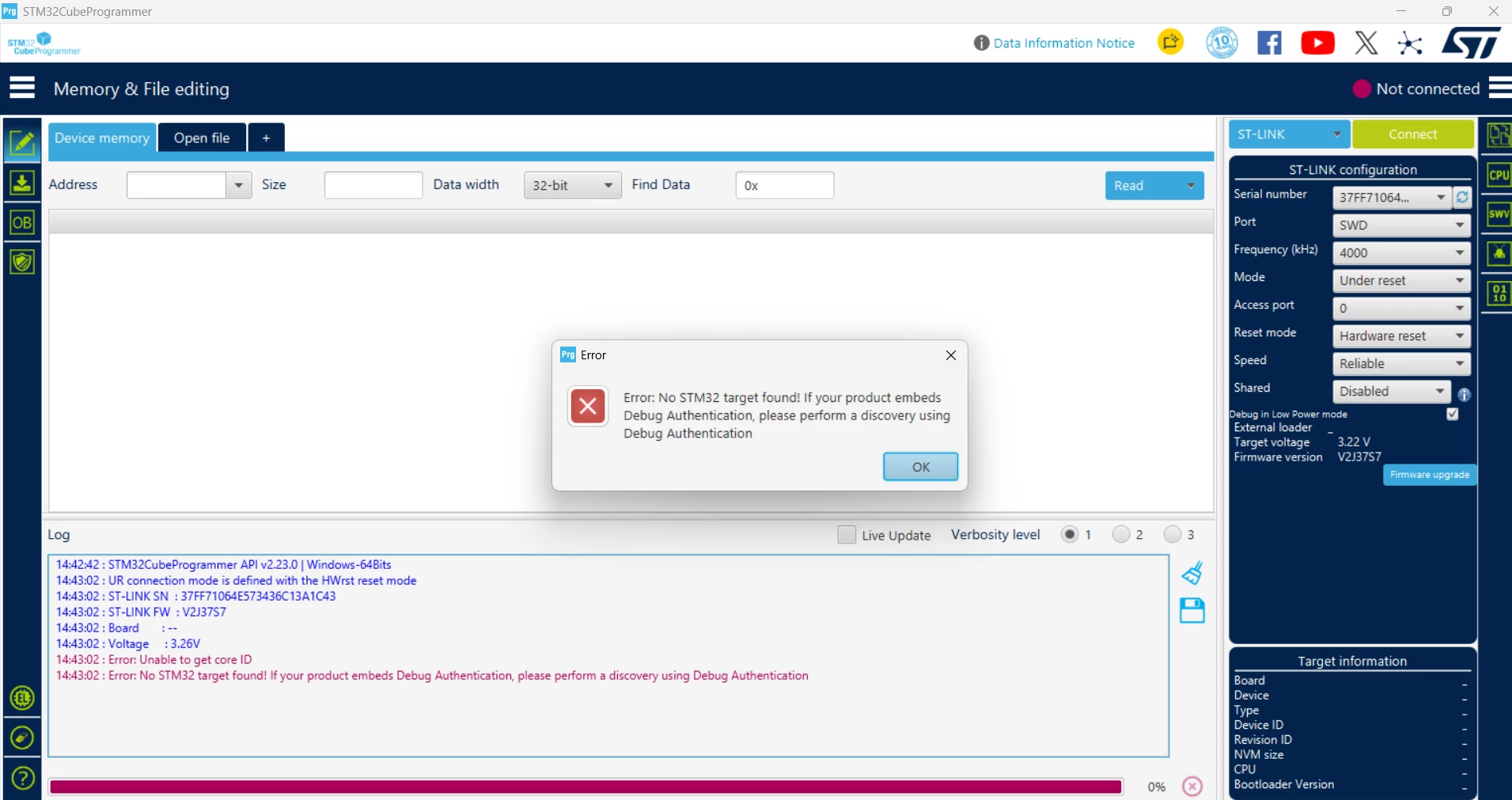
Error: No STM32 target found! If your product embeds Debug Authentication, please perform a discovery using Debug Authentication
  • July 24, 2026
  • 4 replies
  • 97 views


I am using STM32F411CEU6 Black Pill from WeAct. Stlink was working I was able to flash the code but now after testing when I tried to connect it wouldn't connect I keep getting this error. I am using stlink clone. 


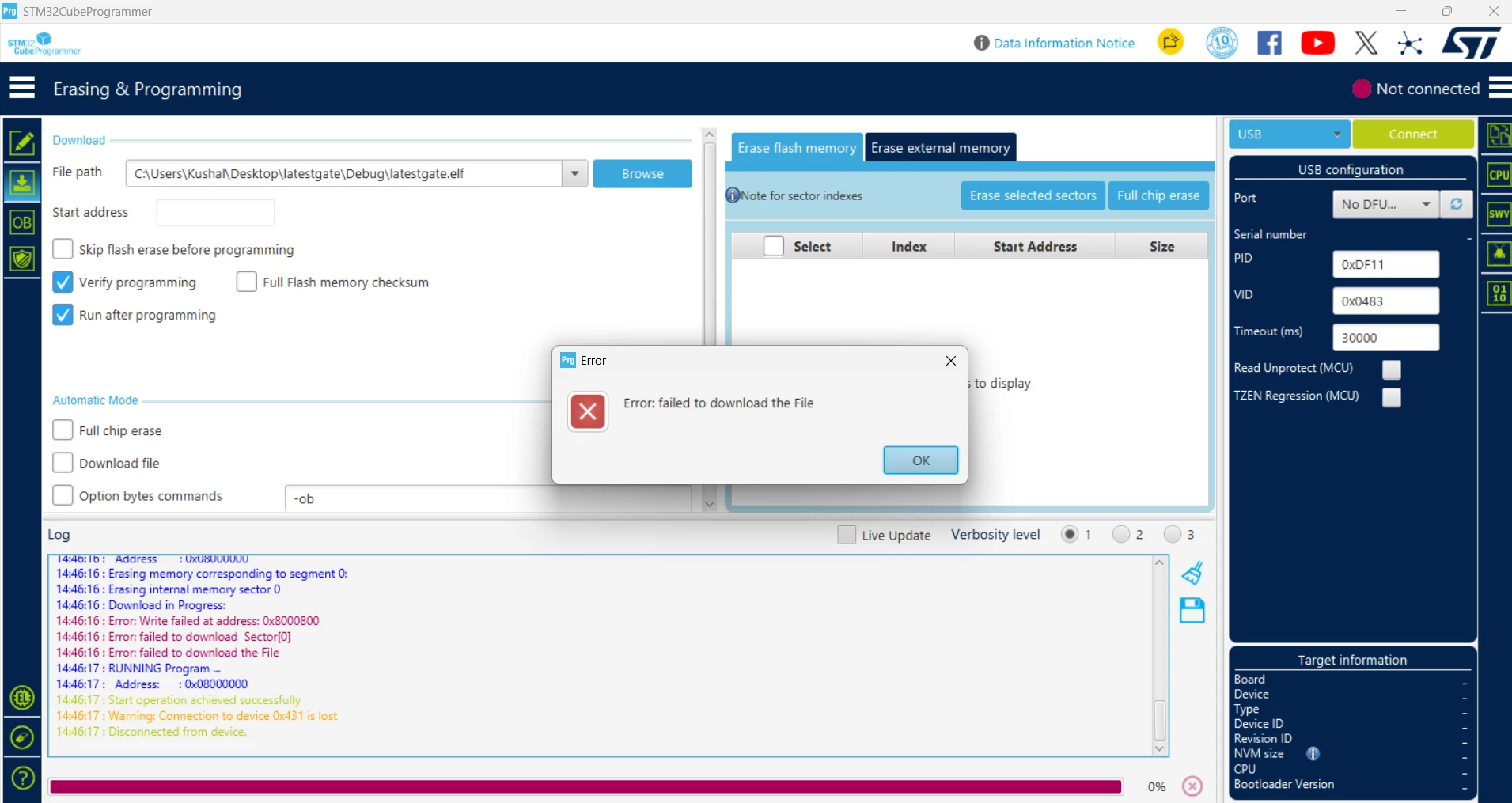
USB under DFU mode gets connected, full chip erase works but when I try to flash the code I get this error 


Please help me out

4 replies

Andrew Neil
Super User
July 24, 2026

I am using STM32F411CEU6 Black Pill 

Note that this is not an ST product, and might not contain a genuine STM32


 I am using stlink clone

Unsurprisingly, ST tools are not guaranteed to work properly - or even at all - with fake or cloned ST-Links.

Have you tried with a genuine ST-Link, or other known-good debug probe?


A complex system that works is invariably found to have evolved from a simple system that worked.A complex system designed from scratch never works and cannot be patched up to make it work.
AScha.3
Super User
July 24, 2026

The STM32F411CEU6 is probably genuine by ST.

+

Try connect in mode: normal + software reset.

(As the sticks/clones have no working hardware reset !!! )

"If you feel a post has answered your question, please click ""Accept as Solution""."
Andrew Neil
Super User
July 24, 2026

The STM32F411CEU6 is probably genuine by ST.

F4 clones spotted in the wild:


A complex system that works is invariably found to have evolved from a simple system that worked.A complex system designed from scratch never works and cannot be patched up to make it work.
AScha.3
Super User
July 24, 2026

Andrew,

(in the link) i see just problems with fake/clone st-linkV2 , the F411 seem genuine.

At the end he has everything working with the st-link (from mouser) , Right ?

"If you feel a post has answered your question, please click ""Accept as Solution""."
Associate
July 24, 2026

Hi thanks for the reply, 


I was able to flash the device with the clone stlink 3 hours ago but now I am not able to do it. 


Have you tried with a genuine ST-Link, or other known-good debug probe?

I dont have a genuine stlink 


I tried the hardware reset from cubeprogrammer -

hold and press nrst button

connect

release nrst

it still didn’t work


Even if stlink is showing issue what about the usb dfu method? I’m getting download failed error. 


Andrew Neil
Super User
July 24, 2026

I was able to flash the device with the clone stlink 3 hours ago but now I am not able to do it. 


So what did you change in those 3 hours?

In particular, have you added low-power and/or reconfigured the SWD pins.

Intermittent working could be a sign of poor wiring connections - please show some good, clear photos of your setup.


what about the usb dfu method? I’m getting download failed error

Has that method ever worked for you ?

A complex system that works is invariably found to have evolved from a simple system that worked.A complex system designed from scratch never works and cannot be patched up to make it work.
Associate
July 24, 2026

All I did was note down the readings from the pins(A0,A1,A2,A3,A4) I had configured using multimeter. I made sure I didn't touch neighbouring pins.


I didn't try with usb dfu before since this is a new board which I bought yesterday since I was able to flash with stlink I just continued with it. When stlink failed I tried the dfu method but even that failed.


Maxime_MARCHETTO1
ST Community Manager
July 24, 2026

Hello ​@Kushal2707,

The product you are using is a clone of a genuine ST product. 

To get the support you need, please contact the third party you purchased this product from.  

For assurance of buying authentic ST products, we recommend purchasing exclusively through our official distributors, which you can find listed here: ST Official Distributors.  

Best regards,  

Maxime


In order to give better visibility on the answered topics, please click on 'Best answer' on the reply which solved your issue or answered your question.